Many different platforms, same great performance. That’s why Vulkan is a very big deal. With the release Tuesday of Vulkan 1.3, NVIDIA continues its unparalleled record of day one driver support for this cross-platform GPU application programming interface for 3D graphics and computing. Vulkan has been created by experts from across the industry working together Read article >
The Keras Hyperband algorithm seems to work well: it simulates the various models, and when it reaches the Early Stopping condition on a model, the training of that model stops and the training of a new model starts.
What I noticed is that with this EarlyStopping callback implementation, when EarlyStopping stops the training of a model, before starting the training of the next model, the following two consecutive Python errors occur (anyway, the simulation doesn’t exit or generate exceptions, but it goes on, by simulating the successive model):
W tensorflow/core/framework/op_kernel.cc:1755] Invalid argument: ValueError: callback pyfunc_2 is not found Traceback (most recent call last): File "/home/username/anaconda3/envs/myenv/lib/python3.8/site-packages/tensorflow/python/ops/script_ops.py", line 233, in __call__ raise ValueError("callback %s is not found" % token) ValueError: callback pyfunc_2 is not found W tensorflow/core/kernels/data/generator_dataset_op.cc:103] Error occurred when finalizing GeneratorDataset iterator: Invalid argument: ValueError: callback pyfunc_2 is not found Traceback (most recent call last): File "/home/username/anaconda3/envs/myenv/lib/python3.8/site-packages/tensorflow/python/ops/script_ops.py", line 233, in __call__ raise ValueError("callback %s is not found" % token) ValueError: callback pyfunc_2 is not found [[{{node PyFunc}}]]
While if I don’t use the “min_delta” argument, these two errors don’t appear.
I also noted, looking for examples on the Internet, that, the “min_delta” argument of the EarlyStopping callback is never set – so it is always left at its default value – when tuning.
Do you know why?
PS:
I have another question:I noticed that if I set the Hyperband “max_epochs”, for example, equal to 100, the training of the model is performed by steps:
firstly, from epoch 1 to epoch 3; secondly, from 4 to 7; then, from 8 to 13; then, from 14 to 25; then, from 26 to 50; and finally, from 51 to 100.
If I set “patience=15”, I noticed that the EarlyStopping callback stops the training right after epoch 66 (thus, the first epoch at which EarlyStopping is able to operate, because 51+15=66); could it be a coincidence, or maybe should it be the normal behavior when tuning with Keras Hyperband, or what?
The latest release of Vulkan 1.3 simplifies render passes and makes synchronization easier.
A total of 23 of the most often requested Vulkan extensions developed by NVIDIA and other Khronos members are now incorporated into the brand new Vulkan 1.3 core specification. NVIDIA is ready with zero-day drivers for developers to immediately try out this significant new version of the industry’s only modern, cross-platform GPU API on their own systems.
Some of the most significant new core functionality in Vulkan 1.3 includes:
Dynamic state to reduce the number of pipeline objects needed to avoid hitching.
Streamlined management of shader pipeline compilations.
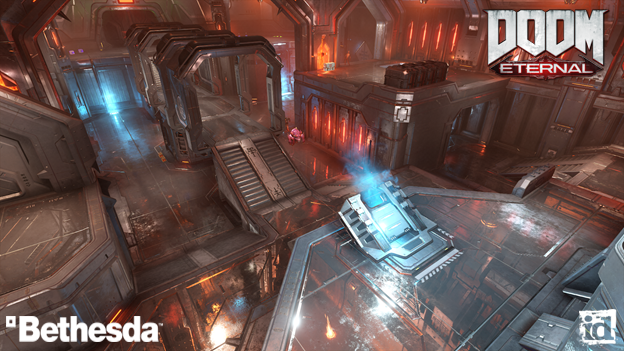
Figure 1. Doom Eternal running at 200 FPS with every single game setting on a GeForce 2080ti.
Nsight tools support
To help developers upgrade to Vulkan 1.3 with ease, developer tools have been upgraded to support the new functionality. This gives Vulkan developers the ability to jump into the new standard quickly and have the right tools to investigate and optimize, saving you time and frustration.
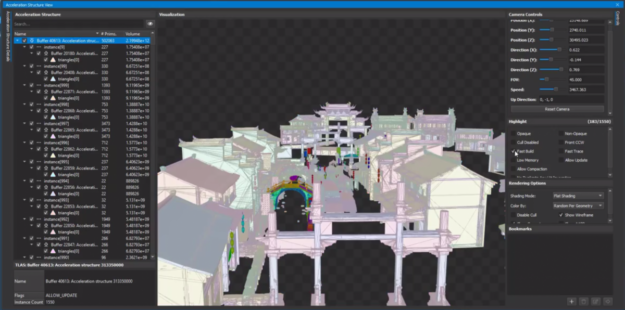
Nsight Graphics is a powerful debugger and profiler that helps you identify API issues quickly using the events view and API inspector. You can inspect Vulkan ray tracing acceleration structures, as well as look at and edit shaders in real time. The advanced shader profiler helps identify where the GPU is not executing shader instructions with full parallelism, so you can make modifications to your shaders for improved performance.
With the GPU Trace next-generation profiler you can view frames on a timeline with low-level GPU performance metrics. These metrics can help you fine-tune your Vulkan application and take full advantage of all GPU resources.
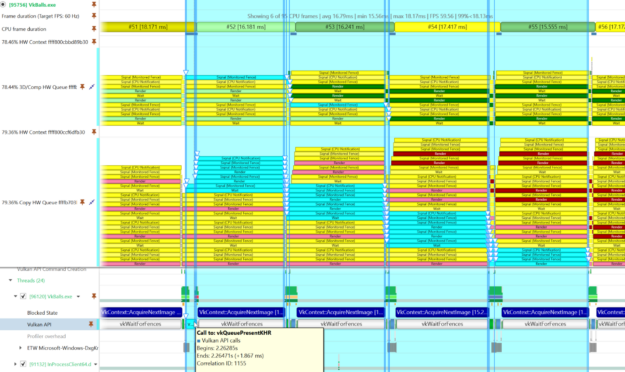
Nsight Systems is an application performance analysis tool designed to track GPU workloads to their CPU origins, uncovering bottlenecks. A system-wide view helps you analyze GPU workloads, GPU performance metrics, graphics APIs, compute APIs, frame stutter, and correlate them with each other.
“Vulkan is the cornerstone of Adobe’s multi-platform, multi-vendor rendering strategy for its Adobe Substance 3D products. Thanks to the ray tracing extensions that NVIDIA pioneered and contributed to Khronos, Vulkan gives native access to ray tracing hardware, offering exceptional ray tracing performance on supported devices. In addition, Nsight Graphics and Nsight Systems are invaluable tools when it comes to understanding and improving the performance of Vulkan ray tracing applications.” – Francois Beaune, Lead Software Engineer, Photorealistic Rendering at Adobe 3D & Immersive
Nsight Systems is a great place to start as you can verify if you are CPU or GPU limited. Its integration with Nsight Graphics makes for a seamless experience switching between the two as you performance tune the application.
These tools give you the power to harness the NVIDIA GPUs to their maximum potential and deliver high frame rates in games and other intensive Vulkan applications.
Figure 2. Correlating Vulkan API calls to WDDM queue packets using NVIDIA Nsight Systems.
Vulkan support for NVIDIA RTX SDKs and DLSS
Vulkan developers can maximize the performance of real-time ray tracing in their applications with support from NVIDIA RTX SDKs. With NVIDIA RTX Direct Illumination developers can add millions of dynamic lights to game environments without worrying about performance or resource constraints. NVIDIA RTX Global Illumination provides scalable solutions to compute multibounce indirect lighting. NVIDIA Real-Time Denoiser is a spatio-agnostic, temporal, API agnostic, denoising library that’s designed to work with low ray-per-pixel images, and NVIDIA RTX Memory Utility reduces memory consumption of acceleration structures.
“Vulkan has empowered us to deliver bleeding-edge performance on our recent DOOM games running idTech. DOOM and DOOM Eternal showcase how Vulkan may be leveraged to achieve state-of-the-art visuals and gameplay at extremely high frame rates across a wide variety of platforms. The flexibility of the Vulkan API allows us to collaborate closely with our hardware partners to meet the creative vision of our games. This past year, we brought NVIDIA DLSS and Ray Tracing to DOOM Eternal, made possible by extensions developed by NVIDIA.” – Billy Khan, Director of Engine Technology at id Software
Every Vulkan developer can access DLSS upscaling technology on Windows and Linux. NVIDIA also added DLSS support for Vulkan API games on Proton and has DLSS support for both x86 and ARM-based platforms. With NVIDIA DLSS support for Vulkan, Linux gamers can use the dedicated Tensor Cores in their GeForce RTX GPUs to accelerate frame rates in DOOM Eternal, No Man’s Sky, and Wolfenstein: Youngblood.
Figure 3. Vulkan ray tracing debugging is made easy with NVIDIA Nsight Graphics.
Supporting new Vulkan functionality
NVIDIA ships Vulkan across a breadth of products and is deeply engaged in driving Vulkan’s evolution. In addition to supporting the Khronos Group as President, NVIDIA has chair positions in the Vulkan ray tracing, machine learning, and portability subgroups.
NVIDIA is often the first to spearhead the development of new Vulkan functionality. This includes the “VKRay” vendor extension, the only current implementation of Vulkan Mesh Shaders. Along with the first implementation of the new Vulkan Video extensions and the NVIDIA Cooperative Matrix Vulkan extension, which exposes Tensor Cores for inferencing acceleration.
where ann_model is the compiled model of the Artificial Neural Network under test, while both training_gen() and valid_gen() are Python generators.
As it can be seen, Early Stopping and Tensorbord are the callbacks passed to tuner.search().
The Keras Hyperband algorithm works well: it simulates the various models, and when it reaches the Early Stopping condition on a model, the training of that model stops and the training of a new model starts; the point is that I noticed that between these two events (stop and start), the following two consecutive Python errors occur (anyway, the simulation doesn’t exit or generate an Exception, but it goes on, by simulating the successive model):
W tensorflow/core/framework/op_kernel.cc:1755] Invalid argument: ValueError: callback pyfunc_2 is not found Traceback (most recent call last): File "/home/username/anaconda3/envs/myenv/lib/python3.8/site-packages/tensorflow/python/ops/script_ops.py", line 233, in __call__ raise ValueError("callback %s is not found" % token) ValueError: callback pyfunc_2 is not found W tensorflow/core/kernels/data/generator_dataset_op.cc:103] Error occurred when finalizing GeneratorDataset iterator: Invalid argument: ValueError: callback pyfunc_2 is not found Traceback (most recent call last): File "/home/username/anaconda3/envs/myenv/lib/python3.8/site-packages/tensorflow/python/ops/script_ops.py", line 233, in __call__ raise ValueError("callback %s is not found" % token) ValueError: callback pyfunc_2 is not found [[{{node PyFunc}}]]
The first error seems to refer to a “callback”, while the second one refers to a “callback” and a “generator”.
Which could be the cause of these errors? What could be this callback “not found”?
When I load a trained model that I have previously saved, the model topology is being loaded, but none of the weights are loaded (so I have to train the model from scratch). I am very confused by this, and can find noone else who has had the same problem (here, stackoverflow, …).
I would really apreciate some help, if anyone has any idea what is going on.
I am saving my model as follows:
model.save('file://' + path);
To load the model, I am using:
model = tf.loadLayersModel('file://' + path + '/model.json');
I am running my training on a 1070 Ti with about 8Gb of VRAM and 6,5 are available. Now i am getting this error, when i use a batch size greater than 2
2022-01-24 23:28:40.444781: E tensorflow/stream_executor/cuda/cuda_driver.cc:802] failed to alloc 4294967296 bytes on host: CUDA_ERROR_OUT_OF_MEMORY: out of memory
For me this looks like it is trying to allocate only 4294967296 byte and i have 8589900000 byte available. So im only trying to allocate about 50%. nvidia-smi shows im using 7488MiB/8192MiB of VRAM during training(batchsize = 1). And 14,6 /16GB of RAM.
Obviously training with a batch size of 1 is useless, 8 is just doable it seems, but i dont understand why? Most people say a batch size of 64 should be possible with my hardware, please correct me.
I’m working with tf.keras on a Machine Learning project, and I’d like to implement an Attention pooling layer.
The equation which describes it is in Table I of this paper (it’s indicated at the last row of the table, at the column “Pooling function”).
The paper also says:
in the attention pooling function, the weights for each frame w_i are learned with a dedicated layer in the network.
I tried to implement the Attention pooling layer, in tf.keras, by (after reading this Keras documentation page) subclassing the Keras Layer class, such as:
Meta Platforms gave a big thumbs up to NVIDIA, choosing our technologies for what it believes will be its most powerful research system to date. The AI Research SuperCluster (RSC), announced today, is already training new models to advance AI. Once fully deployed, Meta’s RSC is expected to be the largest customer installation of NVIDIA Read article >
Let’s face it, the global supply chain may not be the most scintillating subject matter. Yet in homes and businesses around the world, it’s quickly become the topic du jour: empty shelves; record price increases; clogged ports and sick truckers leading to disruptions near and far. The business of organizing resources to supply a product Read article >

 The latest release of Vulkan 1.3 simplifies render passes and makes synchronization easier.