I have a prediction routine that involves doing some postprocessing of the output of model.predict(x) function. The postprocessing involves a comparison of the output to a the mean output of all training data. The process has worked well until now, but I would like to combine it all, mean training vector included, into a TF SavedModel. I.e. I’m trying to get the final output (postprocessing included) when calling model.predict(x)
Is there any way to customize the functionality of the model.predict(x) function?
What my current pipeline looks like:
mean_training_output = # an array consisting of the mean output vector from the training data predicted = model.predict(x) # Compare distance of new and mean training output normalized_distance = np.zeros(len(predicted)) for i in range(len(predicted)): normalized_distance[i] = np.linalg.norm(feature_vectors_flattned[i]-mean_training_output) # What I actually want model.predict() to output normalized_distance
So in the above snippet I would actually want model.predict() to output normalized_distance.
Learn how standard language parallelism can be used for programming accelerated computing applications on NVIDIA GPUs with ISO C++, ISO Fortran, or Python.
The NVIDIA platform is the most mature and complete platform for accelerated computing. In this post, I address the simplest, most productive, and most portable approach to accelerated computing. There are three approaches that you can take for programming GPUs (Figure 1).
Figure 1. Three approaches to programming the NVIDIA platform
CUDA C++ and Fortran are the innovation ground where NVIDIA can expose new hardware and software innovations, and where you can tune your applications to achieve the best possible performance on NVIDIA GPUs. Many developers assume that this is how NVIDIA expects everyone to program for GPUs.
Instead, we expect that developers coming to the NVIDIA platform for the first time will use standard, parallel programming languages, such as ISO C++, ISO Fortran, and Python. In this post, I highlight some successes in using this approach to parallel programming to demonstrate the most productive path to entering the NVIDIA CUDA ecosystem.
The foundation of the NVIDIA strategy is providing a rich, mature set of SDKs and libraries on which applications can be built. NVIDIA already provides highly tuned math libraries, such as cuBLAS, cuSolver, and cuFFT; core libraries, such as Thrust and libcu++; and communication libraries, such as NCCL and NVSHMEM, as well as other packages and frameworks on which you can build your applications.
On top of this, NVIDIA layers the three different programming approaches:
Standard language parallelism, which is the subject of this post
Languages for platform specialization, such as CUDA C++ and CUDA Fortran for obtaining the best possible performance on the NVIDIA platform
Compiler directives, bridging the gap between these two approaches by enabling incremental performance optimization
Each of these approaches makes tradeoffs in terms of performance, productivity, and code portability. As they can all interoperate, you don’t have to use a particular model but can mix any or all as desired.
If you start writing code using parallelism in standard programming languages, then you can come to the NVIDIA platform or any other platform with baseline code that is already capable of running in parallel. This is why we have invested more than a decade collaborating in the standard language committees on the adoption of features to enable parallel programming without the need for additional extensions or APIs. Standard language parallelism is a rising tide that raises all boats.
ISO C++
The C++ programming language is consistently among the top programming languages in recent studies of programming trends. It has seen a significant increase in usage in scientific computing. The richness of its Standard Template Library makes it a highly productive language for new code development and, since the release of C++17, it has supported several important features for parallel programming.
I’ve seen several applications get refactored away from traditional for loops in favor of these C++ parallel algorithms. Here are the results from a few of them.
Lulesh
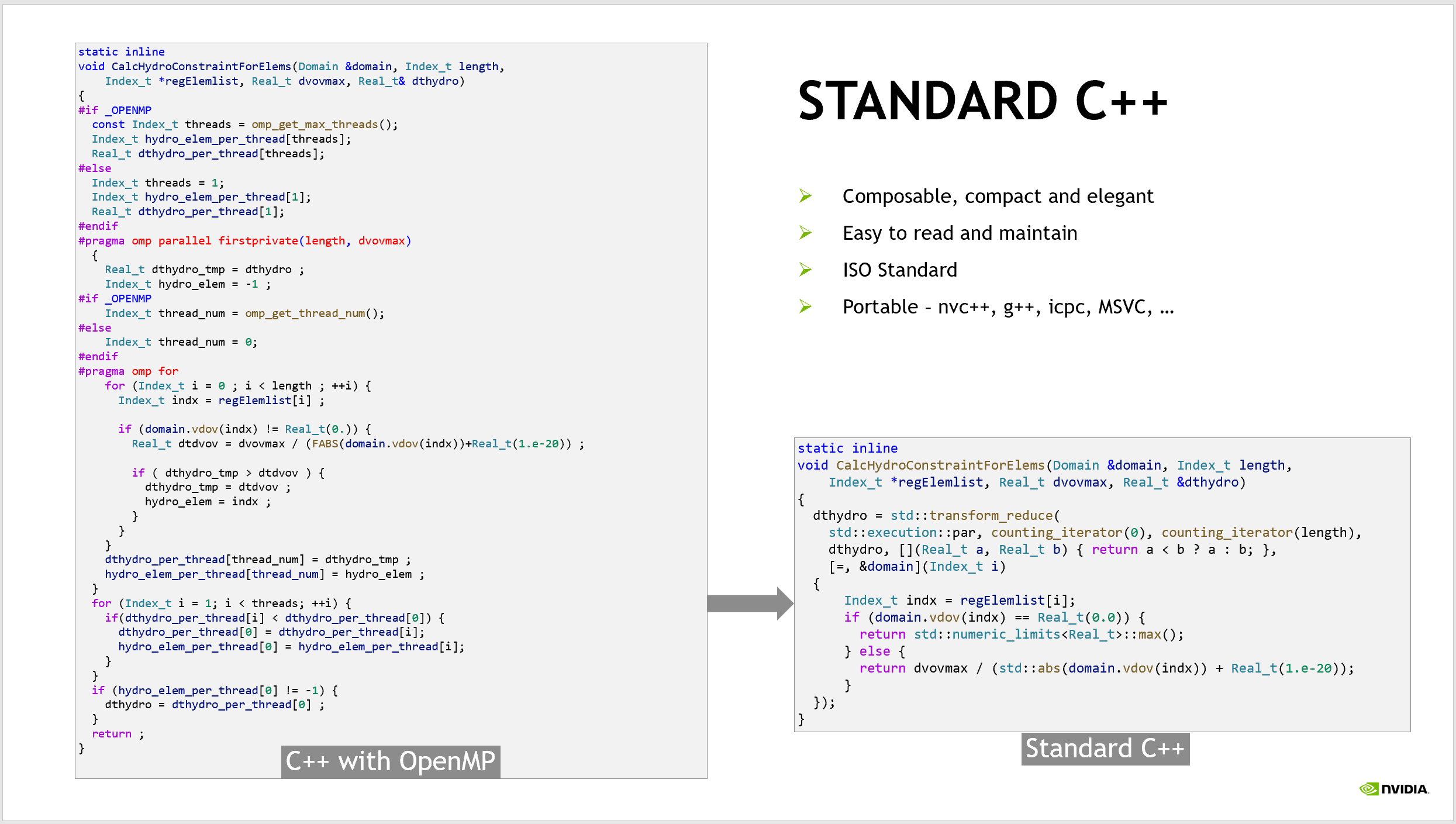
Lulesh is a hydrodynamics mini-app from Lawrence Livermore National Laboratory (LLNL), written in C++. The mini-app has several versions for evaluating different programming approaches, both in terms of the quality of the code and performance. We worked with the developers to rewrite their existing OpenMP-based code to use C++ Parallel Algorithms. Figure 2 shows an example of just one of the application’s important functions.
Figure 2. Refactoring Lulesh from OpenMP to ISO C++ parallelism results in code that is simpler, easier to read, ISO standard, and portable to all compilers that support ISO C++
The code on the left uses OpenMP to parallelize the loops in the code across CPU threads. To maintain both a serial and parallel version of the code, the developers used #ifdef macros and compiler pragmas. The result is repeated code and the introduction of an additional API, OpenMP, into the source.
The code on the right is the same routine, but rewritten using the C++ transform_reduce algorithm. The resulting code is much more compact, making it less error prone, easier to read, and more maintainable. It also removes the dependency on OpenMP, relying instead on the C++ standard template library, while maintaining a single source code for all platforms. This code is fully ISO C++ compliant, capable of being built by any C++ compiler that supports C++17. As it turns out, it is faster too!
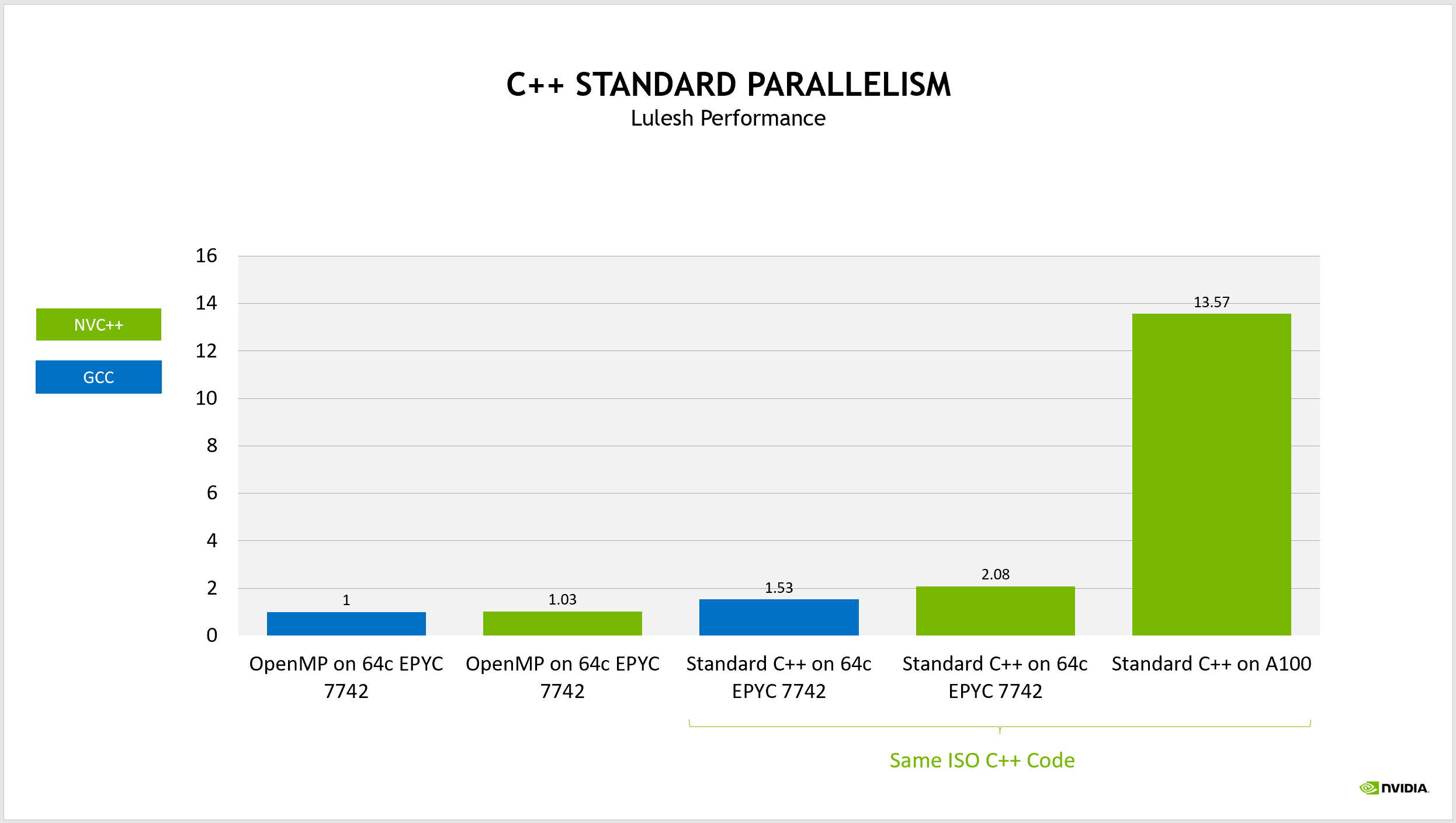
Figure 3. The ISO C++ version of Lulesh is faster than the original OpenMP code and portable to multiple compilers and between the CPU and GPU
As a performance baseline, we used the OpenMP code running on all cores of an AMD EPYC 7742 processor and built with GCC. Rebuilding this baseline code using NVIDIA nvc++ compiler achieves essentially the same performance on the CPU.
If you instead build the ISO C++ code using the same version of GCC and running on the same CPU, the performance improves by roughly 50%, due to various improved overheads and opportunities for the compiler to better optimize the code.
This turns into a 2X performance improvement when building this code using nvc++ and running on the same CPU. This is already an exciting achievement but to top that off, you can build this same code, changing only a compiler option to target an NVIDIA GPU instead of a multicore CPU. Now that same code runs more than 13X faster by running on an NVIDIA A100 GPU. There’s a 13.5X performance improvement from the original code, running in parallel both on the CPU and GPU, using strictly ISO C++ code.
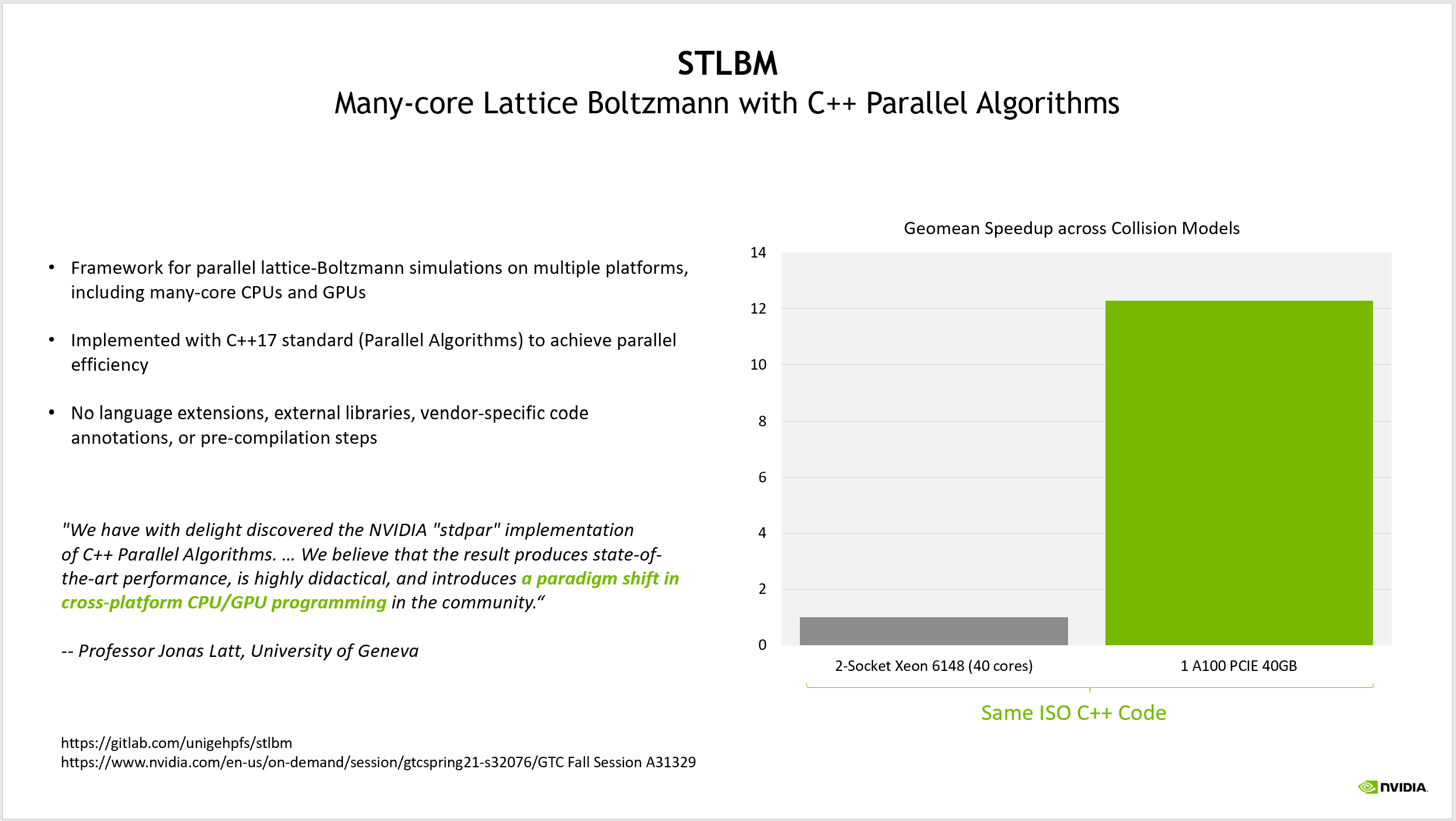
His application achieves more than a 12X performance improvement using GPUs. What is notable is that his baseline for comparison is a source code that is parallel by default, using the parallel algorithms in the C++17 standard template library to express the parallelism inherent in the application.
He categorized the experience of using ISO C++ to program for GPUs as “a paradigm shift in cross-platform CPU/GPU programming.” Rather than writing an application that is serial by default and then adding parallelism later, his team has written an application that is ready for any parallel platform on which they wish to run.
Figure 4. STLBM is capable of running the same source code on multicore CPU nodes and on NVIDIA GPUs
NVIDIA is heavily invested in the continued development of parallelism and concurrency in C++ and has coauthored a variety of proposals for the upcoming C++23 specification to further improve your ability to write code that is parallel-first.
ISO Fortran
Fortran remains a language whose primary focus is on scientific and high performance computing. Originally, the FORmula TRANslator, Fortran provides a variety of advantages both to developers and compilers, and also has a huge existing code base for modeling and simulation codes.
Fortran began adding features to support parallel programming in Fortran 2008, enhanced these capabilities in Fortran 2018, and continues to refine them in the upcoming version, currently referred to as Fortran 202X. Just as with ISO C++, NVIDIA has been working with application developers to use standard language parallelism in Fortran to modernize their applications and make them parallel-first.
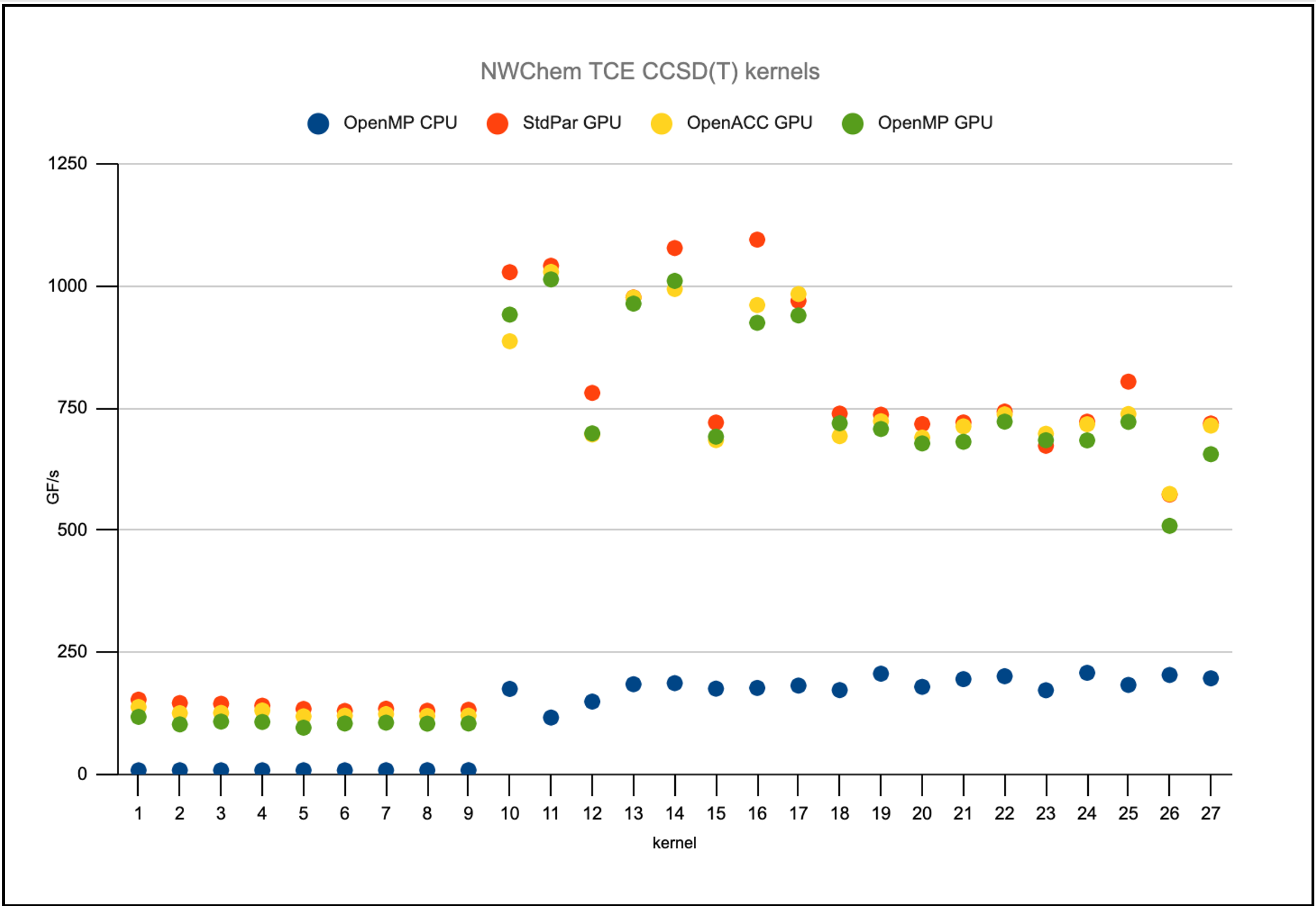
For NWChem, he isolated several performance-critical loops that perform tensor contractions and has written them using several programming models. On multicore CPUs, these tensor contractions use OpenMP for threading across CPU cores. For GPUs, there are versions available using OpenACC, OpenMP target offloading, and now Fortran do concurrent loops.
Figure 5 shows that the do concurrent loops perform at the same level as both OpenACC and OpenMP target offloading on NVIDIA GPUs but without the need to include these additional APIs in the application. This is all standard Fortran.
Figure 5 Performance of a range of NWChem application kernels using several programming models
High-performance flux transport
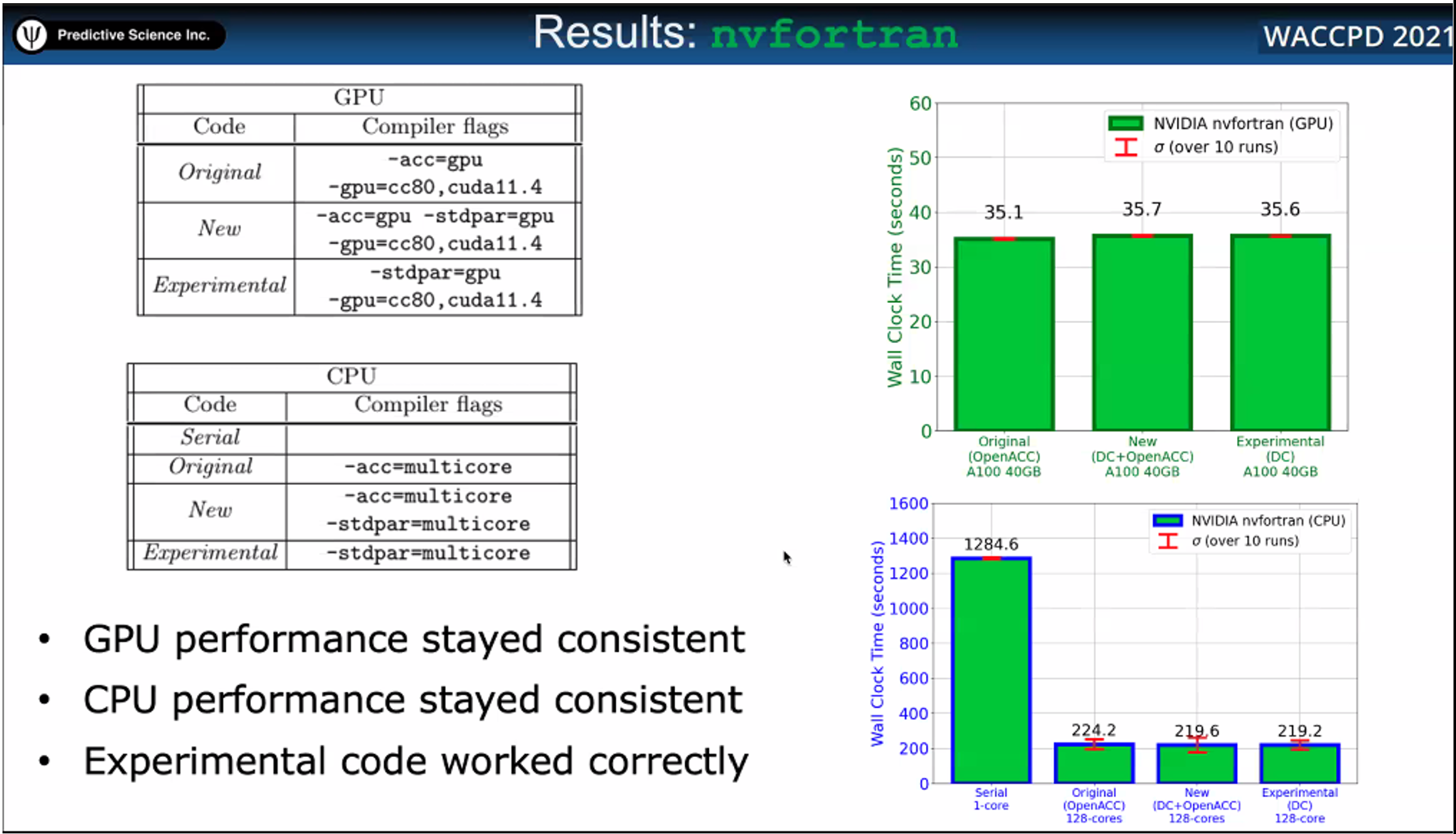
At the recent Workshop for Accelerator Programming Using Directives (WACCPD), collocated at the SC21 conference, a team of developers from Predictive Science Inc. showed their results in refactoring one of their production codes, which previously used OpenACC to run on NVIDIA GPUs, using do concurrent loops.
They compared the results of building this purely ISO Fortran application using NVIDIA nvfortran, gfortran, and ifort. They concluded that, for their application when using the nvfortran compiler, pure Fortran gave the performance that they required without the need for any directives. Furthermore, this code could run in parallel on GPUs and multicore CPUs without modification.
Figure 6. Performance results for HPFT benchmark using nvfortran compiler
This paper received the award for best paper at the workshop, even though it required no directives at all for accelerator programming. When asked whether they would continue the standard language parallelism approach in their other applications, the presenter replied that they already have plans to adopt this approach in other important applications for their company.
Python with Legate and cuNumeric
The Python language has had a meteoric rise in popularity over the past decade. It is now commonly used in machine learning, data science, and even traditional modeling and simulation applications. Although Python is not an ISO programming language, like C++ and Fortran, we are implementing the spirit of standard language parallelism in the Python language as well.
In his keynote address at GTC’21 Fall, NVIDIA CEO Jensen Huang introduced the alpha release of cuNumeric, a library that is modeled after NumPy and which enables features similar to what I have discussed for ISO C++ and Fortran. The NumPy package is so prevalent in Python development that it is a near certainty that any HPC application written in Python uses it.
The cuNumeric package, written on top of a package called Legate, enables NumPy applications to automatically scale their work not only onto GPUs but across GPUs in a large cluster. I’ve seen for several example applications that simply replacing references to NumPy in the code to instead refer to cuNumeric, I could weakly scale that application to the full size of the NVIDIA internal cluster, Selene, which is among the 10 fastest supercomputers in the world.
I hope this post has inspired you to see that GPU programming is not as difficult as you may have heard. If you use standard language parallelism, it may even be possible without any code changes at all.
NVIDIA is encouraging you to write applications parallel-first such that there is never a need to “port” applications to new platforms and standard language parallelism is the best approach to doing this, as it requires nothing more than the ISO standard languages. This is why we continue to invest in the ISO programming languages and in bringing even more features for parallelism and concurrency to these languages.
In summary, using standard language parallelism has the following benefits:
Full ISO language compliance, resulting in more portable code
Code that is more compact, easier to read, less error prone
Code that is parallel by default, so it can run without modification on more platforms
Here are several talks from GTC’21 that can provide you with even more detail about this approach to parallel programming:
SHIELD Software Experience Upgrade 9.0 is rolling out to all NVIDIA SHIELD TVs, delivering the Android 11 operating system and more. An updated Gboard — the Google Keyboard — allows people to use their voices and the Google Assistant to discover content in all search boxes. Additional permissions let users customize privacy across apps, including Read article >
NVIDIA is America’s best place to work, according to Glassdoor’s just-issued list of best employers for 2022. Amid a global pandemic that has affected every workplace, NVIDIA was ranked No. 1 on Glassdoor’s 14th annual Best Places to Work list for large US companies. The award is based on anonymous employee feedback covering thousands of Read article >
I don’t want to share a lot of details, but I’ve been working on a project that uses OpenCV for basic object detection (mostly through template matching) and tesseract OCR to read text, all in a video game. It’s to be expected that many of the objects are nearly identical 2D video game assets, so detection using template matching in opencv is very accurate.
I’ve been interested in exploring whether or not tensorflow would be appropriate for my use case.
I have the following use case / pattern that I’m looking to implement, and was interested to get your opinion on if tensorflow is an appropriate framework for my use case, or if I should continue to use opencv/tesseract:
Image classification – I need to first determine which type of image I’m looking at to determine what kind of processing to do. There are 3-4 classes of images I’m interested in
There’s one class of image where I need to perform both object detection and OCR
Object detection/tracking would be for half a dozen objects on the screen at any given time.
OCR can be done using tesseract if necessary, as my experimentation with tensorflow OCR implementations has been pretty poor accuracy.
Text is always expected to be of a certain format and in the same region of the screen
There’s another class of image where I need to perform only OCR. The OCR properties of the previous image class remain true.
OCR can be done using tesseract if necessary, as my experimentation with tensorflow OCR implementations has been pretty poor accuracy.
Text is always expected to be of a certain format and in the same region of the screen
Finally, the last image class tell me that no object detection or OCR need to be performed.
My questions are:
Is tensorflow right for me? Why or why not? What are the tradeoffs (besides time to tag custom datasets)?
If tensorflow is right for me, how would I model the above logic? Should I just detect everything and program business logic based on what’s detected, or is there a good way to model this pipeline in tensorflow?
I’m working through a toy problem to learn feature extraction with transfer learning. I gotten this warning when trying to compile this code. I’m running this on Google Colab, Tensorflow version 2.7. Is there something I can do to the input tensor on the base model to resolve this warning? Thanks.
input_shape = (224, 224, 3) base_model = tf.keras.applications.EfficientNetB0(include_top=False) base_model.trainable = False # Create input layer inputs = layers.Input(shape=input_shape, name="input_layer") # Add in data augmentation Sequential model as a layer x = data_augmentation(inputs) # Give base_model inputs (after augmentation) and don't train it x = base_model(x, training=False) # Pool output features of base model x = layers.GlobalAveragePooling2D(name="global_average_pooling_layer")(x) # Put a dense layer on as the output outputs = layers.Dense(10, activation="softmax", name="output_layer")(x) # Make a model with inputs and outputs model_1 = keras.Model(inputs, outputs) # Compile the model model_1.compile(loss="categorical_crossentropy", optimizer=tf.keras.optimizers.Adam(), metrics=["accuracy"]) # Fit the model history_1_percent = model_1.fit(train_data_1_percent, epochs=5, steps_per_epoch=len(train_data_1_percent), validation_data=test_data_10_percent, # this is deliberate. validation_steps=int(0.25* len(test_data_10_percent)), # Track model training logs callbacks=[create_tensorboard_callback("transfer_learning_part_2", "1_percent_data_aug")])
Use long-range and high-precision data sets to achieve 3D object detection for perception, mapping, and localization algorithms.
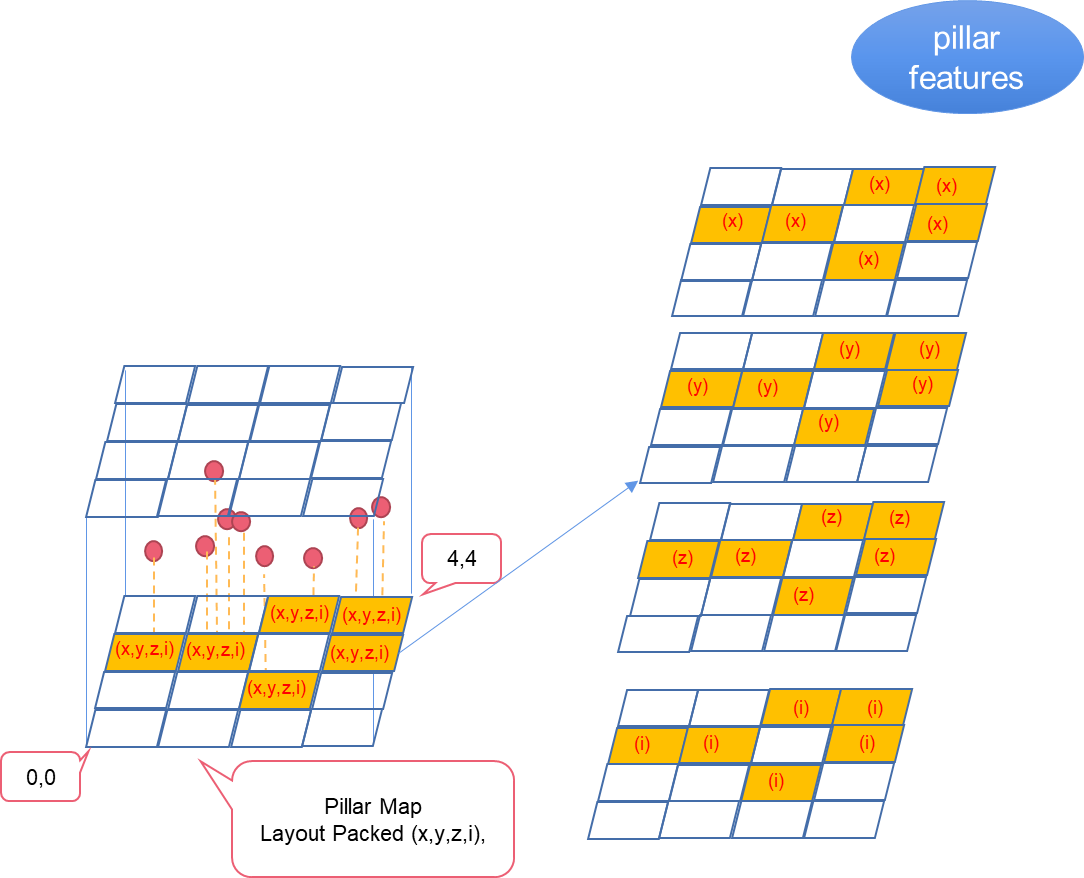
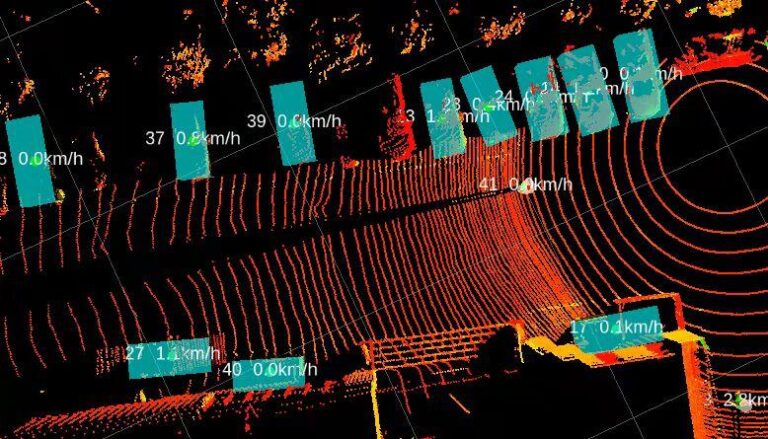
A point cloud is a data set of points in a coordinate system. Points contain a wealth of information, including three-dimensional coordinates X, Y, Z; color; classification value; intensity value; and time. Point clouds mostly come from lidars that are commonly used in various NVIDIA Jetson use cases, such as autonomous machines, perception modules, and 3D modeling.
One of the key applications is to leverage long-range and high-precision data sets to achieve 3D object detection for perception, mapping, and localization algorithms.
PointPillars is one the most common models used for point cloud inference. This post discusses an NVIDIA CUDA-accelerated PointPillars model for Jetson developers. Download the CUDA-PointPillars model today.
What is CUDA-Pointpillars
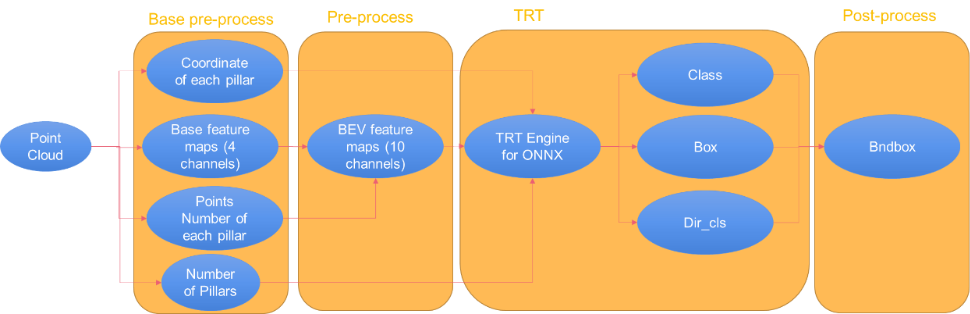
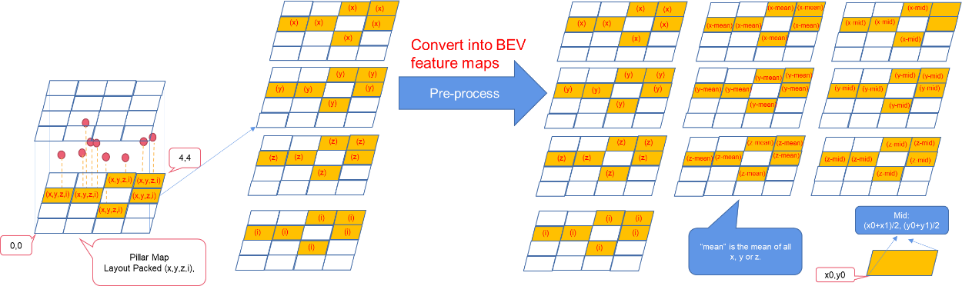
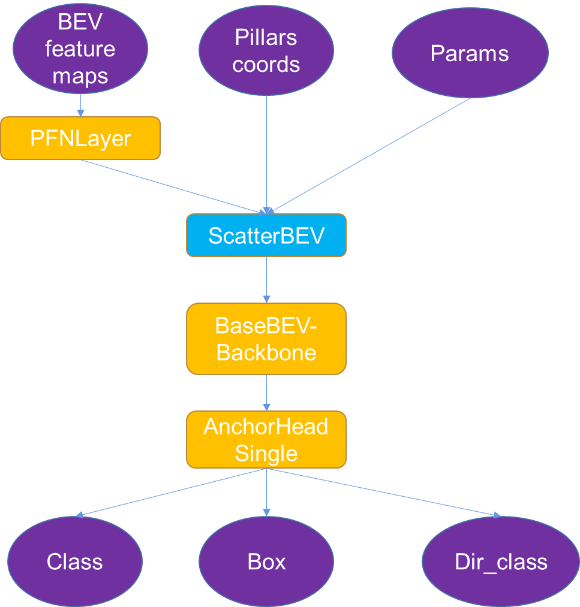
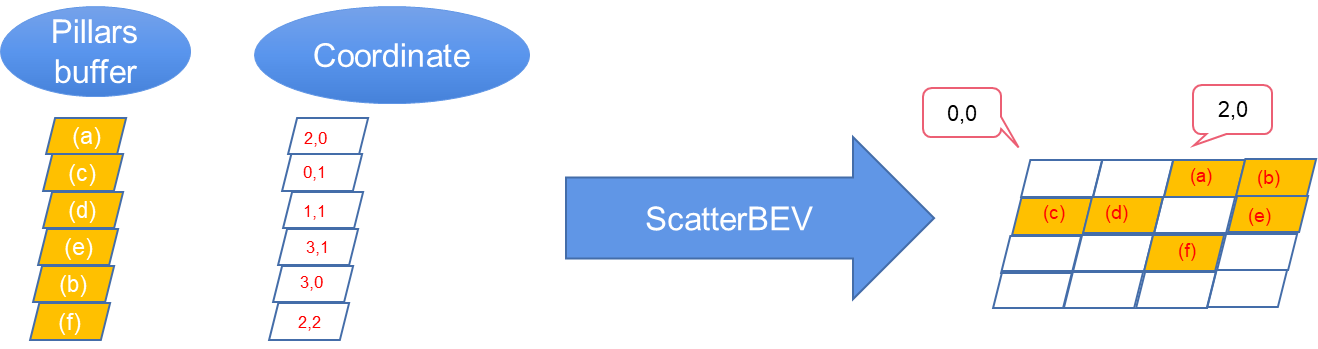
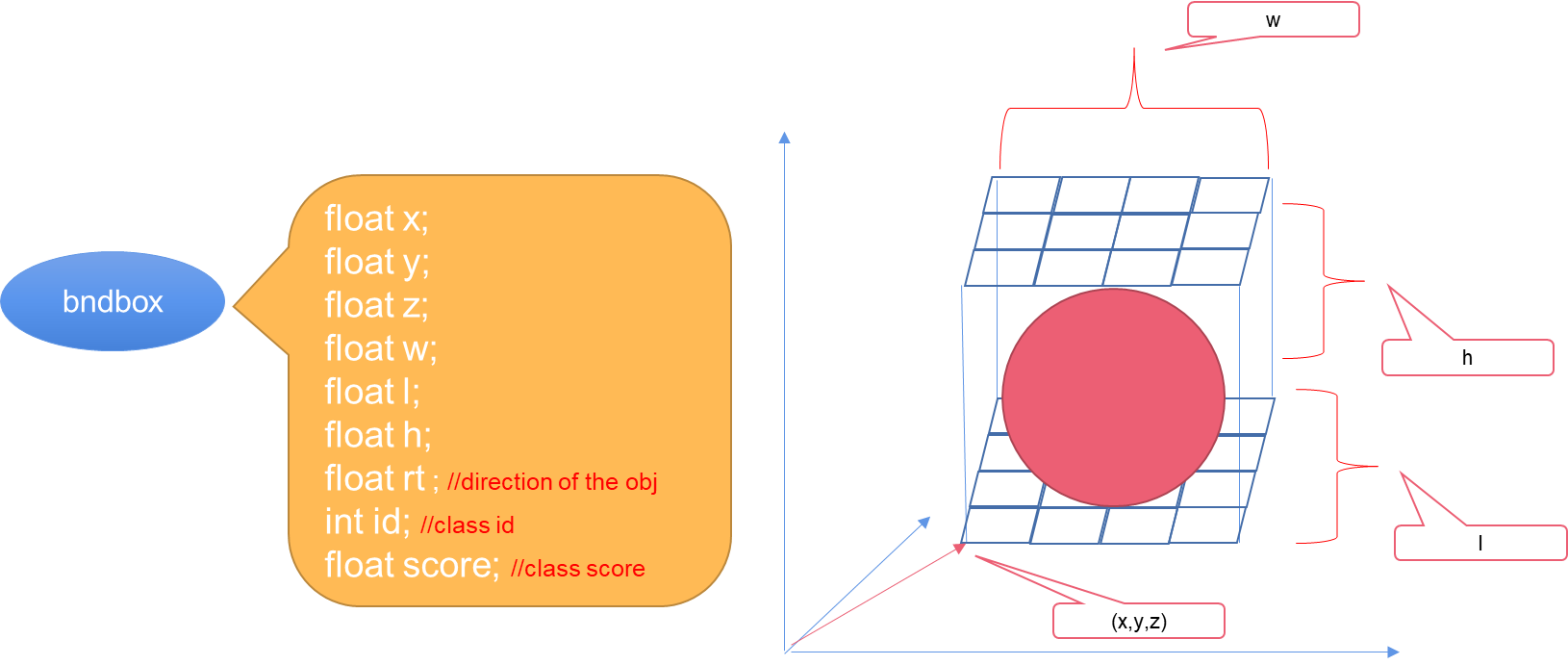
In this post, we introduce CUDA-Pointpillars, which can detect objects in point clouds. The process is as follows:
Converting a native model trained by OpenPCDet into an ONNX file for CUDA-Pointpillars
In our project, we provide a Python script that can convert a native model trained by OpenPCDet into am ONNX file for CUDA-Pointpillars. Find the exporter.py script in the /tool directory of CUDA-Pointpillars.
To get a pointpillar.onnx file in the current directory, run the following command:
$ python exporter.py --ckpt ./*.pth
Performance
The table shows the test environment and performance. Before the test, boost CPU and GPU.
Jetson
Xavier NVIDIA AGX 8GB
Release
NVIDIA JetPack 4.5
CUDA
10.2
TensorRT
7.1.3
Infer Time
33 ms
Table 1. Test platform and performance
Get started with CUDA-PointPillars
In this post, we showed you what CUDA-PointPillars is and how to use it to detect objects in point clouds.
Because native OpenPCDet cannot export ONNX and has too many small operations with low performance for TensorRT, we developed CUDA-PointPillars. This application can export native models trained by OpenPCDet to a special ONNX model and inference the ONNX model by TensorRT.
Hi, recently I decided to try out Tensorflow Lite so I went to their github(https://github.com/tensorflow/examples) and downloaded the examples file. However, when I tried to open an example such as object detection in Android Studio, I kept getting the error:
Could not resolve all dependencies for configuration ‘:app:taskApiDebugRuntimeClasspath’.
Bright Computing, a leader in software for managing high performance computing systems used by more than 700 organizations worldwide, is now part of NVIDIA. Companies in healthcare, financial services, manufacturing and other markets use its tool to set up and run HPC clusters, groups of servers linked by high-speed networks into a single unit. Its Read article >
To make the best portfolio decisions, banks need to accurately calculate values of their trades, while factoring in uncertain external risks. This requires high-performance computing power to run complex derivatives models — which find fair prices for financial contracts — as close to real time as possible. “You don’t want to trade today on yesterday’s Read article >

 Learn how standard language parallelism can be used for programming accelerated computing applications on NVIDIA GPUs with ISO C++, ISO Fortran, or Python.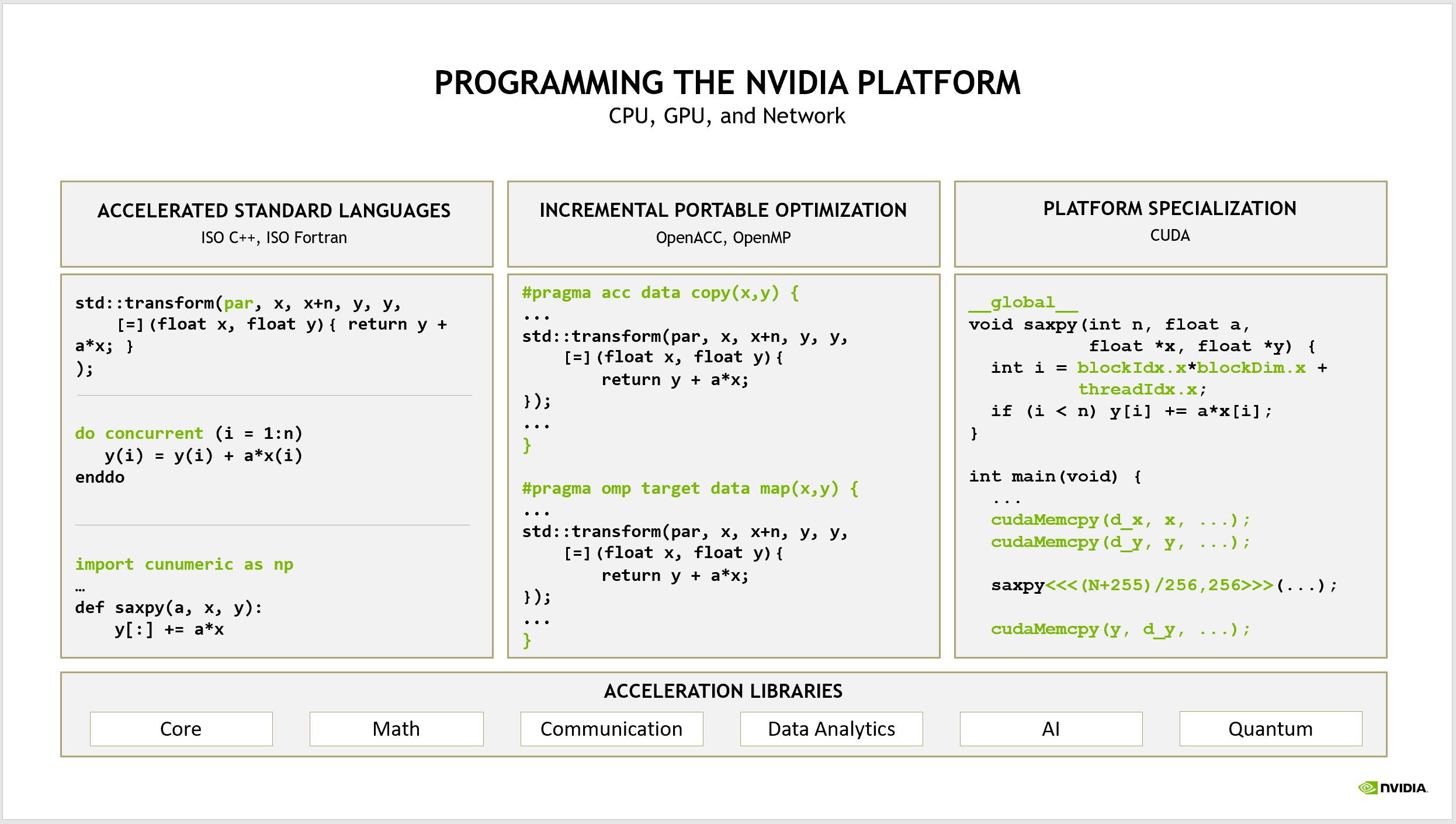
 Use long-range and high-precision data sets to achieve 3D object detection for perception, mapping, and localization algorithms.