Hi, anyone have working example of regression with text and numerical features? I’m struggling to get good result with multiple type of input like this
submitted by /u/AccurateAd8373
[visit reddit] [comments]
 DataBloom
Hi, anyone have working example of regression with text and numerical features? I’m struggling to get good result with multiple type of input like this
submitted by /u/AccurateAd8373
[visit reddit] [comments]
TensorFlow Introduces the first version of ‘TensorFlow Similarity’. TensorFlow Similarity is an easy and fast Python package to train similarity models using TensorFlow.
One of the most essential features for an app or program to have in today’s world is a way to find related items. This could be similar-looking clothes, song titles that are playing on your computer/phone etc. More generally, it’s a vital part of many core information systems such as multimedia searches or recommenders because they rely on quickly retrieving related content/data – which would otherwise take up your time if not done efficiently.
Github: https://github.com/tensorflow/similarity
TensorFlow Blog: https://blog.tensorflow.org/2021/09/introducing-tensorflow-similarity.html
submitted by /u/techsucker
[visit reddit] [comments]
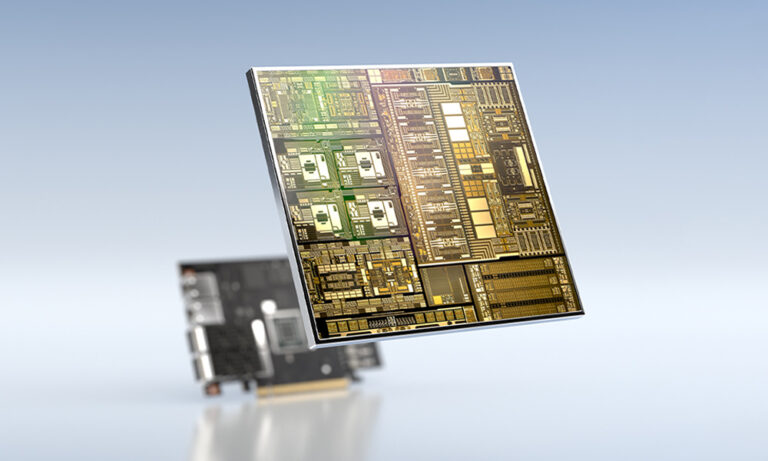 The early access version of the NVIDIA DOCA SDK was announced earlier this year at GTC. DOCA marks our focus on finding new ways to accelerate computing. The emergence of the DPU paradigm as the evolution of SmartNICs is finally here. We enable developers and application architects to squeeze more value out of general-purpose CPUs … Continued
The early access version of the NVIDIA DOCA SDK was announced earlier this year at GTC. DOCA marks our focus on finding new ways to accelerate computing. The emergence of the DPU paradigm as the evolution of SmartNICs is finally here. We enable developers and application architects to squeeze more value out of general-purpose CPUs by accelerating, offloading, and isolating the data center infrastructure to the DPU.
One of the most important ways to think about DOCA is as the DPU-enablement platform. DOCA enables the rapid consumption of DPU features into new and existing data center software stacks.
A modern data center consists of much more than simple network infrastructure. The key to operationally efficient and scalable data centers is software. Orchestration, provisioning, monitoring, and telemetry are all software components. Even the network infrastructure itself is mostly a function of software. The network OS used on the network nodes determines the feature set and drives many downstream decisions around operation tools and monitoring.
We call DOCA a software framework with an SDK, but it’s more than that. An SDK is a great place to start when thinking about what DOCA is and how to consume it. One frequent source of confusion is where components run. Which DOCA components are required on the host, and which are required on the DPU? Under which conditions would you need the SDK compared to the runtime environment? What are the DOCA libraries, exactly?
For those new to DOCA, this post demystifies some of the complexity around the DOCA stack and packaging. First, I’d like to revisit some terms and refine what they mean in the DOCA context.
This is a software development kit. In context, this is what an application developer would need to be able to write and compile software using DOCA. It contains runtimes, libraries, and drivers. Not everyone needs everything that is packaged with or is typically part of the SDK.
In a strict sense, an SDK is more about packaging software components, but it is also used to describe most concisely (though not entirely accurately) how the industry should think about what DOCA is and how to consume it. DOCA is primarily meant for use by application developers.
This is the set of components required to run or execute a DOCA application. It contains the linked libraries and drivers that a DOCA application must have to run. In terms of packaging, it doesn’t need to contain the header files and sources to be able to write and build (compile) applications. DOCA applications can be written and built for either x86 or Arm, so there are different runtime bundles for each architecture.
There are two different contexts here. In the broader and more general context, a library is a collection of resources used by applications. Library resources may include all sorts of data such as configuration, documentation, or help data; message templates; prewritten code; and subroutines, classes, values, or type specifications.
In the context of DOCA, libraries also provide a collection of more functional and useful behavior implementations. They provide well-defined interfaces by which that behavior is invoked.
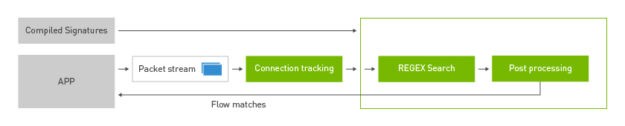
For instance, the DOCA DPI library provides a framework for inspecting and acting on the contents of network packets.
To write a DPI application using the DPU RegEx accelerator from scratch would be a lot of work. You’d have to write all the preprocessing and postprocessing routines to parse packet headers and payload and then write a process to compile RegEx rules for the high-speed lookup on the accelerator.
Device drivers provide an interface to a hardware device. This bit of software is the lowest level of abstraction. DOCA provides an additional layer of abstraction for the specific hardware functions of the DPU. This way, as the DPU hardware evolves, changes to the underlying hardware will not require DOCA applications to also update to follow new or different driver interfaces.
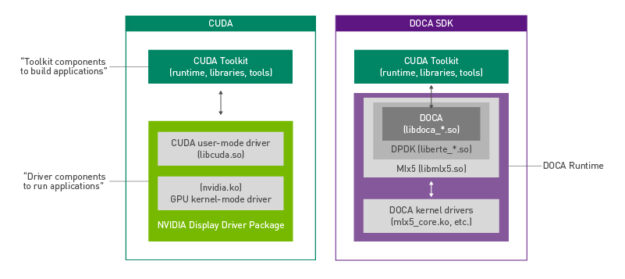
Another useful way to think about DOCA packaging is through its similarities to CUDA. The DOCA runtime is meant to include all the drivers and libraries in a similar vein to what the NVIDIA display driver package provides for CUDA.
Applications that must invoke CUDA libraries for GPU processing only need the NVIDIA display driver package installed. Likewise, DOCA applications need only the runtime package for the specific architecture. In both cases, you have an additional set of packages and tools for integrating GPU or DPU functionality and acceleration into applications.
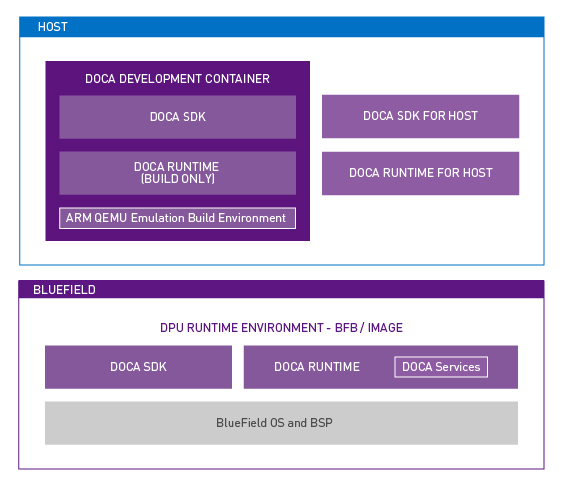
Another complicating factor can be sorting out which DOCA components are required on which platform. After all, the DPU runs its own OS, but also presents itself as a peripheral to the host OS.
DOCA applications can run on either the x86 host or on the DPU Arm cores. DOCA applications running on the x86 host are intended to use the DPU acceleration features through DOCA library calls. In terms of packaging, different OSs can mean different installation procedures for all these components, but luckily this isn’t as confusing as it seems for administrators.
For the NVIDIA BlueField DPU, all the runtime and SDK components are bundled with the OS image. It is possible to write, build, and compile DOCA applications on the DPU for rapid testing. All the DOCA components are there, but that isn’t always an ideal development environment. Having the SDK components built in and included with the DPU OS image makes it easier for everyone as it is the superset that contains the runtime components.
For the x86 host, there are many more individual components to consider. The packages that an administrator needs on the host depends, again, primarily on whether this host is a development environment or build server, and for which architecture. Or will the host run and execute applications that invoke DOCA libraries?
For x86 hosts destined to serve as a development environment, there is one additional consideration. For the development of DOCA applications that will run on x86 CPUs, an administrator needs the native x86 DOCA SDK for host packages. For developing Arm applications from an x86 host, NVIDIA has a prebuilt DOCA development container that manages all those cross-platform complexities.
In the simplest case for x86 hosts that only run or execute applications using DOCA, that’s what the DOCA Runtime for Host package would satisfy. It contains the minimum set of components to enable applications written using DOCA libraries to properly execute on the target machine. Figure 3 shows the different components across the two different OS domains.
Now that I’ve explained how all that packaging works on the x86 host, I should mention that you have an easy way to get the right components installed in the right places. NVIDIA SDK Manager reduces the time and effort required to manage this packaging complexity. SDK Manager can not only install or repair the SDK components on the host but can also detect and install the OS onto the BlueField DPU, all through a graphical interface. Piece of cake!
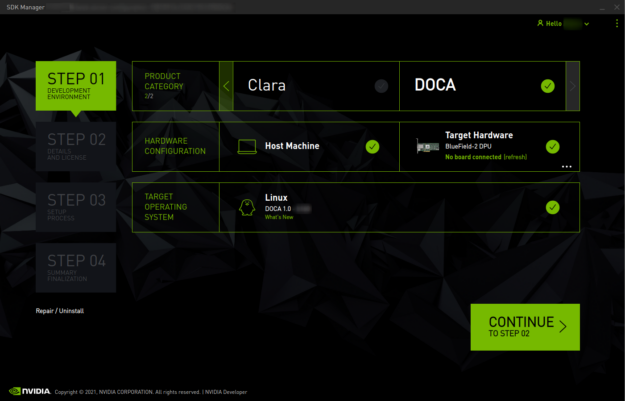
Hopefully, this post goes a long way in helping you understand and demystify DOCA and its packaging. To download DOCA software and get started, see the NVIDIA DOCA developer page.
 Recreate the past with the new NVIDIA Omniverse retro design challenge.
Now’s your chance to use technologies of the future to recreate the past, with the new NVIDIA Omniverse Enter the Retroverse: A Graphics Flashback design challenge.
For this contest, we are asking creators to build and design their gaming space from the past—whether it’s a living room, bedroom, college dorm, or another area. The final submission can be big or small. Meaning you can create an entire room, or assemble a detailed close-up of a floor or desk from a space that inspired your passion for gaming or computer graphics.
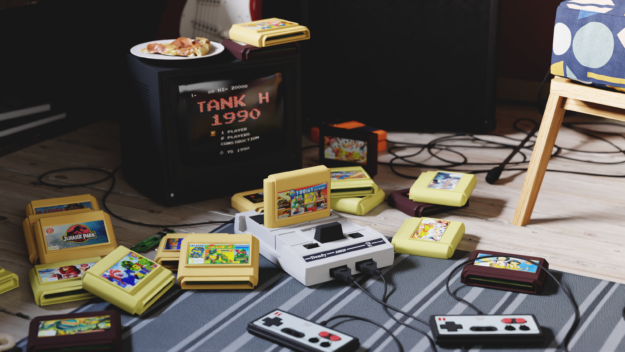
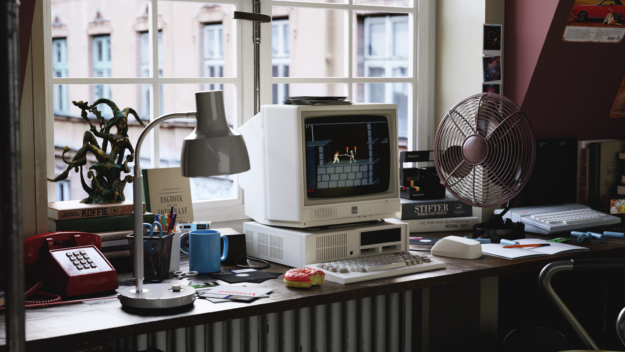

Creators must use Omniverse to design the 3D space in a retro style from the 80s, 90s, or 2000s. NVIDIA is collaborating with TurboSquid by Shutterstock, a leading 3D marketplace, to provide pre-made assets of consoles.
Participants can use any of the pre-selected assets from TurboSquid to build and design their space. Feel free to re-texture the assets, or even model the classic consoles or PCs from scratch.
Use any 3D software, workflow, or Connector to assemble the retro scene, creating the final render in Omniverse Create.
Entries will be judged on various criteria, including the use of Omniverse Create, the quality of the final render, and overall originality.
The top three entries will receive an NVIDIA RTX A6000, GeForce RTX 3090, and GeForce RTX 3080 GPU, respectively.
The winners of the contest will be announced at our GTC conference in November.
Learn more about the Retroverse contest and start creating in Omniverse today. Share your submission on Twitter and Instagram by tagging @NVIDIAOmniverse with #CreateYourRetroverse.
For support and tips on how to get started, watch these tutorials, get help from Omniverse experts in the contest forum, and join our Discord server.
Imagine you’re sitting in Discord chat, telling your buddies about the last heroic round of your favorite game, where you broke through the enemy’s defenses and cinched the victory on your own. Your friends think you’re bluffing and demand proof. With GeForce NOW’s content capture tools running automatically in the cloud, you’ll have all the Read article >
The post How to Use NVIDIA Highlights, Freestyle and Montage in GeForce NOW appeared first on The Official NVIDIA Blog.
Hi, I thought this would be the right place to ask.
I have a python program that uses an audio and image classification, would I be able to convert them and use them on mobile?
If so what language would be best for the mobile application.
Thanks.
submitted by /u/why________________
[visit reddit] [comments]
Hi all, i am struggeling to get Tensorflow-Lite running on a Raspberry Pi 4. The problem is that the model (BirdNET-Lite on GitHub) uses one special operator from Tensorflow (RFFT) which has to be included. I would rather use a prebuilt bin than compiling myself. I have found the prebuilt bins from PINTO0309 in GitHub but don’t understand if they would be useable or if i have to look somewhere else. BirdNET is a software to identify birds by their sounds, and also a really cool (and free) app. Many thanks!
submitted by /u/FalsePlatinum
[visit reddit] [comments]
A one liner : For the DevOps nerds, AutoDeploy allows configuration based MLOps.
For the rest : So you’re a data scientist and have the greatest model on planet earth to classify dogs and cats! :). What next? It’s a steeplearning cusrve from building your model to getting it to production. MLOps, Docker, Kubernetes, asynchronous, prometheus, logging, monitoring, versioning etc. Much more to do right before you The immediate next thoughts and tasks are
What if you could only configure a single file and get up and running with a single command. That is what AutoDeploy is!
Read our documentation to know how to get setup and get to serving your models.
Feature Support.
submitted by /u/kartik4949
[visit reddit] [comments]
AI is at play on a global stage, and local developers are stealing the show. Grassroot communities are essential to driving AI innovation, according to Kate Kallot, head of emerging areas at NVIDIA. On its opening day, Kallot gave a keynote speech at the largest AI Expo Africa to date, addressing a virtual crowd of Read article >
The post The Bright Continent: AI Fueling a Technological Revolution in Africa appeared first on The Official NVIDIA Blog.
The transportation industry is adding more torque toward realizing autonomy, electrification and sustainability. That was a key takeaway from Germany’s premier auto show, IAA Mobility 2021 (Internationale Automobil-Ausstellung), which took place this week in Munich. The event brought together leading automakers, as well as execs at companies that deliver mobility solutions spanning from electric vehicles Read article >
The post Autonomy, Electrification, Sustainability Take Center Stage at Germany’s IAA Auto Show appeared first on The Official NVIDIA Blog.