I’m trying to build a model and convert it to use in TensorFlow Lite for Microcontrollers. I’m having an issue where every Keras model I generate contains a REDUCE_PROD operator (even a completely basic model consisting of a single Dense(1) layer). However, the TF Lite for Microcontrollers runtime doesn’t support the REDUCE_PROD operator and flags an error upon attempting to load the model.
Is there a way I can exclude this operator when generating a model? Am I missing something?
I am attempting to train a 3 layer neural network that predicts maximum and minimum survival duration. The final layer has two outputs (corresponding to a prediction of maximum/minimum survival) and I have written a custom loss function. However I have realised that I need to apply the loss differently depending on which node I am evaluating.
What would be the best way of approaching this? Would I be better off training two separate models to predict maximum and minimum survival?
Learn about the latest release of Nsight Graphics 2021.4, an all-in-one graphics debugger and profiler to help game developers get the most out of NVIDIA hardware.
Nsight Graphics 2021.4 is an all-in-one graphics debugger and profiler to help game developers get the most out of NVIDIA hardware. From analyzing API setup, to solving nasty bugs, to providing deep insight into how applications use the GPU for better performance, Nsight Graphics is the ultimate tool.
The latest release is available to download now >>
Key features include:
GPU Trace with One-shot capture feature
GPU Trace now supports applications that utilize Vulkan-CUDA interop
Analysis view for GPU Trace
Resizable BAR capabilities
GPU Trace
GPU Trace introduces a new capture type called One-shot. The One-shot capture type supports profiling applications, which do not have a specific frame beginning and ending. This makes it easier to profile and optimize tools that rely on compute workloads—such as generating normal maps or optimizing geometry/LODs. One-shot captures are supported for D3D12 and Vulkan applications using compute or ray tracing features. Ray tracing with DirectML and WinML is also supported.
Figure 1. GPU Trace
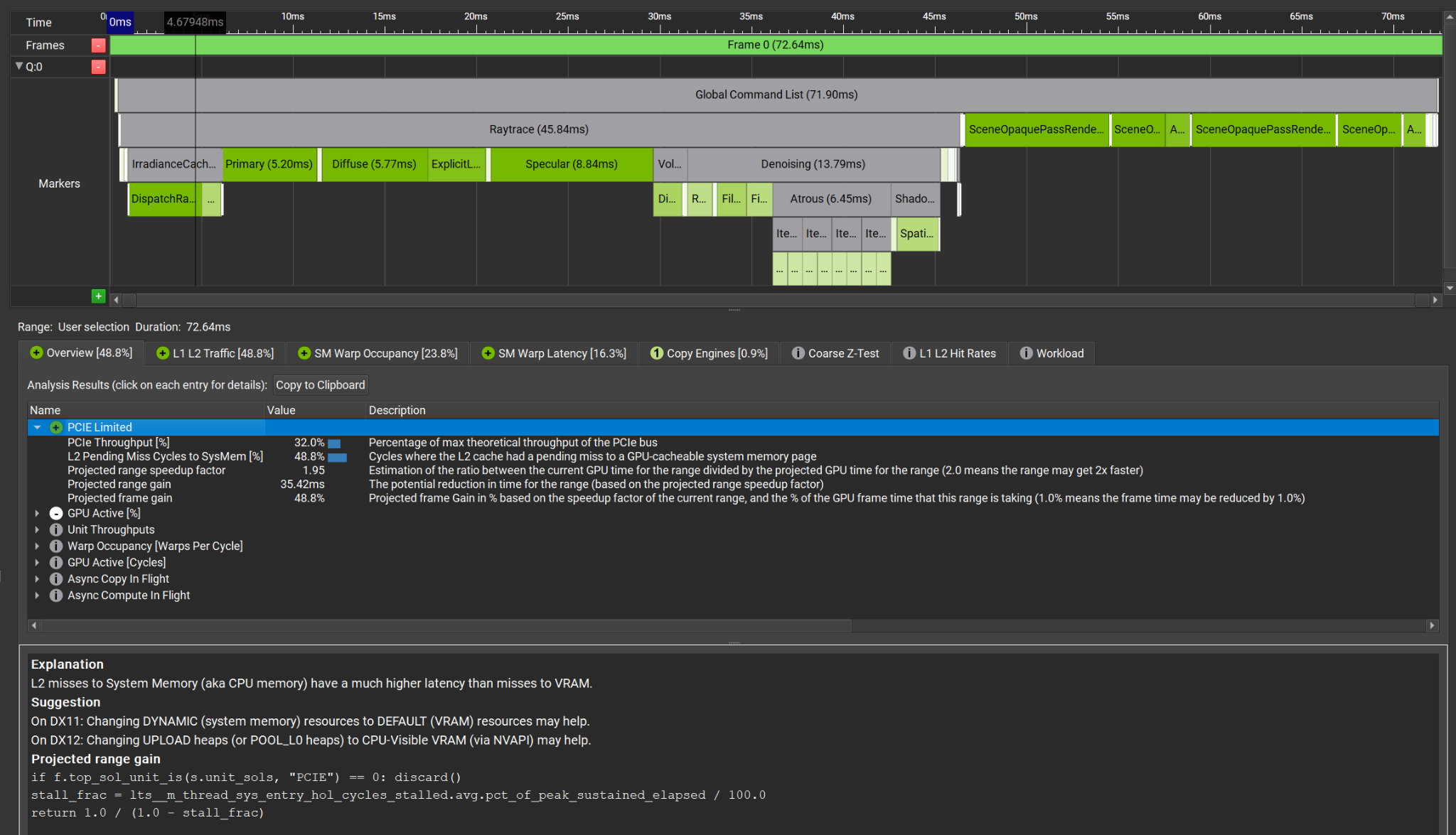
Trace Analysis helps identify work regimes with the most potential for performance improvement. Select the “Analyze” button after taking a GPU Trace, and the advanced analysis engine will provide a new report with explanations and suggestions on how to improve GPU utilization.
Figure 2. Trace Analysis
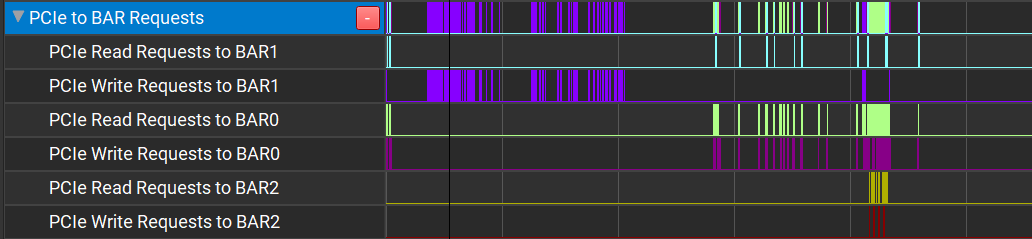
In March 2021, NVIDIA introduced new Resizable BAR capabilities with Game Ready GeForce drivers. Users with a compatible motherboard and GPU can enable all of the GPU memory to be accessed by the CPU at once. GPU Trace also reveals if BAR memory transfers are happening efficiently. View more information >>
Figure 3. Resizable BAR
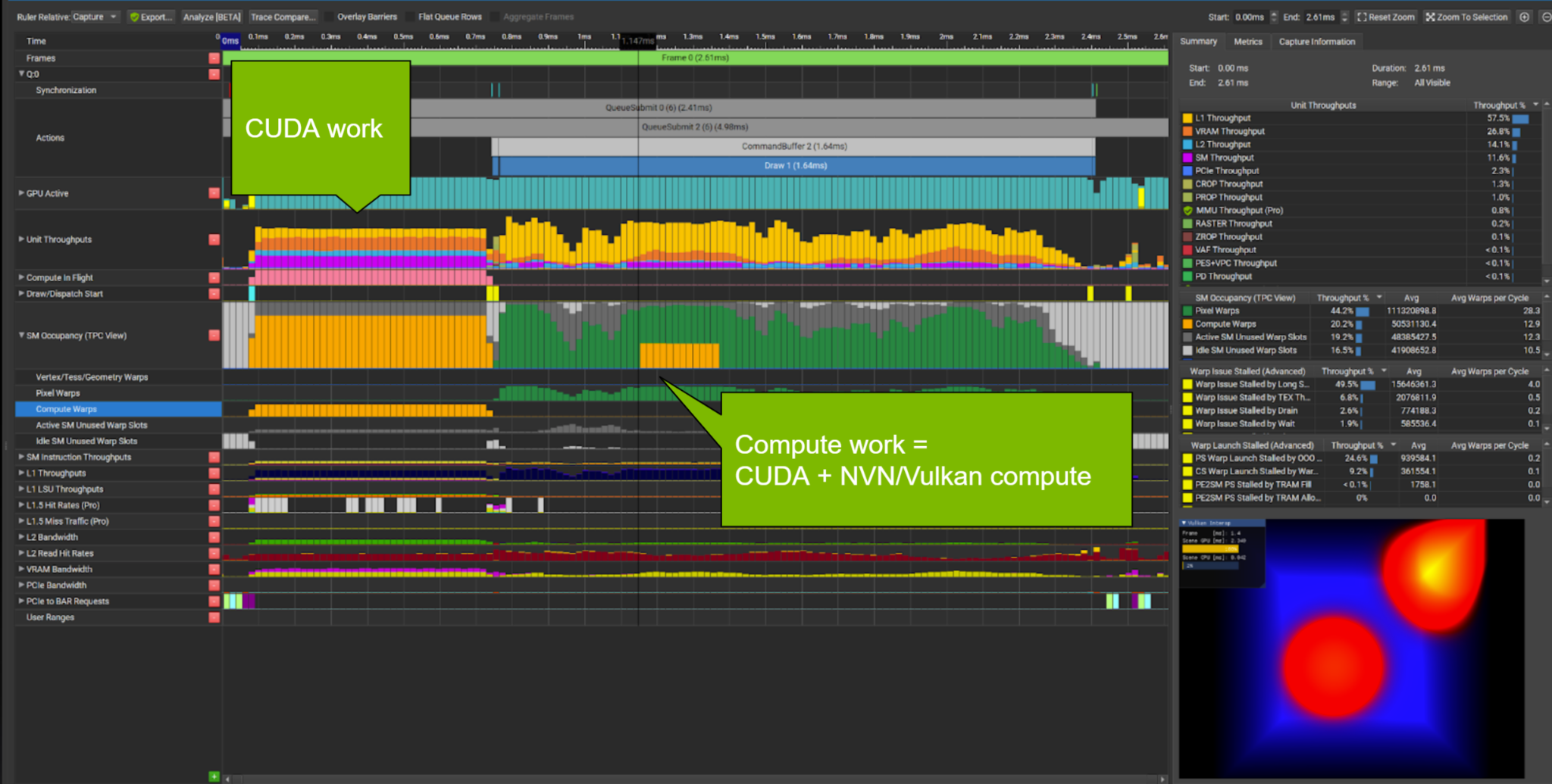
Using VK_NV_cuda_kernel_launch, it is now possible to launch CUDA kernels from a Vulkan graphics application without the overhead of the context switch. GPU Trace now supports this capability.
Figure 4. CUDA kernels
C++ Captures
When working with C++ Captures, it can be useful to open up an integrated development environment with a project that allows for code browsing or modification. In this release, the added button in the C++ Capture document opens up a Visual Studio environment with the associated project, taking advantage of Visual Studio’s native CMake support
Please continue to use the integrated feedback button that lets you send comments, feature requests, and bugs directly. You can send feedback anonymously, or provide an email, for follow up.
Just click on the little speech bubble at the top right of the window.
3D deep learning researchers can build on more cutting edge algorithms and simplify their workflows with the latest version of the Kaolin PyTorch Library.
3D deep learning researchers can build on the latest algorithms to simplify and accelerate workflows using the Kaolin PyTorch Library, available now.
NVIDIA Kaolin library, first released in November 2019, was originally written in the NVIDIA Toronto AI lab as an internship project. After writing repetitive boilerplate code and copying algorithmic components for several projects, the researchers started development of a PyTorch library bringing common functionality for 3D deep learning (3D DL) to one place. Since its first release, Kaolin library has grown into a mature codebase with robust and optimized utilities and algorithms for 3D deep learning.
The Kaolin library brings 3D deep learning researchers utilities to accelerate their workflows, as well as reusable research components to provide a basis for future innovations. For example, Kaolin simplifies handling and processing of complex 3D datasets used for training. It also includes writers for 3D checkpoints that can be visualized in a companion Omniverse Kaolin App with the latest NVIDIA RTX technology. And it provides building blocks like conversions between 3D representations, useful 3D loss functions for training, and differentiable rendering. The Kaolin team is dedicated to deliver continuous improvements and ship new algorithmic building blocks to power 3D DL innovation.
The latest Kaolin library release includes a new representation, structured point clouds (SPC), a sparse octree-based acceleration data structure, with highly efficient convolution and ray tracing capabilities. SPCs are useful for scaling up and accelerating neural implicit representations, popular in 3D DL research today. It also powers the latest version of NeuralLOD training, delivering up to 30x reduction in memory, and speeding up training time 3x.
Visualization from Charles Loop, Model Courtesy of Qianyi Zhou, Stanford. Real-time volume rendering with Kaolin’s SPC. Colors represent the number of “hits” per ray, efficiently computed through sparse SPC structure.
It also includes a new lightweight Tensorboard-style web dashboard called Dash3D. Users can leverage this tool to inspect checkpoints of 3D predictions produced by DL models during training, even on remote hardware configurations.
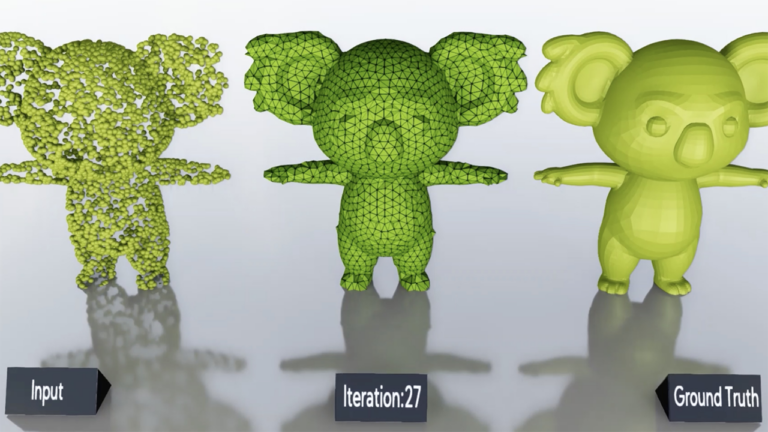
Lightweight visualization of 3D model predictions that evolve during training in the new Kaolin Dash3D.
The library release improves support for 3D datasets, including new datasets (SHREC, ModelNet), additional formats (.off) and speedups for the USD 3D file format, resulting in 10x improvement in load time efficiency during training over popular obj format. In addition, new tutorials for differentiable rendering and 3D checkpoints are included.
See official change log for additional details on Kaolin library release. Researchers can download the Kaolin library on GitHub today.
New research creates a low-cost and easy-to-use machine learning model to analyze streams of data from earth-imaging satellites.
New research from a group of scientists at UC Berkeley is giving data-poor regions across the globe the power to analyze data-rich satellite imagery. The study, published in Nature Communications, develops a machine learning model resource-constrained organizations and researchers can use to draw out regional socioeconomic and environmental information. Being able to evaluate local resources remotely could help guide effective interventions and benefit communities globally.
“We saw that many researchers—ourselves included—were passing up on this valuable data source because of the complexities and upfront costs associated with building computer vision pipelines to translate raw pixel values into useful information. We thought that there might be a way to make this information more accessible while maintaining the predictive skill offered by state-of-the-art approaches. So, we set about constructing a way to do this,” said coauthor Ian Bolliger, who worked on the study while pursuing a PhD in Energy and Resources at UC Berkeley.
At any given time, hundreds of image-collecting satellites circle the earth, sending massive amounts of information to databases daily. This data holds valuable insight into global challenges, including health, economic, and environmental conditions—even offering a look into data-poor and remote regions.
Combining satellite imagery with machine learning (SIML) has become an effective tool for turning these raw data streams into usable information. Researchers have used SIML on a broad-range of studies, from calculating poverty rates, to water availability, to educational access. However, most SIML projects capture information on a narrow topic, creating data tailored to a specific study and location.
The researchers sought to create an accessible system capable of analyzing and organizing satellite images from multiple sources while lowering compute requirements. The tool they created, called the Multi-Task Observation using Satellite Imagery & Kitchen Sinks (MOSAIKS), does this by using a relatively simpler and more efficient unsupervised machine learning algorithm.
“We designed MOSAIKS keeping in mind that a single satellite image simultaneously holds information about many different prediction variables (like forest cover or population density.) We chose to use an unsupervised embedding of the imagery to create a statistical summary of each image. The unsupervised nature of the featurization step makes the learning and prediction steps of the pipeline very fast, while the specifics of how those features are computed from imagery are well suited to satellite image data,” said coauthor Esther Rolf, a Ph.D. student in computer science at Berkeley.
To develop the model, the researchers used CUDA-accelerated NVIDIA V100 Tensor Core GPUs on AWS. The publicly available CodeOcean capsule, which provides code, compute, and storage, for anyone to interactively run, uses NVIDIA GPUs.
Figure 1. Training data (left) and predictions using a single featurization of daytime imagery (right). Insets (far right) marked by black squares in global maps. Training sample is a uniform random sampling of 1,000,000 land grid cells, 498,063 for which imagery were available and could be matched to task labels.
“We want policymakers in resource-constrained settings and without specialized computational expertise to be able to painlessly gather satellite imagery, build a model of a variable they care about (say, the presence of adequate sanitation systems), and test whether this model is actually performing well. If they can do this, it will dramatically improve the usefulness of this information in implementing policy objectives,” Bolliger said.
Currently the team is developing and testing a public-facing web interface tool, making it easy for people to query for MOSAIKS features in user-specified locations. The researchers encourage interested researchers to sign up for the beta version.
I have a problem using LSTM from keras. When I try to train the model, the training stops at “Epoch 1/50” and never progresses. The program just stops with a Process finished code and shows no error messages regarding the missing training.
The problem only occurs when I try to use LSTM’s default parameters. So if I for example give a new activation argument with such as “relu” then it works fine?
It seems to be on my local computer the problem pertains as the code can run on Colab with and without default parameters, but for some reason I can not be allowed to train the model at all. This is especially frustrating as there are no error messages displayed.
I really hope there is a skilled person who can help or guide me in the right direction with this problem.
Thanks 🙂
import tensorflow as tf
from tensorflow.keras.models import Sequential
from tensorflow.keras.layers import Dense, Dropout, LSTM, InputLayer
2021-08-27 10:20:22.799484: I tensorflow/stream_executor/platform/default/dso_loader.cc:53] Successfully opened dynamic library cudart64_110.dll 2021-08-27 10:20:26.443509: I tensorflow/stream_executor/platform/default/dso_loader.cc:53] Successfully opened dynamic library nvcuda.dll 2021-08-27 10:20:26.488972: I tensorflow/core/common_runtime/gpu/gpu_device.cc:1733] Found device 0 with properties: pciBusID: 0000:01:00.0 name: NVIDIA GeForce RTX 2060 computeCapability: 7.5 coreClock: 1.2GHz coreCount: 30 deviceMemorySize: 6.00GiB deviceMemoryBandwidth: 245.91GiB/s 2021-08-27 10:20:26.489580: I tensorflow/stream_executor/platform/default/dso_loader.cc:53] Successfully opened dynamic library cudart64_110.dll 2021-08-27 10:20:26.532650: I tensorflow/stream_executor/platform/default/dso_loader.cc:53] Successfully opened dynamic library cublas64_11.dll 2021-08-27 10:20:26.533109: I tensorflow/stream_executor/platform/default/dso_loader.cc:53] Successfully opened dynamic library cublasLt64_11.dll 2021-08-27 10:20:26.559639: I tensorflow/stream_executor/platform/default/dso_loader.cc:53] Successfully opened dynamic library cufft64_10.dll 2021-08-27 10:20:26.565224: I tensorflow/stream_executor/platform/default/dso_loader.cc:53] Successfully opened dynamic library curand64_10.dll 2021-08-27 10:20:26.637251: I tensorflow/stream_executor/platform/default/dso_loader.cc:53] Successfully opened dynamic library cusolver64_11.dll 2021-08-27 10:20:26.660612: I tensorflow/stream_executor/platform/default/dso_loader.cc:53] Successfully opened dynamic library cusparse64_11.dll 2021-08-27 10:20:26.661815: I tensorflow/stream_executor/platform/default/dso_loader.cc:53] Successfully opened dynamic library cudnn64_8.dll 2021-08-27 10:20:26.662201: I tensorflow/core/common_runtime/gpu/gpu_device.cc:1871] Adding visible gpu devices: 0 2021-08-27 10:20:26.662770: I tensorflow/core/platform/cpu_feature_guard.cc:142] This TensorFlow binary is optimized with oneAPI Deep Neural Network Library (oneDNN) to use the following CPU instructions in performance-critical operations: AVX AVX2 To enable them in other operations, rebuild TensorFlow with the appropriate compiler flags. 2021-08-27 10:20:26.664656: I tensorflow/core/common_runtime/gpu/gpu_device.cc:1733] Found device 0 with properties: pciBusID: 0000:01:00.0 name: NVIDIA GeForce RTX 2060 computeCapability: 7.5 coreClock: 1.2GHz coreCount: 30 deviceMemorySize: 6.00GiB deviceMemoryBandwidth: 245.91GiB/s 2021-08-27 10:20:26.665660: I tensorflow/core/common_runtime/gpu/gpu_device.cc:1871] Adding visible gpu devices: 0 2021-08-27 10:20:27.284225: I tensorflow/core/common_runtime/gpu/gpu_device.cc:1258] Device interconnect StreamExecutor with strength 1 edge matrix: 2021-08-27 10:20:27.284551: I tensorflow/core/common_runtime/gpu/gpu_device.cc:1264] 0 2021-08-27 10:20:27.284738: I tensorflow/core/common_runtime/gpu/gpu_device.cc:1277] 0: N 2021-08-27 10:20:27.285152: I tensorflow/core/common_runtime/gpu/gpu_device.cc:1418] Created TensorFlow device (/job:localhost/replica:0/task:0/device:GPU:0 with 3961 MB memory) -> physical GPU (device: 0, name: NVIDIA GeForce RTX 2060, pci bus id: 0000:01:00.0, compute capability: 7.5) 2021-08-27 10:20:28.198186: I tensorflow/compiler/mlir/mlir_graph_optimization_pass.cc:176] None of the MLIR Optimization Passes are enabled (registered 2) Epoch 1/50 2021-08-27 10:20:29.513381: I tensorflow/stream_executor/platform/default/dso_loader.cc:53] Successfully opened dynamic library cudnn64_8.dll Process finished with exit code -1073740791 (0xC0000409)
NVIDIA Decision Support (NDS) is our adaptation of an industry-standard data science benchmark often used in the Apache Spark community. NDS consists of the same 105 SQL queries as the industry standard benchmark TPC-DS, but has modified parts for dataset generation and execution scripts.
Introduction
The August release (21.08) of RAPIDS Accelerator for Apache Spark is now available. It has been a little over a year since the first release at NVIDIA GTC 2020. We have improved in so many ways, particularly in terms of ease-of-use with minimal to no-code change for Apache Spark applications. This last year, the team has been focused on adding both functionality and continuously improving performance. As a testament to that, we periodically measure performance and functionality over time with the NVIDIA Data Science (NDS) benchmark at a scale factor of 3,000 (3 TB uncompressed). In this release, apart from adding new features, we are extremely proud to make progress on improving end-to-end speed for all passing queries and lowering the total cost of ownership for NVIDIA EGX servers.
Benchmark updates
NVIDIA Decision Support (NDS) is our adaptation of an industry-standard data science benchmark often used in the Apache Spark community. NDS consists of the same 105 SQL queries as the industry standard benchmark TPC-DS, but has modified parts for dataset generation and execution scripts. In our GTC 2021 update, we had 95 queries passing. With the 21.08 release, with new features such as out-of-core group by, window rank, and dense_rank, we have enabled all of the 105 queries to run on the GPU.
Benchmark setup
Scale Factor — 3K (3TB Dataset with floats)
Systems: 4x NVIDIA Certified EGX Server
EGX Server Hardware Spec: 4-node Dell R740xd, each with (2) 24-core CPUs, 512GB RAM, HDFS on NVMe, (1) CX-6 Dx 25/100Gb NIC, 2x NVIDIA A30 GPU
CPU Hardware Spec: 4-node Dell R740xd, each with (2) 24-core CPUs, 512GB RAM, HDFS on NVMe, (1) CX-6 Dx 25/100Gb NIC
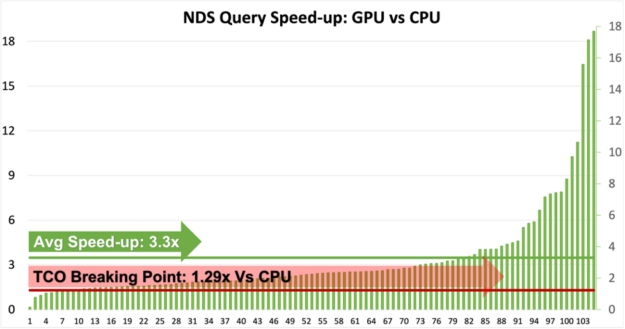
Figure 1: NDS Queries Speed-up on EGX Servers: GPU vs CPU.
Based on this release, we are excited to show that all the 105 queries can now run without any code change on the GPU.
The benchmark servers used for these benchmarks cost little under $170,000 for four servers without GPUs and $220,000 to include one NVIDIA A100 GPU in each server.
In simple terms, benchmark GPU servers would cost 1.29 times CPU servers.
As shown by the chart above (figure 1), more than 95 queries are now 1.29x faster and thereby cheaper to run on GPU.
Some of the queries that are slower on GPU are currently being addressed and we are relentlessly working to improve those queries as well as improve the overall speed-ups.
Users can easily deduce that GPU speed-up varies from 1x to 18x and therefore it’s suggested that users qualify the right use cases for GPUs.
The Qualification Tool would be a handy asset if users are unsure about the right use case for GPU. For more information about the Qualification Tool, refer to the section below.
Profiling & qualification tool
The Profiling & Qualification tool, released in 21.06, saw positive feedback from the user community as well as requests for new features. In 21.08 the qualification tool now has the ability to handle event logs generated by Apache Spark 2.x versions. The tool will also support event logs generated by AWS EMR 6.3.0, Google Dataproc 2.0, Microsoft Azure Synapse, and the Databricks 7.3 and 8.2 runtimes. The qualification tool will no longer require a Spark runtime. Users can now use the qualification tool with just Apache Spark 3.x jars on their machine. The latest version also has new filtering capabilities to choose event logs. The tool also looks for read data formats and types that the plugin doesn’t support and removes these from the score (based on the total task time in SQL Dataframe operations). The output will be reported in a concise format on the terminal and a detailed analysis of each of the processed event logs will be stored as a csv output.
New functionality
This release adds more functionality for arrays and structs. We can now do a union on multi-level struct data types and can also write array data types in Parquet format. We have added rank and dense_rank window functions to the existing lead, lag and row_number functionality. With this added functionality, the RAPIDS Accelerator can now support the most commonly used window operators in SQL. For the timestamp operators, we have added support for LEGACY timestamps. With this functionality, users can read legacy timestamp formats supported in Spark 2.0. For Databricks users, we have added the ability to cache data in GPU (this was already supported for all other platforms).
We continue to make the user experience better with the ability to handle datasets that spill out of GPU memory for group by and windowing operations. This improvement will save users time creating partitions to avoid out-of-memory errors on the GPU. Similarly, the adoption of UCX 1.11 has improved error handling for RAPIDS Spark Accelerated Shuffle Manager.
As we noted in the last release, we moved to CalVer and a bi-monthly release cadence since the last release (21.06). The upcoming versions will add expanded support for additional decimal types and continue to add more nested data type support for multi-level struct and maps. In addition, lookout for micro-benchmarks with code-samples and notebooks that will highlight operations best suited for GPUs. We want to hear from you, the users. Reach out to us on GitHub and let us know how we can continue to improve your experience using RAPIDS Spark.
Healthcare giant Johnson & Johnson is injecting data science across its business to improve its manufacturing, clinical trial enrollment, forecasting and more. “I actually like to call it decision science,” said Jim Swanson, the company’s executive vice president and enterprise chief information officer, in a panel discussion at the most recent NVIDIA GPU Technology Conference. Read article >
GFN Thursday is here to wake you up when September begins because there are a bunch of awesome day-and-date launch games coming to GeForce NOW this month. September brings 16 new day-and-date games to the cloud — including the anticipated Life is Strange: True Colors. They’re part of the 34 games being added throughout the Read article >

 Learn about the latest release of Nsight Graphics 2021.4, an all-in-one graphics debugger and profiler to help game developers get the most out of NVIDIA hardware.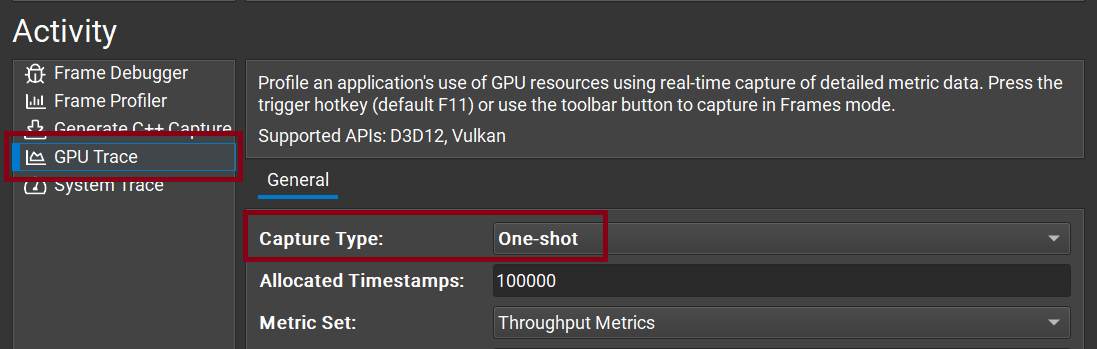
 3D deep learning researchers can build on more cutting edge algorithms and simplify their workflows with the latest version of the Kaolin PyTorch Library.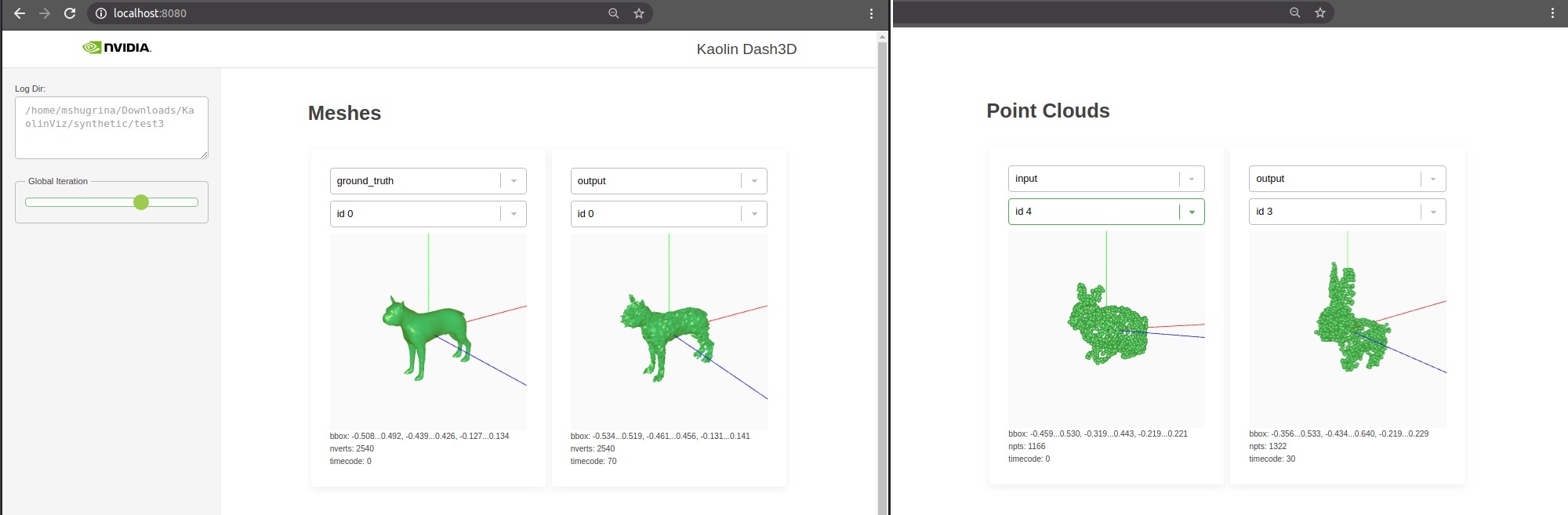
 New research creates a low-cost and easy-to-use machine learning model to analyze streams of data from earth-imaging satellites.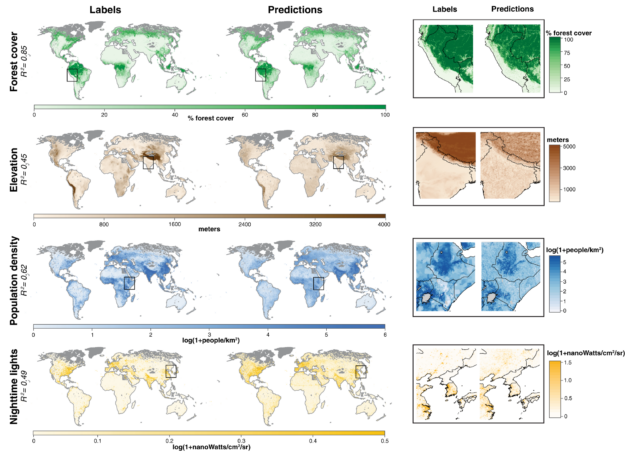

 NVIDIA Decision Support (NDS) is our adaptation of an industry-standard data science benchmark often used in the Apache Spark community. NDS consists of the same 105 SQL queries as the industry standard benchmark TPC-DS, but has modified parts for dataset generation and execution scripts.