Categories
Misc

Taking it to the Street: NVIDIA DRIVE Ecosystem Brings AVs to Public Markets

Just like money, autonomous vehicles never sleep. And the companies developing them are working just as hard, rolling out transformative technology and growing into publicly traded entities. This ecosystem includes every aspect of the autonomous vehicle industry ― from sensors to software to mobility services ― all using the high-performance, energy-efficient NVIDIA DRIVE platform to Read article >

The post Taking it to the Street: NVIDIA DRIVE Ecosystem Brings AVs to Public Markets appeared first on The Official NVIDIA Blog.

Categories
Misc

Make Any Face Come to Life: NVIDIA’s Simon Yuen Talks Audio2Face

We all know about the applications for digital humans for films and video games, but at NVIDIA, Simon Yuen has discovered the vast need and potential for digital humans beyond the entertainment industry. Yuen spoke with NVIDIA AI Podcast host Noah Kravitz about how we’re getting to a point where the simulation of digital humans Read article >

The post Make Any Face Come to Life: NVIDIA’s Simon Yuen Talks Audio2Face appeared first on The Official NVIDIA Blog.

Categories
Misc

ConvLSTM3D

I may be losing my mind, but the tf website lists a 3D convolutional LSTM for keras in tf-nightly, but I can’t seem to find it after installing or updating.

Did it get dropped at some point? I’m hoping I can add the LSTM before flattening the data.

submitted by /u/QuantumSorcerer
[visit reddit] [comments]

Categories
Misc

Can TensorFlow or other machine learning detect objects on your desktop?

For example, can you run an app that will look at your desktop and identify icons / mouse / live video / certain applications like it can do for real world objects in videos?

I don’t know how to Google this, I can’t find any real results for this question of using your live desktop in place of a video as you source.

Hope this is clear, thanks.

submitted by /u/Iamjohnmiller
[visit reddit] [comments]

Categories
Misc

Discover New CUDA 11.4 Features

The new release consists of GPU-accelerated libraries, debugging and optimization tools, an updated C/C++ compiler, and a runtime library to build and deploy your application on major architectures.

NVIDIA announces our newest release of the CUDA development environment consisting of GPU-accelerated libraries, debugging and optimization tools, an updated C/C++ compiler, and a runtime library to build and deploy your application on major architectures including NVIDIA Ampere, x86, Arm server processors, and POWER. The latest release, CUDA 11.4, and its features are focused on enhancing the programming model, new language support, and performance of your CUDA applications.

Key features:

  • CUDA Programming model enhancements
    • CUDA Graph launch performance
    • Multi-process Service (MPS) features
    • Asynchronous Programming model
  • Language support – CUDA
    • C++ support enhancements
    • Python support
  • Compiler enhancements
  • CUDA Driver enhancements
    • GPUDirect RDMA package inclusion
    • GPUDirect Storage package inclusion

CUDA 11.4 ships with R470 driver. The driver now includes GPUDirect RDMA, as well as GPUDirect Storage packages that streamline and enable you to leverage these technologies without the need for separate installation of additional packages. The driver also enables new MIG configurations for the recently launched NVIDIA A30 GPU to double the amount of memory per MIG slice. This results in optimal performance for various workloads on the A30 GPU, especially for AI Inference workloads.

Resources:

Learn More & Download Now

Categories
Misc

How to view MSE for individual predictions?

I am using tensorflow for a regression problem and I would like to see the error for each prediction that the model makes during training. At the end of epoch it prints the MSE for that epoch but I would like to be able to print or view all the errors for each prediction. Is there a way to do that? I was thinking about adding some print statements or modifying the tensorflow source code in some way. Thanks!

submitted by /u/NameError-undefined
[visit reddit] [comments]

Categories
Misc

Hidden GEM: Canadian Weather Forecasts to Run on NVIDIA-Powered System

The supercomputer behind Canada’s weather forecasts is getting an upgrade, adopting NVIDIA networking to support long-running, computationally intensive environmental models. Located in Quebec, the system runs a complex forecasting and data assimilation system known as GEM — the Global Environmental Multiscale model. The model processes information about temperature, air pressure and wind to produce both Read article >

The post Hidden GEM: Canadian Weather Forecasts to Run on NVIDIA-Powered System appeared first on The Official NVIDIA Blog.

Categories
Misc

Latest Nsight Compute 2021.2 Release Now Available for Download

The new release helps identify more performance issues, and makes it easier to understand and fix them.

The new Nsight Compute 2021.2 release helps identify more performance issues, and makes it easier to understand and fix them.

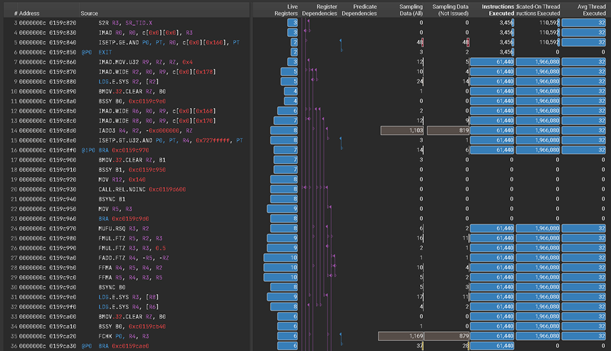
Register Dependency Visualization

This latest release adds a new feature for register dependency visualization. It helps identify long dependency chains and inefficient register usage that can limit performance. The SASS view in the Source page has new columns that track all the potential writes for a register each time it is read. Columns show all dependencies for registers, predicates, uniform registers and uniform predicates.

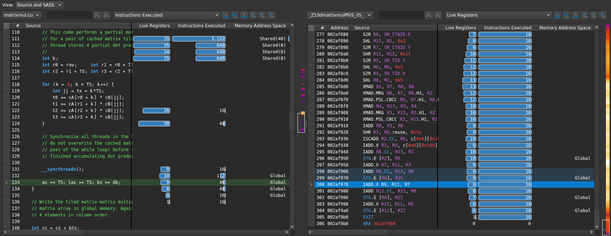
Standalone Source Viewer

Developers have frequently requested this feature to allow the view of side-by-side assembly and correlated source code for CUDA kernels in the Source page without needing to collect a profile. Users can directly open .cubin files from disk in the GUI to see the code correlation. This feature helps users understand how their code is being translated into assembly by the compiler and can be used to identify compiler optimizations and inefficiencies.

Guided Analysis Improvements

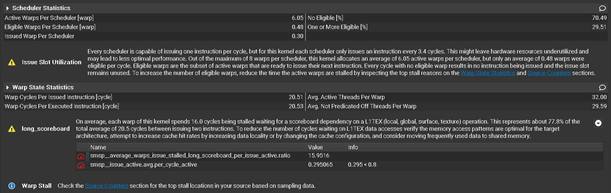
Several other features have been added to improve the guided analysis experience within the GUI. These include highlighted focus metrics, report cross-links, increased rule visibility and documentation references. These all add to the built-in profile and optimization guided analysis that Nsight Compute provides to help users understand and fix performance bottlenecks.

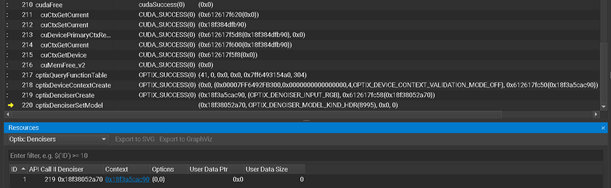
OptiX 7 Resource Tracking

In addition to existing Optix API tracing, this release provides support for tracking OptiX objects in the Resources tool window. OptiX 7 users can now see the properties and lifetime for objects like OptixDeviceContext, OptixProgramGroup, OptixDenoiser and more. Understanding when objects are created, destroyed, and interacted with can reveal unexpected behaviours that may cause performance or correctness issues in an OptiX application.

Additional Improvements

There have been additional improvements to management of baseline reports, font settings, CLI filters, and a new Python interface for reading report data. There is also support for tracking the new memory alloc/free nodes in CUDA graphs. For full details, see the latest release notes.

Resources:

Learn More & Download Now  
Documentation
Forums
GTC On-Demand Session: “CUDA is Evolving, and the Latest Developer Tools are Adapting to Keep Up”
GTC On-Demand Session: “Requests, Wavefronts, Sectors Metrics: Understanding and Optimizing Memory-Bound Kernels with Nsight Compute”
Demo Video: New Nsight Systems and Nsight Compute Highlights
Additional instructional videos and blog posts for more information.

Categories
Misc

Access filters within a convolutional layer – TensorFlow2

I am using TF2.5 & Python3.8 where a conv layer is defined as:

 Conv2D( filters = 64, kernel_size = (3, 3), activation='relu', kernel_initializer = tf.initializers.GlorotNormal(), strides = (1, 1), padding = 'same', ) 

Using a batch of 60 CIFAR-10 dataset as input:

 x.shape # TensorShape([60, 32, 32, 3]) 

Output volume of this layer preserves the spatial width and height (32, 32) and has 64 filters/kernel maps applied to the 60 images as batch-

 conv1(x).shape # TensorShape([60, 32, 32, 64]) conv1.kernel.shape # TensorShape([3, 3, 3, 64]) 

In this output, the first (3, 3) is the spatial width and height of the filters/kernels applied in this conv layer. The third 3 refers to the number of input channels provided to this layer and 64 refers to the number of filters applied.

How can I access the 64 filters applied in this conv layer?

Currently I am using the code:

 filters = conv1.kernel[:, :, 0, :] filters.shape # TensorShape([3, 3, 64]) 

Is this correct? Also, how can I iterate over the 64 different filters of this conv layer?

Thanks

submitted by /u/grid_world
[visit reddit] [comments]

Categories
Misc

convolutional layer – trainable weights TensorFlow2

I am using TF2.5 & Python3.8 where a conv layer is defined as:

 Conv2D( filters = 64, kernel_size = (3, 3), activation='relu', kernel_initializer = tf.initializers.GlorotNormal(), strides = (1, 1), padding = 'same', ) 

Using a batch of 60 CIFAR-10 dataset as input:

 x.shape # TensorShape([60, 32, 32, 3]) 

Output volume of this layer preserves the spatial width and height (32, 32) and has 64 filters/kernel maps applied to the 60 images as batch-

 conv1(x).shape # TensorShape([60, 32, 32, 64]) 

I understand this output. But when I do:

 conv1.trainable_weights[0].shape # TensorShape([3, 3, 3, 64]) 

I don’t understand this?

Help

submitted by /u/grid_world
[visit reddit] [comments]