The GeForce NOW RTX 3080 membership gives gamers unrivaled performance from the cloud – with latency so low that it feels just like playing on a local PC. Today, gamers can experience RTX 3080-class streaming at only $19.99 a month, thanks to GeForce NOW’s new monthly membership plans*. It’s a great chance to experience powerful Read article >
cuStateVec is a library for acceleration of state vector-based quantum circuit simulation. We discuss APIs, integrations, and benchmarks.
Quantum computing aspires to deliver more powerful computation and faster results for certain types of classically intractable problems. Quantum circuit simulation is essential to understanding quantum computation and the development of quantum algorithms. In a quantum circuit, the quantum device is composed of N qubits, and computations are performed by applying a sequence of quantum gates and measurements to the qubits.
Mathematically, the quantum state of the N-qubit system can be described as a complex 2N-dimensional vector. The most intuitive method to simulate a quantum circuit on a classical computer, known as state vector simulation, stores this vector with its 2N complex values directly in memory. The circuit is executed by multiplying the vector by a series of matrices that correspond to the gate sequence that makes up the circuit.
However, as the dimension of the state vector grows exponentially with the number of qubits, the memory requirements for a full description of the state limits this method to circuits with 30–50 qubits. Alternative methods based on tensor networks can simulate significantly more qubits but are generally limited in the depth and complexity of circuits that they can effectively simulate.
The cuStateVec library provides single GPU primitives to accelerate state vector simulations. As the state vector method is fundamental in simulating quantum circuits, most quantum computing frameworks and libraries include their own state vector simulator. To enable easy integration to these existing simulators, cuStateVec provides an API set to cover common use cases:
Measurement
Gate application
Expectation value
Sampler
State vector movement
Measurement
A qubit can exist in a superposition of two states, |0> and |1>. When a measurement is performed, one of the values is probabilistically selected and observed, and another value collapses. The cuStateVec measurement API simulates qubit measurement and supports use cases of the measurement on the Z-basis product and batched single-qubit measurements.
Gate application
Quantum circuits have quantum logic gates to modify and prepare quantum states to observe a desirable result. Quantum logic gates are expressed as unitary matrices. The cuStateVec gate application API provides features to apply quantum logic gates for some matrix types, including the following:
Dense
Diagonal
Generalized permutation
Matrix exponential of Pauli matrices
Expectation value
In quantum mechanics, expectation value is calculated for an operator and a quantum state. For quantum circuits, we also calculate the expectation for given circuit and quantum states. cuStateVec has an API to calculate the expectation value with a small memory footprint.
Sampler
The state vector simulation numerically keeps quantum states in the state vector. By calculating the probability for each state vector element, you can efficiently simulate measurements of multiple qubits for multiple times without collapsing the quantum state. The cuStateVec sampler API executes sampling on GPU with a small memory footprint.
State vector movement
The state vector is placed on a GPU to accelerate simulations by the GPU. To analyze a simulation result on a CPU, copy the resulting state vector to the CPU. cuStateVec provides the accessor API to do this on behalf of users. During the copy, the ordering of state vector elements can be rearranged so that you can reorder qubits into the desired qubit ordering.
The first project to announce integration of the NVIDIA cuStateVec Library was Google’s qsim, an optimized simulator for their quantum computing framework, Cirq. The Google Quantum AI team extended qsim with a new cuStateVec-based GPU simulation backend to complement their CPU and CUDA simulator engines.
Build instructions for Cirq and qsim with cuStateVec
To enable cuStateVec through Cirq, compile qsim from the source and install the bindings for Cirq provided by the qsimcirq Python package.
# Prerequisite:
# Download cuQuantum Beta2 from https://developer.nvidia.com/cuquantum-downloads
# Extract cuQuantum Beta2 archive and set the path to CUQUANTUM_ROOT
$ tar -xf cuquantum-linux-x86_64-0.1.0.30-archive.tar.xz
$ export CUQUANTUM_ROOT=`pwd`/cuquantum-linux-x86_64-0.1.0.30-archive
$ ln -sf $CUQUANTUM_ROOT/lib $CUQUANTUM_ROOT/lib64
# Clone qsim repository from github and checkout v0.11.1 branch
$ git clone https://github.com/quantumlib/qsim.git
$ git checkout v0.11.1
# Build and install qsimcirq with cuStateVec
$ pip install .
# Install cirq
$ pip install cirq
In this example, we run a circuit that creates a Greenberger-Horne-Zeilinger (GHZ) state and samples experimental outcomes. The following Python script gets the amplitudes in |0…00> and |1…11> by calling three different simulators:
Cirq built-in simulator
qsim CPU-based simulator
qsim accelerated with cuStateVec
For the Cirq and qsim CPU-based simulators, we enable two sockets of a 64-core EPYC 7742 CPU. For the cuStateVec-accelerated simulation, we use a single A100 GPU.
import cirq
import qsimcirq
n_qubits = 32
qubits = cirq.LineQubit.range(n_qubits)
circuit = cirq.Circuit()
circuit.append(cirq.H(qubits[0]))
circuit.append(cirq.CNOT(qubits[idx], qubits[idx + 1])
    for idx in range(n_qubits - 1))
# Cirqs = cirq.sim.Simulator()
result = s.compute_amplitudes(circuit, [0, 2**n_qubits-1])
print(f'cirq.sim  : {result}')
# qsim(CPU)
options = qsimcirq.QSimOptions(max_fused_gate_size=4, cpu_threads=512)
s = qsimcirq.QSimSimulator(options)
result = s.compute_amplitudes(circuit, [0, 2**n_qubits-1])
print(f'qsim(CPU) : {result}')
# qsim(cuStateVec)
options = qsimcirq.QSimOptions(use_gpu=True, max_fused_gate_size=4, gpu_mode=1)
s = qsimcirq.QSimSimulator(options)
result = s.compute_amplitudes(circuit, [0, 2**n_qubits-1])
print(f'cuStateVec: {result}')
The following console output shows that the CPU version of qsim was 5.1x faster than Cirq’s simulator by optimizations with CPU SIMD instructions and OpenMP. By using cuStateVec version, the simulation is further accelerated, 30.04x faster than Cirq’s simulator and 5.9x faster than qsim’s CPU version.
cirq.sim  : [0.70710677+0.j 0.70710677+0.j], 87.51 s
qsim(CPU) : [(0.7071067690849304+0j), (0.7071067690849304+0j)], 17.04 s
cuStateVec: [(0.7071067690849304+0j), (0.7071067690849304+0j)], 2.88 s
Performance results
Preliminary performance results on gate applications of some popular circuits are shown in the following figures. Simulations are accelerated for all qubit counts. However, as the number of qubits is increased, the simulation becomes significantly accelerated, by a factor of roughly 10-20x for the largest circuits. This performance opens opportunities to explore development and evaluation of larger quantum circuits.
Cirq/qsim + cuStateVec on the A100 versus 64-core CPU
Figure 1. Simulation performance of popular quantum circuits with cuStateVec on a single NVIDIA A100 GPU, versus Cirq/qsim on a 64-core EPYC 7742 CPU
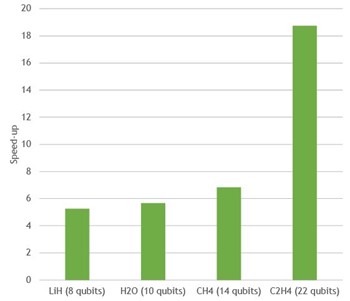
VQE speed-up On One NVIDIA A100 relative to 64 CPU cores in EPYC 7742
Figure 2. Variational Quantum Eigensolver speed-up for several different molecules with cuStateVec on a single NVIDIA A100 GPU, versus Cirq/qsim on a 64-core EPYC 7742 CPU
Multi-GPU state vector simulation
State vector simulations are also well suited for execution on multiple GPUs. Most gate applications are a perfectly parallel operation and accelerated by splitting the state vector and distributing it on several GPUs.
Beyond approximately 30 qubits, a multi-GPU simulation is inevitable. This is because a state vector is not able to fit in a single GPU’s memory due to its exponential increase in size with additional qubits.
When multiple GPUs work together on a simulation, each GPU can apply a gate to its part of the state vector in parallel. In most cases, each GPU only needs local data for the update of the state vector and each GPU can apply the gate independently.
However, depending on which of the simulated qubits a gate acts on, the GPUs might sometimes require parts of the state vector stored in a different GPU to perform the update. In this case, the GPUs must exchange large parts of the state vector. These parts are typically hundreds of megabytes or several gigabytes in size. Therefore, multi-GPU state vector simulations are sensitive to the bandwidth of the GPU interconnect.
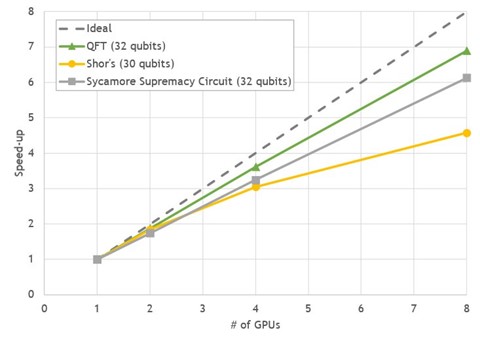
The DGX A100 is a perfect match for these requirements, with eight NVIDIA A100 GPUs providing a GPU-to-GPU direct bandwidth of 600GB/s using NVLink. We chose three common quantum computing algorithms with 30-32 qubits to benchmark Cirq/qsim with cuStateVec on the DGX A100:
Quantum Fourier Transform (QFT)
Shor’s algorithm
Sycamore Supremacy circuit
All benchmarks show good strong-scaling behavior between 4.5–7x speed-up on eight GPUs, compared to a single GPU run.
Figure 3. Multi-GPU scaling of state vector simulations for popular circuits on DGX A100
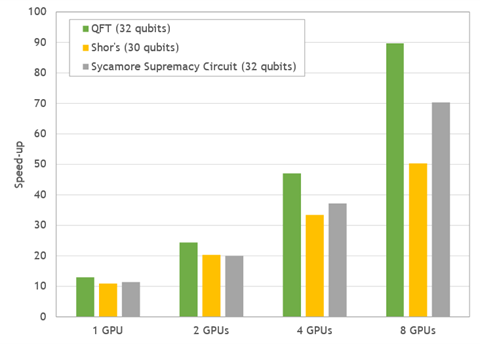
Figure 4. Acceleration ratio of simulations for popular quantum circuits. Performance of GPU simulations was measured on DGX A100 and compared to the performance of two sockets of EPYC 7742.
In comparison to the simulation time on two 64-core CPUs, the DGX-A100 delivers impressive overall speed-ups between 50–90x.
Summary
The cuStateVec library in the NVIDIA cuQuantum SDK aims to accelerate state vector simulators of quantum circuits on GPUs. Google’s simulator for Cirq qsim is one of the first simulators to adopt the library, benefiting Cirq users with the library’s GPU acceleration for their existing programs. Integrations to more quantum circuit frameworks will follow, including IBM’s Qiskit software.
We are also scaling up. Preliminary results for cuStateVec-based multi-GPU simulations show a 50–90x speedup on key quantum algorithms. We hope that cuStateVec becomes a valuable tool for breaking new ground in quantum computing.
Have feedback and suggestions on how we can improve the cuQuantum libraries? Send an email to cuquantum-feedback@nvidia.com.
BMW builds a car every 56 seconds. How do they increase quality? They use robots and complement real data with synthetic. Learn how BMW, Microsoft, and NVIDIA are accelerating production and quality by recognizing parts, obstacles, and people through artificial intelligence-based computer vision.
This talk covers the best practices for developing and optimizing the performance of edge AI applications using DeepStream SDK. Deep dive into a multisensor, multimodel design and learn how to reduce development time and maximize performance using AI at the edge.
A primary challenge confronting enterprises is the demand for creating AI models far outpaces the number of data scientists available. Developers need to easily customize models and bring their AI to market faster. This session will demonstrate the power and ease of NVIDIA TAO that solves this problem. Get a preview at GTC for the new capabilities of TAO Toolkit, including Bring Your Own Model Weights, Rest APIs, TensorBoard visualization, new pretrained models, and more.
It’s easier than ever to develop AI speech applications like virtual assistants and real-time transcription. Today’s advanced tools and technologies make it easy to fine-tune and build scalable, responsive applications. This popular session shows users how to build and deploy their first end-to-end conversational AI pipeline using NVIDIA Riva, as an example.
Text-to-speech (TTS) research expert Andrew Breen will give a high-level overview of recent developments in neural TTS, including adopted approaches, technical challenges, and future direction. Breen was awarded the IEE J. Langham Thomson premium in 1993, and has received business awards from BT, MCI, and Nuance. He invented the Laureate TTS system at BT Labs and founded Nuance’s TTS organization.
Natural Language Processing (NLP) breakthroughs in large-scale language models have boosted the capability to solve problems with zero-shot translation and supervised fine-tuning. However, executing NLP models on localized languages remains limited due to data preparation, training, and deployment challenges. This session highlights scaling challenges and solutions to show how to optimize NLP models using NVIDIA NeMo Megatron—a framework for training large NLP models in other languages.
Merlin expert and Twitter influencer Even Oldridge will demonstrate how to optimize recommendation models for maximum performance and scale. Olrdige is a Twitter influencer and has 8 years of recommender system experience, along with a PhD in computer vision.
Tackle AI-based recommendation system challenges and uncover best practices for delivering personalized experiences that differentiate you from competitors. Hear from Khalifeh AlJadda, an expert in implementing large-scale, distributed, machine-learning algorithms in search and recommendation engines. AlJadda leads the Recommendation Data Science, Search Data Science, and Visual AI teams at The Home Depot. With a PhD in computer science, he previously led the design and implementation of CareerBuilder’s language-agnostic semantic search engine.
How can one use combinatorial optimization to formalize item universe selection in new applications with limited or no datasets? Serdar Kadioglu, will provide insights on how to apply techniques like unsupervised clustering and latent text embeddings to create a multilevel framework for your business. Kadioglu previously led the Advanced Constraint Technology R&D team at Oracle and worked at Adobe. As an adjunct professor at Brown University for computer science, Kadioglu’s algorithmic research is at the intersection of AI and discrete optimization with an interest in building robust and scalable products.
Bringing practical AI robotics into the physical world, such as on a factory floor, is hard. Covariant is working to solve this problem. Mostafa Rohaninejad is part of the core team that built the full AI stack at Covariant from the ground up. In his session, he will share both the technical challenges and the exciting commercial possibilities of AI Robotics.
During the COVID-19 pandemic, hospitals faced high nurse turnover, record burnout, and crisis-level labor shortages. Hospitals must alleviate this staffing crisis. Enter Diligent Robotics, and their robot Moxi, which completes routine tasks to assist nursing staff. Andrea Thomaz will share the unique challenges in achieving robot autonomy in a busy hospital, like maneuvering around objects or navigating to a patient room, all while integrating multiple camera streams that feed into embedded GPUs.
Autonomy is critical when it comes to outdoor and off-road robotics, but environmental and task-specific demands require a different approach than indoor or on-road environments. Nick Peretti will share the NVIDIA Jetson-centered approach that Scythe Robotics uses to run its full sense-plan-act software suite with their autonomous commercial mowers. He will highlight tools and approaches that have enabled Scythe to move quickly to field units, and lessons learned along the way.
Posted by Emily Masten, Software Engineer, Google Research, Operations Research Team
Airlines around the world are exploring several tactics to meet aggressive CO2 commitments set by the International Civil Aviation Organization (ICAO). This effort has been emphasized in Europe, where aviation accounts for 13.9% of the transportation industry’s carbon emissions. The largest push comes from the European Green Deal, which aims to decrease carbon emissions from transportation by 90% by 2051. The Lufthansa Group has gone even further, committing to a 50% reduction in emissions compared to 2019 by the year 2030 and to reach net-zero emissions by 2050.
One unexpected approach that airlines can use to lower carbon emissions is through optimizing their tail assignment, i.e., how to assign aircraft (identified by the aircraft registration painted on their tails) to legs in a way that minimizes the total operating cost, of which fuel is a major contributor. More fuel needed to operate the aircraft means higher operating costs and more carbon ejected into the atmosphere. For example, a typical long-haul flight (longer than ~4,100km or ~2,500mi) emits about a ton of CO2.
The amount of fuel needed to fly between origin and destination can vary widely — e.g., larger aircraft weigh more and therefore require more fuel, while modern and younger aircraft tend to be more fuel-efficient because they use newer technology. The mass of the fuel itself is also significant. Aircraft are less fuel-efficient early in their flights when their fuel tanks are full than later when the volume of fuel is reduced. Another important factor for the tail assignment is the number of passengers on board; as the number of bookings changes, a smaller or larger aircraft might be required. Other factors can affect fuel consumption, both negative (e.g., headwinds or the age of the engines) or positive (e.g., tailwinds, sharklets, skin).
During the past year, Google’s Operations Research team has been working with the Lufthansa Group to optimize their tail assignment to reduce carbon emissions and the cost of operating their flights. As part of this collaboration, we developed and launched a mathematical tail assignment solver that has been fully integrated to optimize the fleet schedule for SWISS International Air Lines (a Lufthansa Group subsidiary), which we estimate will result in significant reductions in carbon emissions. This solver is the first step of a multi-phase project that started at SWISS.
A Mathematical Model for Tail Assignment We structure the task of tail assignment optimization as a network flow problem, which is essentially a directed graph characterized by a set of nodes and a set of arcs, with additional constraints related to the problem at hand. Nodes may have either a supply or a demand for a commodity, while arcs have a flow capacity and a cost per unit of flow. The goal is to determine flows for every arc that minimize the total flow cost of each commodity, while maintaining flow balance in the network.
We decided to use a flow network because it is the most common way of modeling this problem in literature, and the commodities, arcs, and nodes of the flow network have a simple one-to-one correspondence to tails, legs, and airports in the real-life problem. In this case, the arcs of the network correspond to each leg of the flight schedule, and each individual tail is a single instance of a commodity that “flows” along the network. Each leg and tail pair in the network has an associated assignment cost, and the model’s objective is to pick valid leg and tail pairs such that these assignment costs are minimized.
A simple example of the tail assignment problem. There are four legs in this schedule and four possible tails that one can assign to those legs. Each tail and leg pair has an associated operational cost. For example, for Leg 1, it costs $50 to assign Tail 1 to it but $100 to assign Tail 2. The optimal solution, with the minimum cost, is to assign Tail 4 to Legs 3 and 2 and Tail 1 to Legs 1 and 4.
Aside from the standard network flow constraints, the model takes into account additional airline-specific constraints so that the solution is tailored to Lufthansa Group airlines. For example, aircraft turnaround times — i.e., the amount of time an aircraft spends on the ground between two consecutive flights — are airline-specific and can vary for a number of reasons. Catering might be loaded at an airline’s hub, reducing the turnaround time needed at outstations, or a route could have a higher volume of vacation travelers who often take longer to board and disembark than business travelers. Another constraint is that each aircraft must be on the ground for a nightly check at a specified airport’s maintenance hub to receive mandated maintenance work or cleaning. Furthermore, each airline has their own maintenance schedule, which can require aircraft to undergo routine maintenance checks every few nights, in part to help maintain the aircraft’s fuel efficiency.
Preliminary Results & Next Steps After using our solver to optimize their fleet schedule in Europe, SWISS Airlines estimates an annual savings of over 3.5 million Swiss Francs and a 6500 ton reduction in CO2 emitted. We expect these savings will multiply when the model is rolled out to the rest of the airlines in the Lufthansa Group and again when traffic returns to pre-COVID levels. Future work will include ensuring this model is usable with larger sets of data, and adding crew and passenger assignment to the optimization system to improve the flight schedules for both passengers and flight crew.
If you are interested in experimenting with your own network flow models, check out OR-Tools, our open source software suite that can be used to build optimization solutions similar to the solver presented in this post. Refer to OR-Tools related documentation for more information.
Acknowledgements Thanks to Jon Orwant for collaborating extensively on this blog post and for establishing the partnership with Lufthansa and SWISS, along with Alejandra Estanislao. Thanks to the Operations Research Team and to the folks at SWISS, this work could not be possible without their hard work and contributions.
Is your network getting long in the tooth and are you thinking about an upgrade? This blog will cover three areas to consider when updating your data center network.
Normally, data center networks are updated when new applications or servers are installed in the infrastructure. But independent of new server and application infrastructure forcing an update, there are other areas to consider. Three questions to ask when assessing if you need to update your network are:
How are server speeds dictating network design?
Are your network features out of date?
Is your operational workflow inefficient?
How are server speeds dictating networking design?
Network device selection typically starts with understanding how the server Network Interface Cards (NICs) are configured. In the past, server NICs at 10 gigabits/second (10G) were considered the norm. But over the past 5 years we’ve seen a real growth in server computing power. In the accelerated computing world we tend to see 25 to 100G network speeds as the new norm for servers, with the latest servers able to use even 200G NICs.
With higher NIC speeds, the top-of-rack (leaf) switch needs to be upgraded. Failure to update your legacy core (spine) switches will cause oversubscription ratios to move unfavorably, introducing excess congestion and unpredictable latency. If you’re upgrading the leaf switches, you’ll need to upgrade the spine switches as well. Maintaining the same oversubscription ratio should be the goal.
Are your network features out of date?
In addition to the hardware, it may be time to upgrade your network operating system (NOS), especially if you’re using legacy network features and protocols that are hindering your network through inefficient management and packet forwarding. Legacy networks were often built using layer 2 infrastructure everywhere. The entire network would be on a single broadcast domain, and solutions like MLAG would provide one layer of redundancy for every link.
Updating the network to leverage solutions like Layer 3 to the host (also known as host based networking) or VXLAN+EVPN overlays, helps alleviate issues caused by inefficient broadcast domains. Host based networking and overlay networks enable better traffic management, easier provisioning, and more granular security. Anytime is a good time to update your network if it’s relying upon older technologies that aren’t modernized.
Is your operational workflow inefficient?
Beyond the infrastructure hardware and software, an area of optimization that benefits from modern updates is the operational workflow. Classic networks tend to have network admins log in to each switch, router or firewall individually. Configurations are applied unique to the node, and are backed up using a plain text file and stored locally on the network admin’s computer. These workflows tend to be error prone and can lead to typos or inefficiencies such as lost backups and slow maintenance windows. Configuration errors can open security gaps that a cyber adversary could exploit.
Modern networks leverage more advanced tooling and technologies that solve most of those problems.
Updating your networking can add benefits, including:
Infrastructure as code, so your configurations are centralized.
Automation, which allows managing and updating multiple nodes at the same time.
Continuous integration that systematically validates configuration and design prior to deployment.
Network simulation through digital twins. This helps predict how the network will behave and tie together all the elements from network DevOps to automation to continuous integration.
These optimized workflows reduce maintenance window times and errors in deployments, reducing the risk of security gaps while saving time and effort.
Conclusion
There are many reasons to update a network. It’s important to take stock of your network’s hardware, software and operational efficiencies and look at the big picture. With this information you can determine if updating your network will result in faster throughput, more productivity, and lower ownership costs.
I just need a little help regarding my project. I’ve already written a code but I am facing an error in that. I am using a few-shot learning technique, triplet neural network. The triplet neural network(TNN) is a horizontal concatenation triplet consisting of three identical Convolutional Neural Networks (with common parameters) that are trained with triplets of inputs. An anchor instance, a positive instance (of the same class as the anchor), and a negative instance make up the input triplet (different class from the anchor). After that, the network is trained to learn a triplet loss embedding function. To compute triplet loss, three training examples are required. Each triplet is formed by intentionally selecting training examples such that each triplet has: • a reference image called anchor image • an image having the same label as anchor is called a positive image • an image has a different label than the anchor called a negative image.
The TNN learns to create k-dimensional feature vector representation of images in such a manner that similar images lie closer in an embedding space of k-dimensions.
embedding_dimension = 128
from tensorflow.keras.applications.vgg16 import VGG16
We are an GPU cloud platform based on blockchain, we have a plan to support developers about GPU. We want to know what’s the most important reason you choose GPU cloud platform if you are a user of GPU cloud platform. Compared to other GPU cloud platform, do your GPU cloud platform have any special function?
It would be great to get some insight from people who know this and willing to share the comments on this! We will invite 3 of you to get a free GPU for 72 hours. THX
This is my first post here, so hello everyone!
I am using SSD MobileNet V2 FPNLite 320×320 as model currently, but I am just prototyping, so it could change. Basically – I need a relatively low power device which will run my model in real time. Raspberry Pi is out of stock everywhere and I found possible alternative – second hand thin clients. Most of cheap ones have AMD G Embedded CPUs – G-T56N or G-T48E and I couldn’t find anything about them related in any way to machine learning. Will they have enough power to run object detection in real time? How do they compare to RPi 4 or 3 performance? I am obviously fine with bigger form factor and power consumption.



 cuStateVec is a library for acceleration of state vector-based quantum circuit simulation. We discuss APIs, integrations, and benchmarks.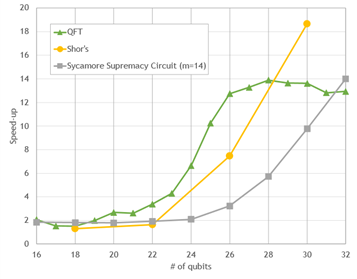
 Great sessions on custom computer vision models, expressive TTS, localized NLP, scalable recommenders, and commercial and healthcare robotics apps.

 Is your network getting long in the tooth and are you thinking about an upgrade? This blog will cover three areas to consider when updating your data center network.