Categories
Misc

NVIDIA DLSS SDK Now Available for All Developers with Linux Support, Unreal Engine 5 Plugin and New Customizable Options

NVIDIA has made Deep Learning Super Sampling (DLSS) easier and more flexible than ever for developers to access and integrate in their games. The latest DLSS SDK update (version 2.2.1) enables new user customizable options, delivers Linux support and streamlines access.

Today, NVIDIA has made Deep Learning Super Sampling (DLSS) easier and more flexible than ever for developers to access and integrate in their games. The latest DLSS SDK update (version 2.2.1) enables new user customizable options, delivers Linux support and streamlines access.

NVIDIA DLSS technology has already been adopted and implemented in over 60 games, including the biggest gaming franchises such as Cyberpunk, Call of Duty, DOOM, Fortnite, LEGO, Minecraft, Rainbow Six, and Red Dead Redemption, with support coming soon for Battlefield 2042. DLSS uses the power of RTX Tensor Cores to boost game frame rates through an advanced deep learning temporal super resolution algorithm.

New User & Developer Customizable Options 

This DLSS update offers new options to developers during the integration process. A new sharpening slider allows users to make an image sharper or softer based on their own personal preferences. DLSS Auto Mode enables optimal image quality for a particular resolution. For resolutions at or under 1440P, DLSS Auto is set to Quality, 4K set to Performance, and 8K set to Ultra Performance. Lastly, an auto-exposure option offers an automatic way to calculate exposure values for developers. This option can potentially improve the image quality of low-contrast scenes. 

Linux Support Available Now

Last month, NVIDIA added DLSS support for Vulkan API games on Proton, enabling Linux gamers to boost frame rates on Proton-supported titles such as DOOM Eternal, No Man’s Sky, and Wolfenstein: Youngblood. Today, the NVIDIA DLSS SDK is adding support for games running natively on Linux with x86.  We are also announcing DLSS support for ARM-based platforms. 

Easier Access for Developers

Accessing the DLSS SDK is now easier than ever — no application required!  Simply download the DLSS SDK 2.2.1 directly from the NVIDIA Developer website, access the Unreal Engine 5 and 4.26 plugin from the marketplace, or utilize DLSS natively in Unity 2021.2 beta.

Make sure to tune into the NVIDIA DLSS virtual session at Game Developers Conference (GDC) July 19 – 23 to learn about best practices on integrating DLSS into your game.  And check out the latest DLSS game releases here.  

Categories
Misc

New Suite of Nsight Tools for Gaming and Graphics Developers

Nsight developer tools is a suite of powerful tools and SDKs for profiling, debugging and optimizing applications focused on improving performance for graphics, gaming and other use cases. Identifying bottlenecks, highlighting code (multi-threading operations, event timing ) to improve efficiency and the unique features offerings for refined user experience.
Nsight developer tools is a suite of powerful tools and SDKs for profiling, debugging and optimizing applications focused on improving performance for graphics, gaming and other use cases. Identifying bottlenecks, highlighting code (multi-threading operations, event timing ) to improve efficiency and the unique features offerings for refined user experience.

Nsight Perf SDK 2021.1.2

The NVIDIA® Nsight Perf SDK is a graphics profiling toolbox for DirectX, Vulkan, and OpenGL, enabling you to collect GPU performance metrics directly from your application.

As the first public release of the SDK, the new features include:

  • HTML Report Generator in an easy-to-use utility library layer. Gather in-depth GPU profiling reports with only minutes of effort, in under 10 lines of code.
  • Open source sample code, ready for you to copy & paste into your program, or to post as the #1 solution on Stack Overflow!
  • Ability to measure whole frames, groupings of GPU workloads, and individual draws and dispatches.
  • Low-level range profiler APIs, for writing custom tools and automation.

For more information, see our v2021.1 release announcement here. 

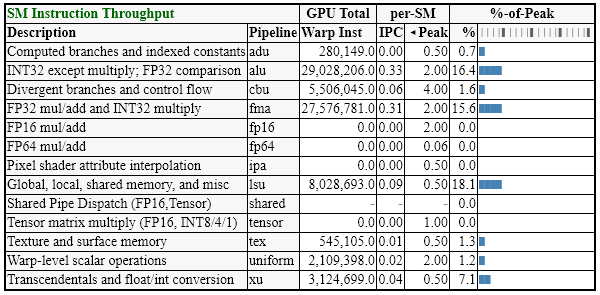
Fig 1: Shader performance table from a Perf SDK report.  There are dozens more tables like this to explore.

Download the Nsight Perf SDK now. 

Comment in forums to discuss more on applications of this SDK.

Nsight Aftermath SDK 2021.1

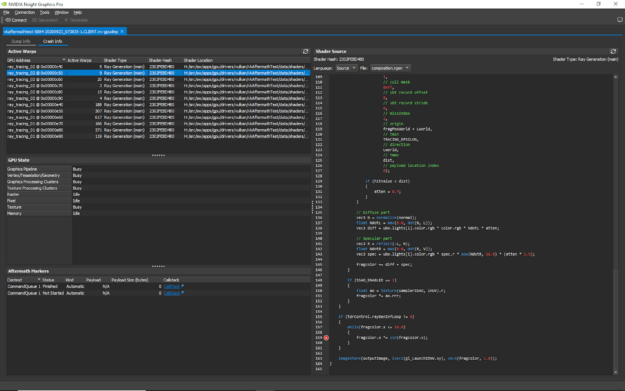
Nsight Aftermath SDK provides valuable data for debugging GPU exceptions.  Applications using the latest graphics APIs like Direct3D 12 and Vulkan, along with cutting edge capabilities like Ray Tracing, can push the GPU more than ever. These new powers and exposure to the metal require diligence and tools to ensure the GPU is set up correctly.  When there is a problem, Nsight Aftermath is there to provide deep GPU state information and breadcrumbs to what leads to the exception. This latest version has enhanced the UI and data display, as well as provided many driver improvements to increase the reliability of the generated dump information.

Fig 2: Shows an example GPU crash dump, correlating the exception to the offending line of HLSL source code.

Download the latest version of Aftermath SDK now.

Visit Nsight Aftermath SDK to get more information on the tool. Post a comment or question on our developer forums to learn more about the tool.

NVIDIA Nsight Graphics 2021.3

NVIDIA® Nsight Graphics is a standalone developer tool that enables you to debug, profile, and export frames built with high fidelity 3D graphics applications. It supports Direct3D (11, 12, DXR), Vulkan (1.2, NV Vulkan Ray Tracing Extension), OpenGL, OpenVR, and the Oculus SDK. 

This latest Nsight Graphics extends support for multiple APIs with the following updates:

  • Windows 21H1 and DirectX Agility SDK Support
  • GPU Trace Vulkan/OpenGL Interop Support
  • GPU Trace OptiX™ Support
  • GPU Trace Multi-Window Application Support
  • Nsight Graphics Sample Applications
  • Nsight Systems Direct Launch 

Details on the features are available in our developer news article.

Fig 3: Sample GPU Trace report from an example Ray Tracing application.

Download this new version of Nsight Graphics. 

Learn more about the upcoming releases by visiting our developer page. 

For questions and comments and to stay up-to-date regarding upcoming releases, visit our developer forums.

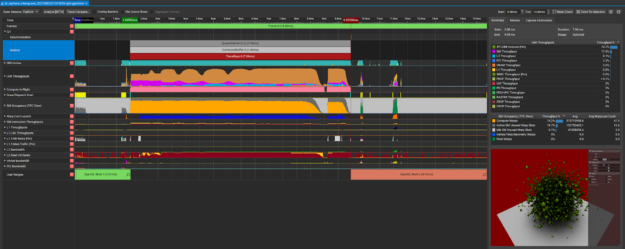
Nsight Systems 2021.3

NVIDIA Nsight Systems is a system-wide performance analysis tool, designed to help developers tune and scale software across CPUs and GPUs. 

The latest release introduces several improvements aimed to assist the user with locating issues and improve the profiling experience with the following updates and enhancements: 

  • Expert system view to help identify problem patterns 
  • Ability to correlate and load multiple reports for analysis
  • Windows 21H1 SDK support
  • Low overhead GPU workload batch trace for Vulkan and Direct3D12
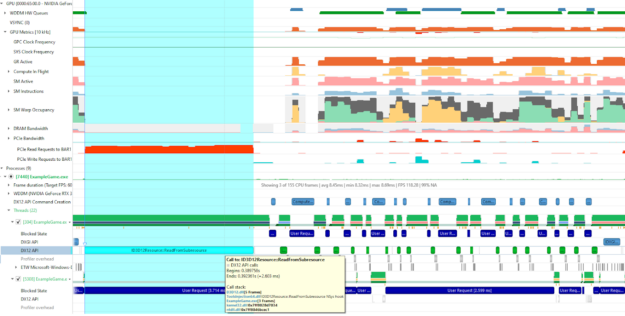
  • GPU Metrics sampling GPU PCIe BAR1 metrics support

 For more details on features, see Nsight System developer news article.

Fig 4: GPU PCIe BAR1 request activity

Nsight Systems Resources:

Download  

Documentation

Forums

[GTC Session]  New Nsight Systems and Nsight Compute Highlights

NVIDIA at GDC: Check out our demo and session regarding Developer tools for Graphics and Game developers.

Sign-up for our Developer Newsletter to stay informed about new announcements and releases!

Categories
Misc

Linear Regression Predicting Absurdly Large Numbers?

I have a model where I input an image and two labels which are floats. There are 2 outputs, both having linear activation functions. I am using mae loss function if that matters.

When I try to predict images with this model, it gives me absurdly large numbers that like nothing the model was trained on.

Does anyone know why this happens and/or how to fix it?

Thanks!

submitted by /u/llub888
[visit reddit] [comments]

Categories
Misc

TinyML model location

Hi everyone, I’m currently working on a research project to enable Federated learning for TinyML compatible devices. For that case, I want to know where the TinyML model is stored in the device (RAM/Flash), since for a Federated learning case study i will need to replace/update the model. Thank you!

submitted by /u/dieselVeasel
[visit reddit] [comments]

Categories
Misc

NVIDIA CEO Awarded Lifetime Achievement Accolade by Asian American Engineer of the Year

NVIDIA CEO Jensen Huang was today conferred the Distinguished Lifetime Achievement Award by Asian American Engineer of the Year, an annual event that recognizes outstanding Asian American scientists, engineers and role models. In a virtual ceremony, Huang was awarded for his contributions as “a visionary and innovator in parallel computing technology that accelerates the realization Read article >

The post NVIDIA CEO Awarded Lifetime Achievement Accolade by Asian American Engineer of the Year appeared first on The Official NVIDIA Blog.

Categories
Misc

Does 1660ti have cuda cores?

I recently started neural networks and wanted to use my pc for making some small models. I thought that being a recent GPU it must be having cuda cores so I installed all the required softwares like cuda toolkit and cuda. After installation I tried to see if it detected my GPU and failed. Then I searched on YouTube and came to the CUDA GPUs list by Nvidia. It has all the GPU around mine like 1650ti and 2060 but no 1660ti. Is there a specific reason for it or does it actually have cuda cores.

submitted by /u/achintya22
[visit reddit] [comments]

Categories
Misc

Cloud for Deep Learning training

Hi Guys, which Cloud platform should I pay for/use in order to perform deep learning experiments? Google Colab Pro doesn’t meet my requirements since it doesn’t let you use the service for more than 24 hours in one go. My experiments might run for approximately 4 days, give or take.

Thanks!

submitted by /u/grid_world
[visit reddit] [comments]

Categories
Misc

Arduino nano ble 33 Sense ( Spirit Level Tester ) in Tiny Motion Trainer | Tensor Flow Lite

Arduino nano ble 33 Sense ( Spirit Level Tester ) in Tiny Motion Trainer | Tensor Flow Lite submitted by /u/Prabeen1
[visit reddit] [comments]
Categories
Misc

HELP!! How do I explain the Maths behind Human Pose Estimation?

Okay, I feel like this is such a dumb question but please please help me. I’m a high school student and I really really want to do this my Maths written assessment on human pose estimation because I want to analyze/accurately compare my dance covers to the original dancer’s performance. I got my inspiration from this video: https://www.youtube.com/watch?v=bPDoMdn71h0&t=0s

I’m really keen to do this and explain the mathematics behind this because I have such a deep interest in it but I honestly don’t know where to start!

Like what should I do? Vectors? Matrices? Gradients? Geometry? Trig? Please help!!!!

submitted by /u/aequomei
[visit reddit] [comments]

Categories
Misc

Keras weights contraints including both bias and kernel matrix at the same time

Hi everyone, I have a question posted on stackoverflow but wanted to share it here too in case someone can help:

My question is related with how keras implements the weights constraints, in particular in dense layers. I am using mainly R and its keras implementation, so I will use here their notation, but I will be also happy if someone has a solution in Python. As far as I know, keras constraints like constraint_maxnorm() can be applied to a layer_dense() with the arguments kernel_constraint or bias_constraint, where the kernel refers to the weigth matrix without the bias terms. However, in order to test new approaches I think it would be useful to also be able to apply constraints to the full weight matrix, where the biases vector forms an extra row in the weigth matrix. An example of this kind of constraint would be to restrict to 1 the L1 norm of the weight vectors incident to a neuron (considering the bias at that neuron also as an element of said vector).

In this sense, custom constraints can be created but the problem is that they receive the kernel weights as input, not both the kernel weights and bias, and the output is also only the kernel weights, not the full weight matrix.

Is it possible to implement this kind of constraints in keras or tensorflow that affect both the kernel and the bias at the same time? In this sense, it would be enough to be able to create custom constraints that accept both the kernel weights and the bias as input, and then apply the desired constraint twice, at the kernel and at the bias.

submitted by /u/moralapablo
[visit reddit] [comments]