Adepth map is an image channel in computer graphics and computer vision that provides information on the distance of the surface of objects as seen from a viewpoint for each pixel in that image. Because of its wide range of applications in augmented reality, portrait mode, and 3D reconstruction, ongoing research in the field of depth-sensing capabilities is being done to pave the way for the future (particularly with the release of the ARCore Depth API). Furthermore, the web community is increasing interest in merging the depth capabilities with JavaScript to enhance the existing web applications by integrating them with real-time AR effects. Despite these recent improvements, the number of photos connected with depth maps continues to be a source of worry.
To drive the next generation of web applications, Tensorflow released its first depth estimation API, called Depth API, and ARPortraitDepth, a model for estimating a depth map for portraiture. They also published 3D photo, a computational photography application that uses the anticipated depth and creates a 3D parallax effect on the given portrait image, further persuading people of the enormous possibilities of depth information. Tensorflow has also launched a live demo for people to try and convert their photographs into 3D versions.
The first open-source release of GPU kernel modules for the Linux community help improve NVIDIA GPU driver quality and security.
NVIDIA is now publishing Linux GPU kernel modules as open source with dual GPL/MIT license, starting with the R515 driver release. You can find the source code for these kernel modules in the NVIDIA Open GPU Kernel Modules repo on GitHub.
This release is a significant step toward improving the experience of using NVIDIA GPUs in Linux, for tighter integration with the OS and for developers to debug, integrate, and contribute back. For Linux distribution providers, the open-source modules increase ease of use. They also improve the out-of-the-box user experience to sign and distribute the NVIDIA GPU driver. Canonical and SUSE are able to immediately package the open kernel modules with Ubuntu and SUSE Linux Enterprise Distributions.
Developers can trace into code paths and see how kernel event scheduling is interacting with their workload for faster root cause debugging. In addition, enterprise software developers can now integrate the driver seamlessly into the customized Linux kernel configured for their project.
This will further help improve NVIDIA GPU driver quality and security with input and reviews from the Linux end-user community.
With each new driver release, NVIDIA publishes a snapshot of the source code on GitHub. Community submitted patches are reviewed and if approved, integrated into a future driver release.
The first release of the open GPU kernel modules is R515. Along with the source code, fully-built and packaged versions of the drivers are provided.
For data center GPUs in the NVIDIA Turing and NVIDIA Ampere architecture families, this code is production ready. This was made possible by the phased rollout of the GSP driver architecture over the past year, designed to make the transition easy for NVIDIA customers. We focused on testing across a wide variety of workloads to ensure feature and performance parity with the proprietary kernel-mode driver.
In this open-source release, support for GeForce and Workstation GPUs is alpha quality. GeForce and Workstation users can use this driver on Turing and NVIDIA Ampere architecture GPUs to run Linux desktops and use features such as multiple displays, G-SYNC, and NVIDIA RTX ray tracing in Vulkan and NVIDIA OptiX. Users can opt in using the kernel module parameter NVreg_EnableUnsupportedGpus as highlighted in the documentation. More robust and fully featured GeForce and Workstation support will follow in subsequent releases and the NVIDIA Open Kernel Modules will eventually supplant the closed-source driver.
Customers with Turing and Ampere GPUs can choose which modules to install. Pre-Turing customers will continue to run the closed source modules.
The open-source kernel-mode driver works with the same firmware and the same user-mode stacks such as CUDA, OpenGL, and Vulkan. However, all components of the driver stack must match versions within a release. For instance, you cannot take a release of the source code, build, and run it with the user-mode stack from a previous or future release.
Refer to the driver README document for instructions on installing the right versions and additional troubleshooting steps.
Installation opt in
The R515 release contains precompiled versions of both the closed-source driver and the open-source kernel modules. These versions are mutually exclusive, and the user can make the choice at install time. The default option ensures that silent installs will pick the optimal path for NVIDIA Volta and older GPUs versus Turing+ GPUs.
Users can build kernel modules from the source code and install them with the relevant user-mode drivers.
Figure 1: Illustration of installation options for the end user to opt-in to open GPU kernel modules and the default path of closed source modules.
Partner ecosystem
NVIDIA has been working with Canonical, Red Hat, and SUSE for better packaging, deployment, and support models for our mutual customers.
Canonical
“The new NVIDIA open-source GPU kernel modules will simplify installs and increase security for Ubuntu users, whether they’re AI/ML developers, gamers, or cloud users,” commented Cindy Goldberg, VP of Silicon alliances at Canonical. “As the makers of Ubuntu, the most popular Linux-based operating system for developers, we can now provide even better support to developers working at the cutting edge of AI and ML by enabling even closer integration with NVIDIA GPUs on Ubuntu.”
In the coming months, the NVIDIA Open GPU kernel modules will make their way into the recently launched Canonical Ubuntu 22.04 LTS.
SUSE
“We at SUSE are excited that NVIDIA is releasing their GPU kernel-mode driver as open source. This is a true milestone for the open-source community and accelerated computing. SUSE is proud to be the first major Linux distribution to deliver this breakthrough with SUSE Linux Enterprise 15 SP4 in June. Together, NVIDIA and SUSE power your GPU-accelerated computing needs across cloud, data center, and edge with a secure software supply chain and excellence in support.” — Markus Noga, General Manager, Business Critical Linux at SUSE
Red Hat
“Enterprise open source can spur innovation and improve customers’ experience, something that Red Hat has always championed. We applaud NVIDIA’s decision to open source its GPU kernel driver. Red Hat has collaborated with NVIDIA for many years, and we are excited to see them take this next step. We look forward to bringing these capabilities to our customers and to improve interoperability with NVIDIA hardware.” — Mike McGrath, Vice President, Linux Engineering at Red Hat
Upstream approach
NVIDIA GPU drivers have been designed over the years to share code across operating systems, GPUs and Jetson SOCs so that we can provide a consistent experience across all our supported platforms. The current codebase does not conform to the Linux kernel design conventions and is not a candidate for Linux upstream.
There are plans to work on an upstream approach with the Linux kernel community and partners such as Canonical, Red Hat, and SUSE.
In the meantime, published source code serves as a reference to help improve the Nouveau driver. Nouveau can leverage the same firmware used by the NVIDIA driver, exposing many GPU functionalities, such as clock management and thermal management, bringing new features to the in-tree Nouveau driver.
Stay tuned for more developments in future driver releases and collaboration on GitHub.
Frequently asked questions
Where can I download the R515 driver?
You can download the R515 development driver as part of CUDA Toolkit 11.7, or from the driver downloads page under “Beta” drivers. The R515 data center driver will follow in subsequent releases per our usual cadence.
Can open GPU Kernel Modules be distributed?
Yes, the NVIDIA open kernel modules are licensed under a dual GPL/MIT license; and the terms of licenses govern the distribution and repackaging grants.
Will the source for user-mode drivers such as CUDA be published?
These changes are for the kernel modules; while the user-mode components are untouched. So the user-mode will remain closed source and published with pre-built binaries in the driver and the CUDA toolkit.
Which GPUs are supported by Open GPU Kernel Modules?
Open kernel modules support all Ampere and Turing GPUs. Datacenter GPUs are supported for production, and support for GeForce and Workstation GPUs is alpha quality. Please refer to the Datacenter, NVIDIA RTX, and GeForce product tables for more details (Turing and above have compute capability of 7.5 or greater).
What is the process for patch submission and SLA/CLA for patches?
We encourage community submissions through pull requests on the GitHub page. The submitted patches will be reviewed and if approved, integrated with possible modifications into a future driver release. Please refer to the NVIDIA driver lifecycle document.
The published source code is a snapshot generated from a shared codebase, so contributions may not be reflected as separate Git commits in the GitHub repo. We are working on a process for acknowledging community contributions. We also advise against making significant reformatting of the code for the same reasons.
Join Microsoft Build 2022 to learn how NVIDIA AI technology solutions are transforming industries such as retail, manufacturing, automotive, and healthcare.
AI continues to transform global industries such as retail, manufacturing, automotive, and healthcare. The NVIDIA and Microsoft Azure partnership provides developers with global access to AI infrastructure on-demand, simplified infrastructure management, and solutions deploying AI-enabled applications.
Join the NVIDIA team virtually at Microsoft Build May 24-26, and learn more about the latest developer technologies, tools, and techniques for data scientists and developers to take AI to production faster. Connect live with subject matter experts from NVIDIA and Microsoft, get your technical questions answered, and hear how customers like BMW and Archer Daniels Midland (ADM) are harnessing the power of NVIDIA technologies on Azure.
Live Customer Interview | 5/25, 10:45-11:15 am Isaac Himanga and Archer Daniels Midland, ADM Watch the live interview. Registration is not required.
Many tools analyze equipment data to identify degraded performance or opportunities for improvement. What is not easy: finding relevant data for hundreds of thousands of assets to feed these models. ADM discusses how they’re organizing process data into a structure for quick deployment of AI to make data-based decisions. A new and better tool is needed to organize data and partnering with Sight Machine is helping move ADM closer to data-centric AI using NVIDIA GPU technology on Azure.
Join this session to see how Azure Cognitive Services uses the NVIDIA Triton Inference Server for inference at scale. We highlight two use cases: deploying the first-ever Mixture of Expert model for document translation and acoustic model for Microsoft Teams Live Captioning. Tune in to learn about serving models with NVIDIA Triton, ONNX Runtime, and custom backends.
Join experts from NVIDIA and Microsoft where you can ask questions about developing applications Graph Composer and new DeepStream features, deployment through IoT Hub, connecting to other Azure IoT Services, or transmitting inference results to the cloud.
Leaving performance on the table for AI inference deployments leads to poor cloud infrastructure utilization, high operational costs, and sluggish UX. Learn how to optimize the model configuration to maximize inference performance by using ONNX Runtime, OLive, Azure ML, NVIDIA Triton Inference Server, and NVIDIA Triton Model Analyzer.
Accelerate your ETL and ML Spark applications using Azure Synapse with NVIDIA RAPIDS.
Hands-on labs, tutorials, and resources
As a developer, you are a key contributor to the advancement of every field. We have created an online space devoted to your needs, with access to free SDKs, technical documentation, peer and domain expert help, and information on hardware to tackle the biggest challenges.
Join the NVIDIA Developer Program for free and exclusive access to SDKs, technical documentation, peer, and domain expert help. NVIDIA offers tools and training to accelerate AI, HPC, and graphics applications.
This feature-rich branch is fully compatible with Unreal Engine 5, and contains all of the latest developments from NVIDIA in the world of ray tracing.
The NVIDIA Branch of Unreal Engine 5 (NvRTX 5.0) is now available. This feature-rich branch is fully compatible with Unreal Engine 5 and has all of the latest developments in the world of ray tracing.
NVIDIA makes it easy for developers to add leading-edge technologies to their Unreal Engine games and applications through custom branches on GitHub. With NvRTX 5.0, developers can leverage RTXGI, RTXDI, and other improvements to ray tracing, such as shadow mismatching when using Nanite.
NvRTX is an engaging and interactive solution for developers to create stunning visuals and enhance ray tracing developments on any DirectX ray tracing (DXR) capable GPU. With these custom branches, developers are able to pick and choose which NVIDIA technologies they want to take advantage of in the games and applications.
RTXDI helps artists add unlimited shadow-casting and dynamic lights to game environments in real time without worrying about performance or resource constraints.
Hi there, I’m trying to learn how to use the object detection models in the Tensorflow Object Detection API but so far all the .ipynb files from Github that I have found so far are outdated (Using Tensorflow 1.x instead of 2.x) or plagued with lots bugs. Any help will be appreciated.
This post details how to use Container Canary from installation and validation to writing custom manifests and container automation.
Bring-your-own-container models are widely supported on today’s modern compute platforms. In other words, you can provide your own container images within your custom software environment.
However, user-provided containers must satisfy each platform’s unique requirements, which can vary from platform to platform. For example, you may need to:
Use a specific non-root user.
Place the home directory in a certain location.
Install dependency packages.
Run web applications on designated ports.
Keeping your container images conformant with these arbitrary requirements can be challenging. As a result, we are eager to introduce a new open-source tool called Container Canary to capture these requirements and automatically test against them. Container Canary provides a specification for recording these requirements as a manifest that can be checked into version control. You can then use the canary CLI tool to validate containers against that manifest.
This is useful in test and continuous integration (CI) environments to avoid regressions in containers while allowing container developers to move quickly.
$ canary validate --file somespec.yaml foo/bar:latest
Validating foo/bar: latest against somespec
  Required packages are installed              	[passed]
  Expected services are running                	[passed]
  Your container is awesome                    	[passed]
validation passed
Installing Container Canary
Container Canary is written in Golang and distributed as static binaries, making it portable and easy to install in CI environments.
To install it, go to the releases page and download the appropriate distribution for your system. For example, Linux users with x86_64 processors would use the canary_linux_amd64 binary. Be sure to replace VERSION in the following commands with the version to install.
$ canary version
Container Canary
 Version:         VERSION
 ...
Validating containers with a Kubeflow example
With Container Canary installed, you can begin validating containers. The /examples/ GitHub directory contains some manifests for popular container platforms, including the Kubeflow example. You can use these manifests to get started right away.
Kubeflow is a popular platform for designing, training, and inferencing machine learning models. The Kubeflow Notebooks service enables you to launch web-based development environments inside Kubeflow. While it does have default containers maintained by the Kubeflow community for running tools like JupyterLab, RStudio, and Visual Studio Code (code-server), you can also choose your own container images with your own software environment.
The list of requirements specifies what your custom container must meet to run correctly on Kubeflow Notebooks. That list looks like the following example:
For Kubeflow Notebooks to work with a container image, the image must:
expose an HTTP interface on port 8888:
kubeflow sets an environment variable NB_PREFIX at runtime with the URL path that we expect the container be listening under
kubeflow uses IFrames, so ensure your application sets Access-Control-Allow-Origin: * in HTTP response headers
run as a user called jovyan:
the home directory of jovyan should be /home/jovyan
the UID of jovyan should be 1000
start successfully with an empty PVC mounted at /home/jovyan:
kubeflow mounts a PVC at /home/jovyan to keep state across Pod restarts
With Container Canary, we have written these requirements out in our example manifest. If you have ever written a Kubernetes pod manifest, this syntax should look familiar to you. You can see that each requirement has been written out in the form of a probe that Container Canary runs against your container to check that the requirement is met.
Now that there is a manifest, I can test a container against it. First, I chose a public image that I knew would not pass the requirements, such as the popular web server NGINX.
$ canary validate --file https://github.com/NVIDIA/container-canary/raw/main/examples/kubeflow.yaml nginx:latest
Cannot find nginx:latest, pulling…
Validating nginx:latest against kubeflow
  Home directory is /home/jovyan               	[failed]
  User is jovyan                               	[failed]
  User ID is 1000                              	[failed]
  Exposes an HTTP interface on port 8888       	[failed]
  Sets 'Access-Control-Allow-Origin: *' header 	[failed]
  Correctly routes the NB_PREFIX               	[failed]
validation failed
Unsurprisingly, this image fails validation.
Next, I tried one of the official Kubeflow images that have been designed to run on Kubeflow Notebooks.
$ canary validate --file https://github.com/NVIDIA/container-canary/raw/main/examples/kubeflow.yaml public.ecr.aws/j1r0q0g6/notebooks/notebook-servers/jupyter-pytorch-cuda:v1.5.0
Cannot find public.ecr.aws/j1r0q0g6/notebooks/notebook-servers/jupyter-pytorch-cuda:v1.5.0, pulling…
Validating public.ecr.aws/j1r0q0g6/notebooks/notebook-servers/jupyter-pytorch-cuda:v1.5.0 against kubeflow
  Home directory is /home/jovyan               	[passed]
  User is jovyan                               	[passed]
  User ID is 1000                              	[passed]
  Sets 'Access-Control-Allow-Origin: *' header 	[passed]
  Correctly routes the NB_PREFIX               	[passed]
  Exposes an HTTP interface on port 8888       	[passed]
validation passed
Success! This image passes validation.
If you are building images for use on Kubeflow, you can validate them in the same way and be confident that changes you make will not cause issues when other users come to run them.
Writing your own validation manifest
You can also write your own manifests to validate containers. Container Canary can help you ensure that your container manifests will run in your own deployments and in third-party platforms. It also assists you with running unit tests on container builds.
Each manifest is a YAML file that begins with some metadata.
# Manifest versioning
apiVersion: container-canary.nvidia.com/v1
kind: Validator

# Metadata
name: foo  # The name of the platform that this manifest validates for
description: Foo runs containers for you  # Optional, A description of that platform
documentation: https://example.com  # Optional, A link to the documentation that defines the container requirements in prose
Next, you can configure some runtime options for the container. These are used when Container Canary starts the image to validate and should imitate the options set on your target platform. These include environment variables, ports to expose, and volumes to attach.
Then, you specify your checks. Checks are the tests to be run against the container to ensure it is compliant. Every check contains a probe that interacts with the container. These interactions include running commands, making HTTP requests, and pinging TCP sockets.
The probes in Container Canary are a superset of those in Kubernetes, so if you have used those before, they should be familiar.
checks:
  - name: mycheck  # Name of the check
    description: Ensuring a thing  # Description of what is being checked (will be used in output)
    probe:
      ...  # A probe to run
An exec check runs a command inside the running container. If the command exits with 0, the check passes.
checks:
  - name: uid
    description: User ID is 1234
    probe:
      exec:
        command:
          - /bin/sh
          - -c
          - "id | grep uid=1234"
An HTTP Get check performs an HTTP GET request against your container. If the response code is
checks:
  - name: http
    description: Exposes an HTTP interface on port 80
    probe:
      httpGet:
        path: /
        port: 80
        httpHeaders:  # Optional, headers to set in the request
          - name: Foo-Header
            value: "myheader"
        responseHttpHeaders:  # Optional, headers that you expect to see in the response
          - name: Access-Control-Allow-Origin
            value: "*"
After you’ve written your manifest, you can use canary to test containers with it.
$ canary validate --file examples/awesome.yaml your/container:latest
Validating your/container:latest against awesome
  Required packages are installed                  [passed]
  Expected services are running                    [passed]
  Your container is awesome                        [passed]
validation passed
Example of automating Container Canary with GitHub Actions
Now that I’ve covered installing Container Canary, validating containers, and writing your own manifests, here’s a quick CI example.
Suppose that you want to build a container that should run a web application on a specific port and also has Python installed. In a new repository, you can create a small Python web application called app.py using fastapi.
Then you can create a Dockerfile to package the application into a container.
FROM python

COPY app.py /app.py

RUN pip install fastapi uvicorn[standard]

EXPOSE 5000

CMD python /app.py
Now, write a Container Canary Validator manifest that tests the container image to ensure that it runs a web server on port 5000 and has Python installed. Call it canary-validator.yaml.
apiVersion: container-canary.nvidia.com/v1
kind: Validator
name: example
description: Container Canary CI Example
env: []
ports:
 - port: 5000
   protocol: TCP
volumes: []
checks:
 - name: http
   description: Exposes an HTTP interface on port 5000
   probe:
     httpGet:
       path: /foo
       port: 5000
     failureThreshold: 30
 - name: python
   description: Has Python installed
   probe:
     exec:
       command:
         - /bin/sh
         - -c
         - "which python"
Finally, create a GitHub Actions config to run this in CI. We chose GitHub Actions for this example because it is popular, free, and easily available, but this configuration should translate for all CI systems.
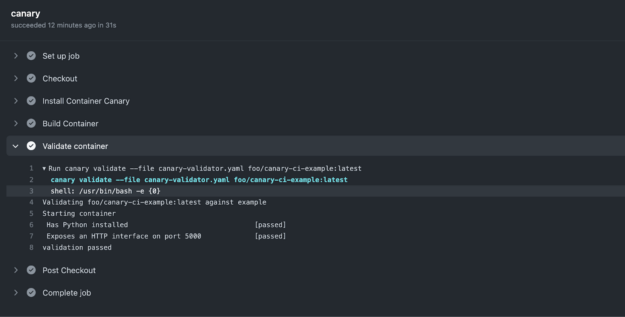
Now when you push your code to GitHub, the Actions runner checks out the code, installs Container Canary, builds the container image, and validates it with canary validate.
Figure 1. Canary validation running successfully in a GitHub Actions workflow
The workflow has been executed and our container image has successfully been validated–and fast! For more information, see all the code for this example in the /jacobtomlinson/canary-ci-example GitHub repo.
Apply what you learned
With Container Canary, you can define concrete interfaces for your container images and validate them to ensure that the images you build always meet a defined specification.
If you are regularly building container images, Container Canary is a must-have in your testing toolkit due to its usefulness in test and CI environments. Container developers can successfully avoid regressions in containers, and move quicker through their projects to save time.
The future of content creation is in AI. This week In the NVIDIA Studio, discover how AI-assisted painting is bringing a new level of inspiration to the next generation of artists.
The Nodding Pigeon library provides a pre-trained model and a simple inference API for detecting head gestures in short videos. Under the hood, it uses Google MediaPipe for collecting the landmark features.
For ML practitioners, this project is also an example of using generative data from a small base-dataset for model training.



 The first open-source release of GPU kernel modules for the Linux community help improve NVIDIA GPU driver quality and security.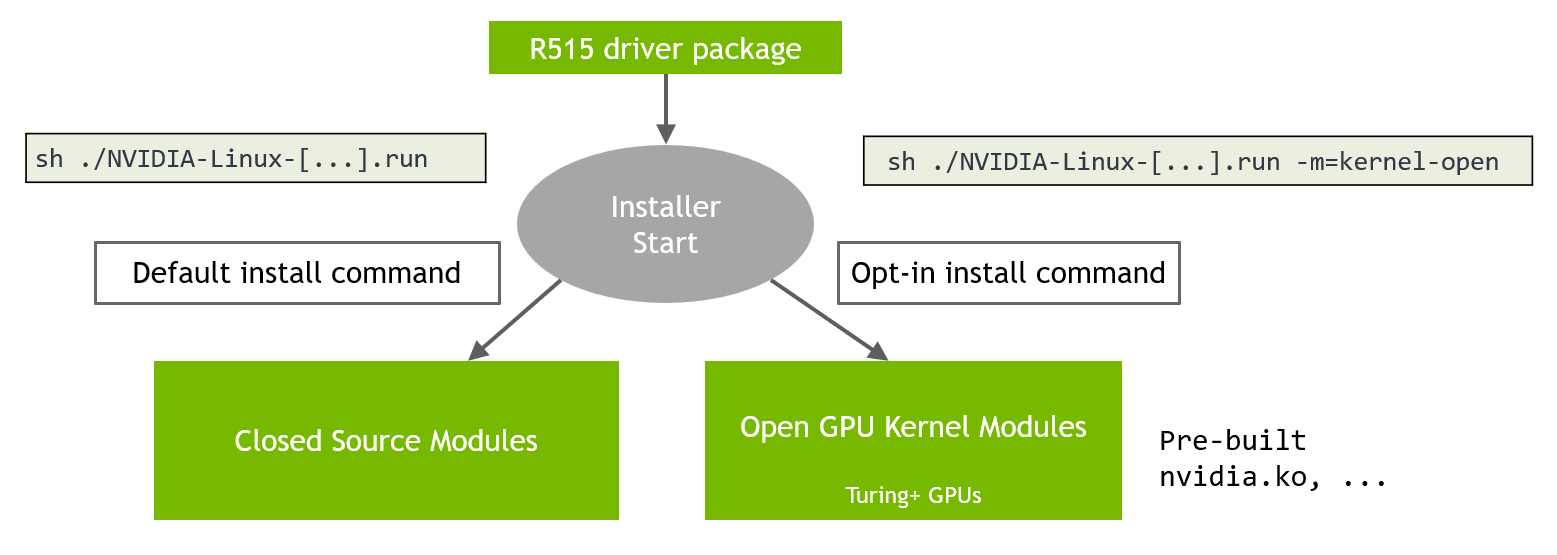
 Join Microsoft Build 2022 to learn how NVIDIA AI technology solutions are transforming industries such as retail, manufacturing, automotive, and healthcare.
  This feature-rich branch is fully compatible with Unreal Engine 5, and contains all of the latest developments from NVIDIA in the world of ray tracing.
 This post details how to use Container Canary from installation and validation to writing custom manifests and container automation.
 Required packages are installed [passed]
 Expected services are running [passed]
 Your container is awesome [passed]
validation passed
Your container is awesome [passed]
validation passed User is jovyan
probe:
exec:
command:
- /bin/sh
- -c
- "[ $(whoami) = jovyan ]"
- name: uid
description:
User is jovyan
probe:
exec:
command:
- /bin/sh
- -c
- "[ $(whoami) = jovyan ]"
- name: uid
description:  User ID is 1000
probe:
exec:
command:
- /bin/sh
- -c
- "id | grep uid=1000"
- name: home
description:
User ID is 1000
probe:
exec:
command:
- /bin/sh
- -c
- "id | grep uid=1000"
- name: home
description:  Home directory is /home/jovyan
probe:
exec:
command:
- /bin/sh
- -c
- "[ $HOME = /home/jovyan ]"
- name: http
description:
Home directory is /home/jovyan
probe:
exec:
command:
- /bin/sh
- -c
- "[ $HOME = /home/jovyan ]"
- name: http
description:  Exposes an HTTP interface on port 8888
probe:
httpGet:
path: /
port: 8888
initialDelaySeconds: 10
- name: NB_PREFIX
description:
Exposes an HTTP interface on port 8888
probe:
httpGet:
path: /
port: 8888
initialDelaySeconds: 10
- name: NB_PREFIX
description:  Correctly routes the NB_PREFIX
probe:
httpGet:
path: /hub/jovyan/lab
port: 8888
initialDelaySeconds: 10
- name: allow-origin-all
description: "
Correctly routes the NB_PREFIX
probe:
httpGet:
path: /hub/jovyan/lab
port: 8888
initialDelaySeconds: 10
- name: allow-origin-all
description: " Sets 'Access-Control-Allow-Origin: *' header"
probe:
httpGet:
path: /
port: 8888
responseHttpHeaders:
- name: Access-Control-Allow-Origin
value: "*"
initialDelaySeconds: 10
Sets 'Access-Control-Allow-Origin: *' header"
probe:
httpGet:
path: /
port: 8888
responseHttpHeaders:
- name: Access-Control-Allow-Origin
value: "*"
initialDelaySeconds: 10