I am running Faster R_CNN on a custom dataset of 250 images for the object detection task. I downloaded the tfrecords from roboflow and I started training a Faster R-CNN with Inception ResNet v2 640×640. However after 200 iterations, the loss on some tasks becomes 0:
Find out how RAPIDS and the cuML support vector machine can achieve faster training time and maximum accuracy when fine-tuning transformers.
In recent years, transformers have emerged as a powerful deep neural network architecture that has been proven to beat the state of the art in many application domains, such as natural language processing (NLP) and computer vision.
This post uncovers how you can achieve maximum accuracy with the fastest training time possible when fine-tuning transformers. We demonstrate how the cuML support vector machine (SVM) algorithm, from the RAPIDS Machine Learning library, can dramatically accelerate this process. CuML SVM on GPU is 500x faster than the CPU-based implementation. This approach uses SVM heads instead of the conventional multi-layer perceptron (MLP) head, making it possible to fine-tune with precision and ease.
What is fine-tuning and why do you need it?
A transformer is a deep learning model consisting of many multi-head, self-attention, and feedforward fully connected layers. It is mainly used for sequence-to-sequence tasks, including NLP tasks, such as machine translation and question-answering, and computer vision tasks, such as object detection and more.
Training a transformer from scratch is a compute-intensive process, often taking days or even weeks. In practice, fine-tuning is the most efficient way of applying pretrained transformers to new tasks, thereby reducing training time.
MLP head for fine-tuning transformers
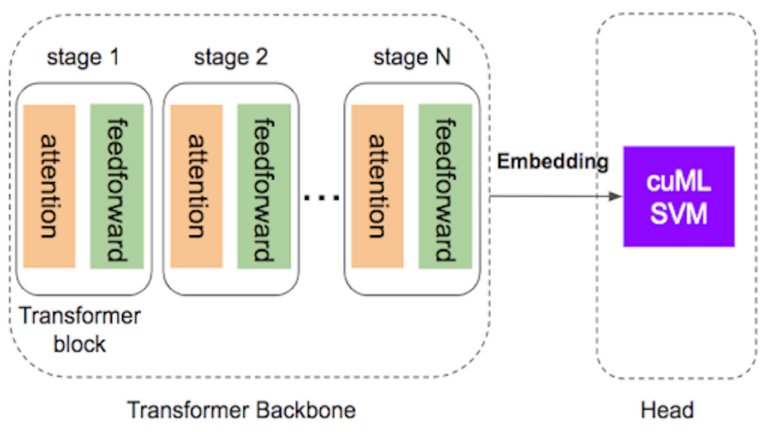
As shown in Figure 1, transformers have two distinct components:
The backbone, which contains multiple blocks of self-attention and feedforward layers.
The head, where final predictions take place for either classification or regression tasks.
During fine-tuning, the backbone network of the transformer is frozen while only the lightweight head module is trained for the new task. The most common choice for the head module is a multi-layer perceptron (MLP) for both classification and regression tasks.
Figure 1. Using cuML SVM as the head speeds up the fine-tuning of transformers
As it turns out, implementing and tuning a MLP can be much harder than it looks. Why is that?
There are multiple hyperparameters to tune: number of layers, dropout, learning rate, regularization, types of optimizers, and more. Choosing which hyperparameter to tune is dependent on the problem that you are trying to solve. For example, standard techniques such as dropout and batchnorm could lead to performance degradation for regression problems.
Additional efforts must be made to prevent overfitting. The transformer’s output is often a long embedding vector, with a length ranging from hundreds to thousands. Overfitting is common when the training data size is not large enough.
Performance in terms of execution time is typically not optimized. Users must write boilerplate code for data processing and training. Batch generation and data movement from CPU to GPU can also become a bottleneck for performance.
Advantages of SVM heads for fine-tuning transformers
Support vector machines (SVMs) are one of the most popular supervised learning methods and most potent when there are meaningful, predictive features available. This is especially true with high-dimensional data due to SVM’s robustness against overfitting.
Yet, data scientists are sometimes hesitant to try SVMs for several reasons:
It requires handcraft feature engineering that can be difficult to implement.
SVMs are traditionally slow.
RAPIDS cuML revives interest in revisiting this classic model by providing a speedup of up to 500x on GPU. With RAPIDS cuML, SVM is gaining popularity again in the data science community.
For example, RAPIDS cuML SVM notebooks have been frequently used in several Kaggle competitions:
As transformers have already learned to extract meaningful representations in the form of long embedding vectors, cuML SVM is an ideal candidate for the head classifier or regressor.
When compared to the MLP head, cuML SVM has the following advantages:
Speed. cuML moves all data to the GPU at once, before processing on the GPU.
Diversity. The predictions of SVM are statistically different from the MLP predictions, rendering it useful in ensembles.
Simple API. cuML SVM API provides scikit-learn style fit and predict functions.
Case study: PetFinder.my Pawpularity Contest
This proposed fine-tuning methodology with SVM heads applies to both NLP and computer vision tasks. To demonstrate this, we looked at the PetFinder.my Pawpularity Contest, a Kaggle data science competition that predicted the popularity of shelter pets based on their photos.
The dataset used for this project consists of 10,000 hand-labeled images, each with a target pawpularity that we aimed to predict. With pawpularity values ranging from 0 to 100, we used regression to solve this problem.
As there are only 10,000 labeled images, it is impractical to train a deep neural network to achieve high accuracy from scratch. Instead, we approached this by using a pretrained swin transformer backbone and then fine-tuning it with the labeled pet images.
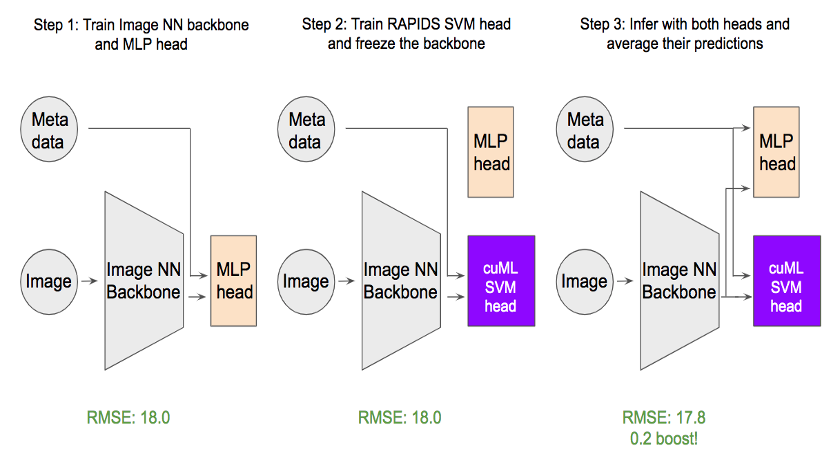
Figure 2. How to use cuML SVM head in fine-tuning.
As shown in Figure 2, our approach requires three steps:
First, a regression head using MLP is added to the backbone swin transformer, and the backbone and head are fine tuned. One interesting finding is that the binary cross entropy loss outperforms the common mean square error loss (MSE) due to the distribution of the target.
Next, the backbone is frozen, and the MLP head is replaced with the cuML SVM head. The SVM head is then trained with the regular MSE loss.
To achieve the best prediction accuracy, we averaged the MLP head and SVM head. The evaluation metric root means that square error is optimized going from 18 to 17.8, which is significant for this dataset.
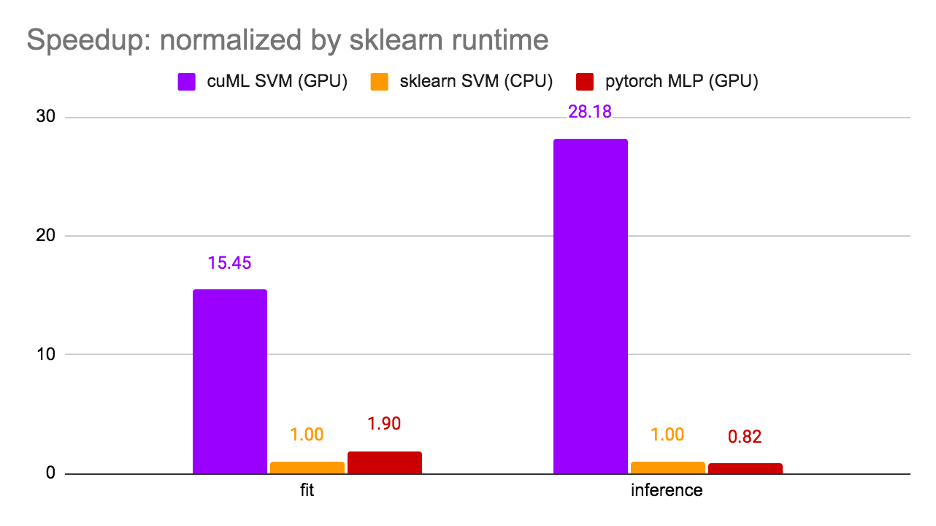
It is worth noting that steps 1 and 3 are optional and have been implemented here to optimize the model’s score for this competition. Step 2 alone is the most common scenario for fine-tuning. For this reason, we measured the run time at step 2 and compared three options: cuML SVM (GPU), sklearn SVM (CPU), and PyTorchMLP (GPU). The results are shown in Figure 3.
Figure 3. Runtime comparison
The runtime is normalized by sklearn SVM and cuML SVM achieved 15x speedup for training and 28.18x speedup for inference. It is noteworthy that cuML SVM is faster than PyTorch MLP due to high GPU utilization. The notebook can be found on Kaggle.
Key takeaways on transformer fine-tuning
Transformers are revolutionary deep learning models, but training them is time-consuming. Fast fine-tuning of transformers on a GPU can benefit many applications by providing significant speedup. RAPIDS cuML SVM can also be used as a drop-in replacement of the classic MLP head, as it is both faster and more accurate.
GPU acceleration infuses new energy into classic ML models like SVM. With RAPIDS, it is possible to combine the best of the two worlds: classic machine learning (ML) models and cutting-edge deep learning (DL) models. In RAPIDS cuML, you will find more lightning-fast and easy-to-use models.
Postscript
At the time of writing and editing this post, the PetFinder.my Pawpularity Contest concluded. NVIDIA KGMON Gilberto Titericz won first place by using RAPIDS SVM. His winning solution was to concentrate embeddings from transformers and other deep CNNs, and use RAPIDS SVM as the regression head. For more information, see his winning solution write-up.
In deep learning and machine learning, having a large enough dataset is key to training a system and getting it to produce results. So what does a ML researcher do when there just isn’t enough publicly accessible data? Enter the MLCommons Association, a global engineering consortium with the aim of making ML better for everyone. Read article >
Using NVIDIA GPUs, Fujifilm Healthcare developed Cardio StillShot to capture cardiac imaging at any heart rate, with 6x better temporal resolution of cardiac CT images.
Capturing clear diagnostic images of the heart and its vasculature is challenging in cardiac computed tomography (CT) imaging because the heart is always moving and the resulting images can be blurry. When a heart is beating quickly, at above 75 beats per minute or irregularly, good image resolution is almost impossible.
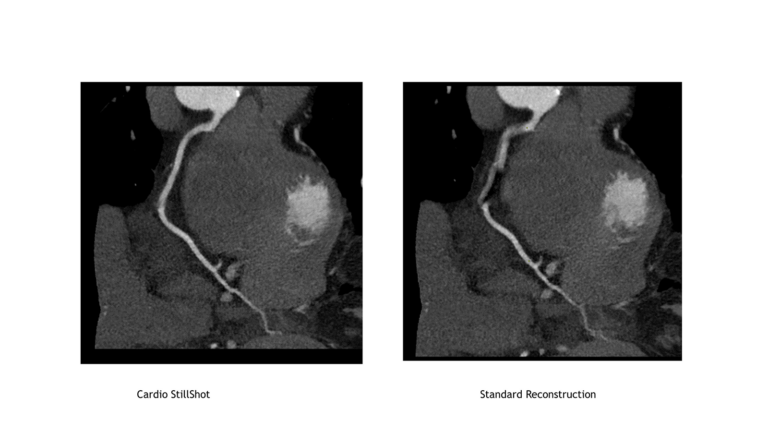
Global diagnostic imaging leader Fujifilm Healthcare developed Cardio StillShot software, which uses NVIDIA GPUs and integrates with their existing whole-body X-ray CT system SCENARIA View, for precise cardiac imaging at any heart rate. This software improves diagnostic imaging without a high-speed rotation scanner. Also, Cardio StillShot achieves over 6x better temporal resolution than conventional image reconstruction methods by detecting cardiac motion and preventing image blurring through motion correction.
Clear cardiac CT images help clinical teams visualize structures such as coronary arteries, aortic valves, and myocardium noninvasively and diagnose heart problems such as heart failure, cardiomyopathy, and structural abnormalities.
Cardiovascular disease rates and noninvasive diagnostic tools
Cardiovascular disease (CVD) is the leading cause of death globally. According to WHO, an estimated 17.9 million people died from CVDs in 2019, representing 32% of all global deaths. Of those deaths, 85% were due to heart attack and stroke. Imaging techniques such as coronary computed tomography angiography (CCTA) is a widely available noninvasive diagnostic tool for assessing a patient’s cardiovascular disease risk early.
CCTA helps identify plaque deposits in the coronary arteries, which supply oxygen and nutrients to the heart. Plaque is the build up of fats, cholesterol, and other substances in artery walls leading to constricted blood flow to the heart.
Identifying plaque buildup early can help prevent heart attacks. In ECG-gated cardiac CT, X-ray images are obtained during the cardiac phase with little cardiac motion, or image reconstruction is performed using multiple samples to create a static image of the coronary artery.
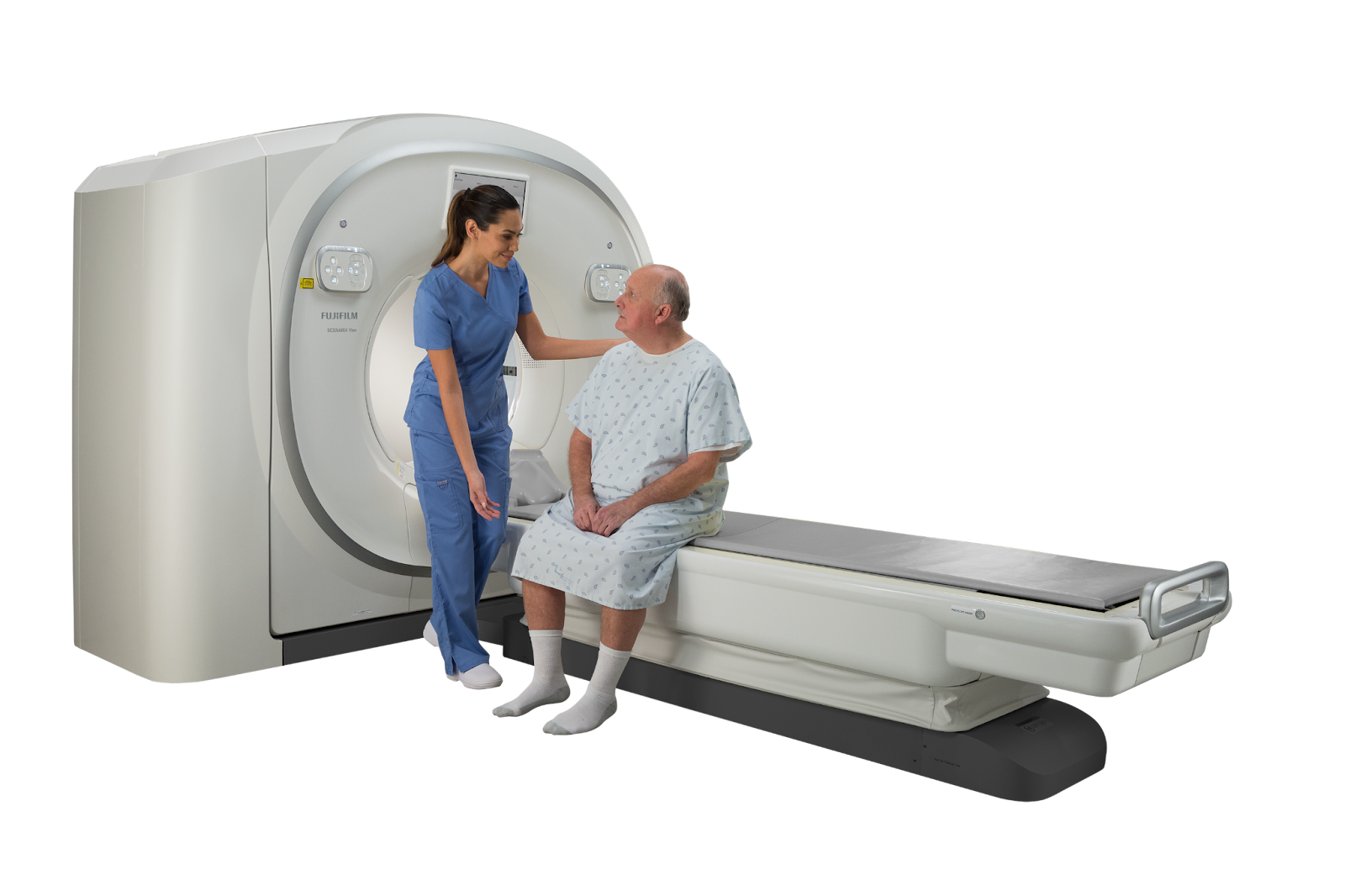
Figure 1: Fujifilm Healthcare’s latest model of SCENARIA View, pictured above, will have Cardio StillShot as a software enablement option along with a RTX A6000 GPU console.
Difficulties with imaging during high heart rates
Patients with high heart rates or irregular heart rates need to be scanned just like every other patient. Unfortunately, it is hard for scanners to get clear diagnostic images under these conditions.At heart rates of 60-75 beats per minute (BPM), there is adequate time to take images between heartbeats. But, when the heart rates rise above 75 BPM, the imaging time window becomes too short, leading to blurry images. Detailed imaging of the coronary arteries requires high temporal resolution.
Cardio StillShot was developed to achieve high temporal resolution by detecting and correcting motions in the heart even when the patient’s heart rate is high, without using beta-blockers or other medications to lower heart rate.
Transitioning from CPUs to GPUs to develop Cardio StillShot
Cardio StillShot image reconstruction software addresses the conventional issues of time resolution. Previously, Fujifilm Healthcare was using CPUs to reconstruct images and remove blurriness. However, CPUs are no longer a viable option for Cardio StillShot due to a 10x increase in the number of calculations required for each image. Fujifilm Healthcare transitioned to NVIDIA GPUs and NVIDIA software to develop Cardio StillShot. The adoption of NVIDIA RTX A6000 GPUs with 77 TFLOPS of compute performance helps calculate the motion vector field (MVF), resulting in clear images for clinical use. Fujifilm Healthcare also used NVIDIA software stack and tools, including NVIDIA Optical Flow SDK to estimate pixel-level motion, CUDA for accelerated calculations, and NVIDIA Nsight Compute to optimize performance.
Exploring 4D motion vector fields to improve image clarity
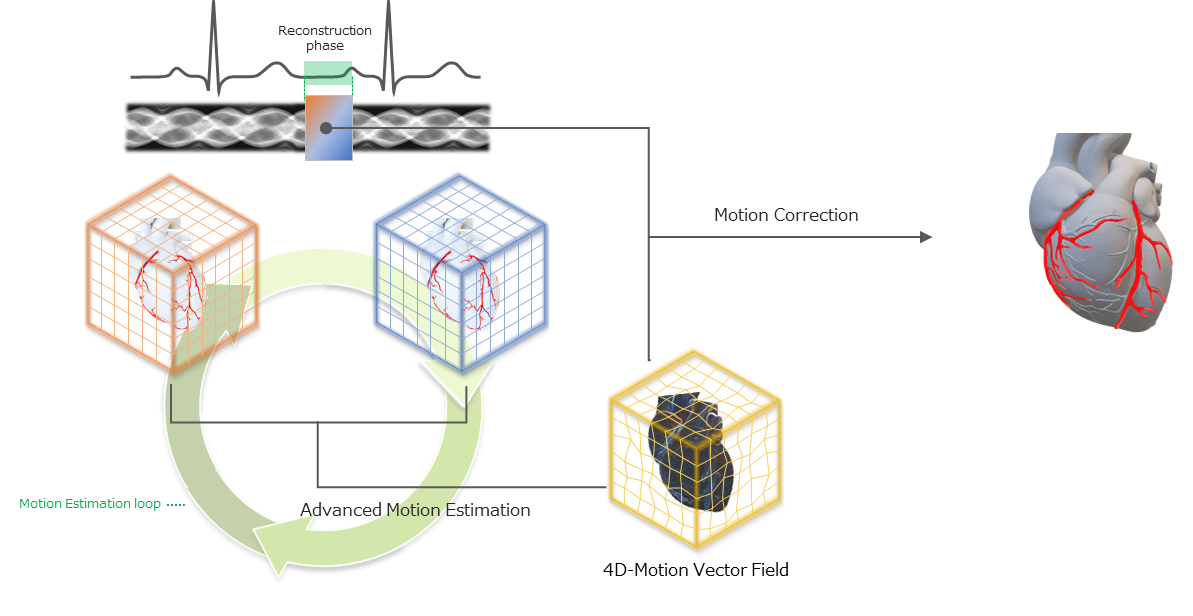
Fujifilm Healthcare used a 4D MVF to estimate the motion in CCTA images. The MVF approach automatically tracks and corrects the heart’s motion resulting in sharper images. The improvement is a 6.25x higher temporal resolution—from 175msec temporal resolution in a standard reconstruction to 28 msec with the Cardio StillShot software. With NVIDIA GPUs, clear views of the heart can be reconstructed in as little as 30 seconds.
Figure 2: Motion Vector Field Synthesis from CT Scan.
Accelerated compute adds premium capabilities to existing scanners
For Fujifilm Healthcare, using accelerated compute shifted the system performance and cost of the CT design. Usually, high-performance features require costly design and manufacturing upgrades. Fujifilm Healthcare broke this trend with NVIDIA GPUs to add premium capabilities to scanners via a software enhancement. Adding GPU acceleration to the StillShot image reconstruction software improved cardiac image quality of an existing CT scanner with over 6x temporal resolution. The Cardio StillShot software runs on Fujifilm Healthcare’slatest model of SCENARIA View, which is available in Japan today and offered worldwide soon. Fujifilm Healthcare will be demonstrating the Cardio StillShot software and SCENARIA View CT scanner at the International Technical Exhibition of Medical Imaging 2022 Conference held in Yokohama, Japan from April 15 to 17.
So im trying to use tnesorflow.keras, but im getting this error:
Import "tensorflow.keras" could not be resolvedPylance
Im new to coding and have very little experience so im not sure if im supposed to do anything besides writing “pip install tensorflow” in the terminal. I’ve also typed “pip install keras” but it was already installed.
When i typed pip install tensorflow in the terminal i did get som yellow text saying that the directory is not in PATH, or something like that. Then i tried adding what i think was the directory to path in environment variables, but that didn’t help either.
I am relatively new to TensorFlow and want to create my own model. I will have four label categories and will be using about 50+ pictures for each. At the moment I am using labelImg to create boxes over my images one by one to develop the data for my labels.
Is there a quicker way to accomplish this task for large numbers of pictures? Or another software than can be used other than labelImg? Thanks in advance.



 Find out how RAPIDS and the cuML support vector machine can achieve faster training time and maximum accuracy when fine-tuning transformers.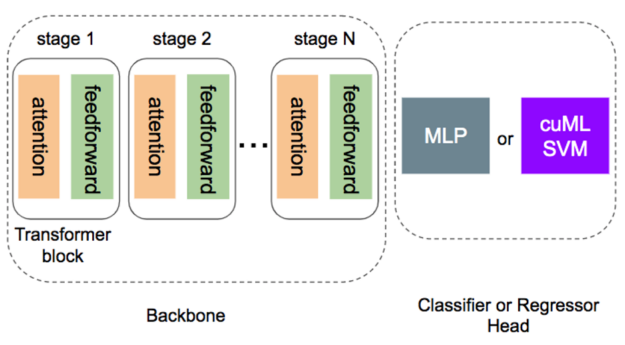
 Using NVIDIA GPUs, Fujifilm Healthcare developed Cardio StillShot to capture cardiac imaging at any heart rate, with 6x better temporal resolution of cardiac CT images.