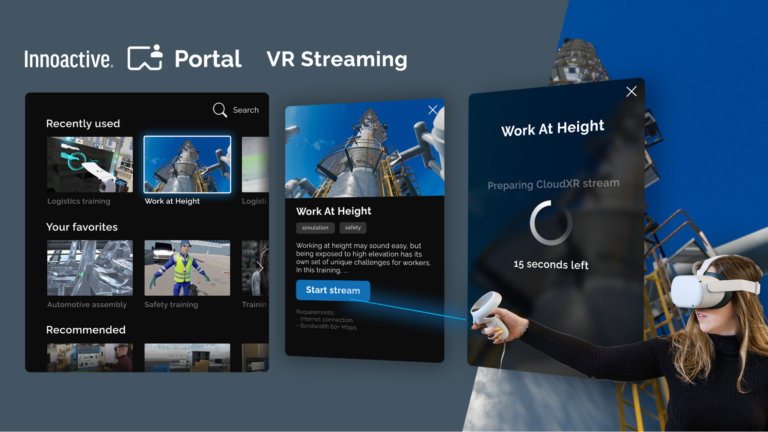
 Building one-click delivery of PC-based VR applications to standalone devices by streaming from the Cloud using NVIDIA CloudXR SDK and Innoactive Portal.
Given how prevalent streaming technologies are today, it is easy to forget that on-demand, globally available applications used to be considered a radical idea. But as the popularity of AR and VR grows, the race is on to push streaming even further. With the demand for realistic content and consumer-grade hardware comes a critical challenge: How to build applications that look good on any device without compromising on the quality and performance requirements of immersive experiences?
To help solve this problem, the team at Innoactive has integrated the NVIDIA CloudXR streaming solution into their VR application deployment platform, Innoactive Portal. Customers like SAP, Deloitte, Linde Engineering, and Volkswagen Group are using the platform to deliver immersive training seamlessly to users whenever and wherever they are.
Portal is a user-centric, enterprise-grade deployment platform for managing and accessing VR content with a single click from any device. What makes Portal unique is the ability to deploy content across platforms and devices including PC VR, standalone VR, and PC 3D applications.
Using both the server and client components of the NVIDIA CloudXR SDK, with improvements in cloud computing frameworks, Portal makes it possible to build an application for PC VR and streaming to all-in-one headsets or other low-compute devices. All end users do is select the application from their library to stream it.
Overcoming the Distribution Bottlenecks of XR
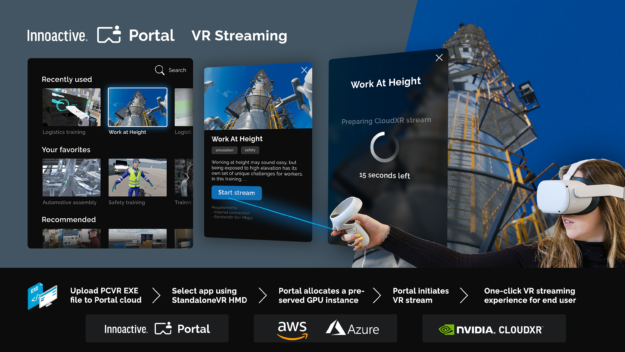
While there are several other enterprise VR platforms out there, Portal makes the process painless for both creators and end users by alleviating three of the most critical bottlenecks in distributing XR content:
- The platform’s secure cloud infrastructure provides customers with centralized control of their content and users, ensuring access for only those who need it.
- The one-click streaming architecture makes content easy to use for users who may not be familiar with navigating in VR.
- The NVIDIA CloudXR support of more complex distribution models, like that of Portal, results in several cost-saving benefits, like the ability to build an application one time and deploy it to any device, anywhere.
It’s been technically possible to use NVIDIA CloudXR to stream a VR application for some time, but Innoactive wanted to provide this functionality to casual and even first-time VR users. They faced a set of challenges to make this happen:
- When users want to start a cloud streamed VR experience, they need a suitable NVIDIA GPU-powered machine available to them on-demand.
- This server running NVIDIA CloudXR not only requires good performance to perform the rendering, it also must be available to users worldwide.
- At the same time, it is important to be as resource-aware as possible. To reach a broad audience, all of this must happen with minimal complexity for the user.
To deliver this zero-friction experience, Innoactive needed to build on top of both the client and server side of the NVIDIA CloudXR SDK.
Building a scalable server architecture for NVIDIA CloudXR
On the server, it is important to ensure that an NVIDIA GPU-powered machine is available on-demand to each user, no matter how many users are trying to access machines, or where or when those users require access.
Relying on cloud providers like Amazon Web Services (AWS) and Microsoft Azure for the compute resources is a logical solution. However, Portal was built with the guiding principle of being an open platform supporting all types of VR content as well as all types of environments to be deployed in.
This agnosticism of cloud providers implies that a service is needed, capable of supporting cloud-rendering machines on either cloud service. In turn this provides the most flexibility to customers who have already decided for one or the other upfront. It also enables Portal to provide maximum coverage and performance to end users by being able to switch to another data center with better latency or performance, independently of the respective provider.
For this reason, Innoactive relies on building custom virtual machine (VM) images with preinstalled software components for any cloud provider. They use a tool called Packer and enable the resulting VMs to be scaled using the respective cloud provider’s VM scale set functionality.
By building for today but planning for tomorrow, Innoactive ensures that this process can be replicated in the future and adapted to work with new cloud providers. Services are now capable of dynamically allocating rendering resources whenever and wherever needed.
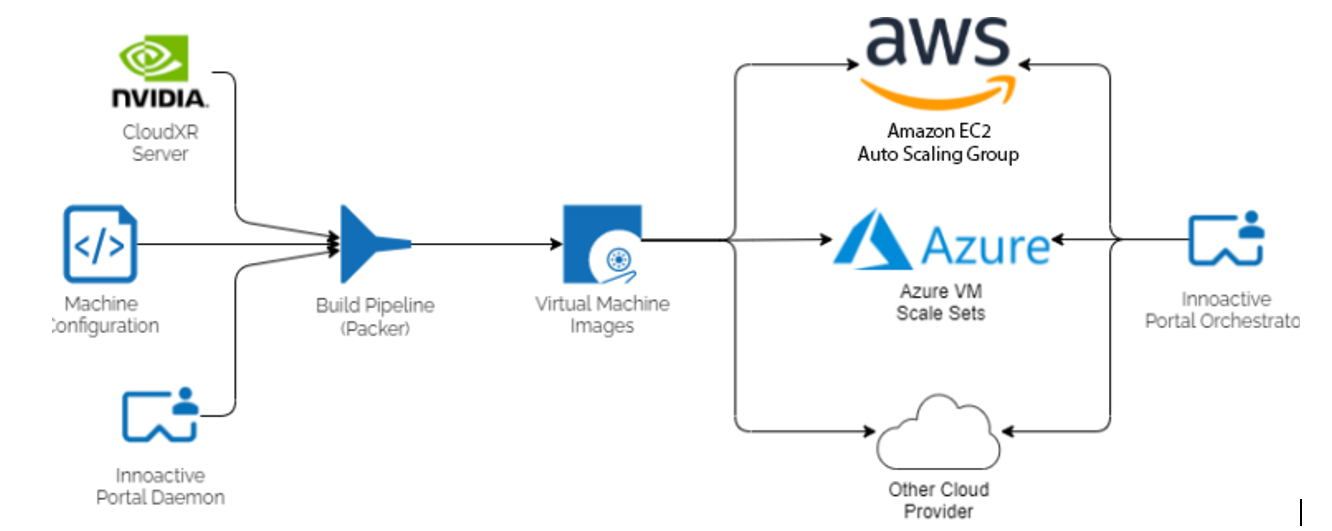
When going to production with cloud-rendered VR, the cost of remote rendering resources must stay as low as possible to provide a positive business case. At the same time, ensuring a great user experience requires a high level of performance, which in turn can quickly become expensive. Thus, the Portal team was tasked to find the optimal cost and performance trade-off.
One huge cost driver apart from the size of a VM is its uptime. The target is to pay for what is needed and no more. However, waiting too long to boot up a machine can make the process feel clumsy or untimely.
Due to the on-demand design of Portal, reducing user wait time is key to getting them into a cloud-rendered experience as fast as possible. Portal detects when users start engaging with it and prepares a VM in anticipation of them launching a VR application. This dramatically reduces the load time for when they launch an application, from a matter of minutes to a matter of seconds.
After the cloud-rendered session is complete, Portal’s cloud-rendering orchestration service automatically removes the machine using the respective cloud provider’s endpoints for scaling. This again ensures that only uptime is paid for, not dead time. Portal can adapt its rendering capabilities depending on the use case. For example, it can ensure that the GPU rendering pool is sufficiently large on days that are planned for VR training at a corporation while minimizing the pool size in times of low activity.
To optimize the cost-performance ratio, you should understand customer and regional differences. Keeping latency at a minimum during a session is one of the most important factors to guaranteeing a great experience. Generally, the closer a server is to the end users, the lower the latency and lag is between user input and the streamed application.
To ensure that users are allocated the nearest server, multiple algorithms are used, one example being IP lookups to narrow down user geolocations. In the future, relying on the 5G network and edge computing will further improve performance.
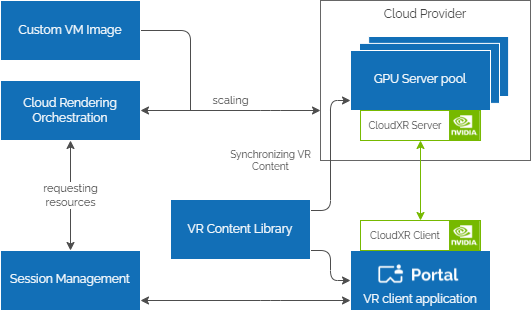
With the previously mentioned architecture and optimizations, Portal supports users with the intent to render a VR application remotely using NVIDIA CloudXR. Portal takes care of allocating rendering resources in the cloud, synchronizes the desired VR content to the remote machine and executes the NVIDIA CloudXR Server so that users can connect. All users do is select the desired VR content.
While providing value on its own, having a preconfigured, ready-to-roll remote rendering machine is just half of the equation. It still requires users to boot up their streaming client and configure it manually by entering the server IP address, which is not something novices are comfortable with.
Building an NVIDIA CloudXR client into Portal
By integrating the NVIDIA CloudXR SDK within the client application, Portal takes away these manual steps to provide a smooth user experience. To keep users updated throughout every step of the process, Portal uses WebSockets built on top of ASP.NET Core SignalR. The client application’s user interface is also built using Unity, to enable fast iteration while still delivering a great user experience.
This comes with the challenge of combining the NVIDIA CloudXR SDK, which is written in C++ using the Android NDK, and an interactive Unity scene into one Portal client app. The result is a single, modular Android application featuring multiple activities that can be easily loaded to a standalone VR headset like Meta Quest 2, Vive Focus 3, or Pico Neo 3.
The user interface guides users up to the point when a remote rendering server is available. It then automatically connects to it through the NVIDIA CloudXR client and ensures that the VR application is correctly started on the server, guaranteeing a frictionless entry into the streamed experience.
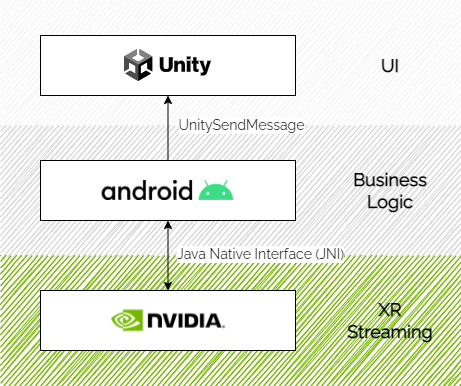
The business-logic layer, written in native Android (Java), contains logic to communicate back and forth with Innoactive’s backend services and handles the entire application state. It updates the user interface layer using a proprietary protocol shipped with Unity called UnitySendMessage and initializes the native NVIDIA CloudXR client library when required.
The native NVIDIA CloudXR activity is extended to use the Java Native Interface (JNI) to communicate back lifecycle events to the business layer. The example code later in this post show this. To isolate the native Unity and NVIDIA CloudXR activities from each other properly, both are designed to run in a dedicated Android process.
The following code examples show the interfacing between Android code and NVIDIA CloudXR. First, the Android code example (Java):
import android.app.Activity;

public class MainActivity extends Activity implements ServerAvailableInterface {
    // load native NVIDIA CloudXR client library (*.aar)
    static {
        System.loadLibrary("CloudXRClient");
    }
    static native void initCloudXR(String jcmdline);

    @Override
    public void onServerReady(String serverIpAddress) {
      // initializes the native CloudXR client after server ip is known
      String arguments = String.format("-s %s", serverIpAddress);
      initCloudXR(arguments);
    }

    public void onConnected() {
      // called by native CloudXR activity when it is successfully connected
      System.out.println("Connected to CloudXR server")
    }
Second, theNVIDIA CloudXR code example (C++):
#include
#include
#include

// ...

// called whenever the CloudXR client state changes
void Client::UpdateClientState(cxrClientState state, cxrStateReason reason) {
    switch (state) {
        // ...
        case cxrClientState_StreamingSessionInProgress:
            OnCloudXRConnected();
            break;
        // ...
    }
}

// Fired when the CloudXR client has established a connection to the server
void Client::OnCloudXRConnected() {
    jmethodID jOnConnected = env ->GetMethodID(mainActivity, "onConnected", "()V");
    env->CallVoidMethod(mainActivity, jOnConnected);
}

// ...
The final client application provides an intuitive interface with a minimal set of required user interactions to select the desired VR content. This interface is accessible from a second screen device independently of VR, often a laptop or phone.
With the Portal’s real-time communication, all connected clients–regardless of device–display the same status updates as a cloud-rendered session is loading. Users then receive a push notification after their content is ready in VR. When done with a session, users can directly proceed with the next streaming session without having to quit the client application.
Bundling Portal’s services together with the extended NVIDIA CloudXR client provides a globally scalable solution for users to access their VR content library from any device with just one click. Portal with NVIDIA CloudXR has changed how customers are able to deploy their PC-based VR. Where customers had a single platform per headset type, Portal now handles the complexity.
The easy-to-use, one-click frontend supports them in scaling VR-based use cases like training employees who are often new to VR. On a more technical level, customers can plan flexibly for headset deployment. They are no longer limited to PC-based VR due to the heavy calculation power that is needed to provide high-quality experiences.
Now, the power of cloud machines makes high-end rendering available on standalone devices through the Portal with NVIDIA CloudXR.
Additional resources
For more information about how Innoactive Portal has helped customers deploy VR training at scale, check out their case studies with SAP and Volkswagen Group.
For more information about NVIDIA CloudXR, see the developer page. Check out GTC 2022 this March 21-24 for the latest from NVIDIA on XR and the era of AI.
 This Jetson Project of the Month enhances synthesizer-based music by applying deep generative models to a classic Eurorack machine.