2021 trends are charging into 2022, heralding a new era of autonomous transportation and opening up business models and services never before dreamed of. In the next year, software-defined compute architectures, electric powertrains, high-fidelity simulation, AI assistants and autonomous trucking solutions are set to transform the transportation industry. This past year, key technologies saw significant Read article >
The latest NVIDIA HPC SDK includes a variety of tools to maximize developer productivity, as well as the performance, and portability of HPC applications.
At the Supercomputing Conference (SC21) NVIDIA preannounced the next update to the HPC SDK. Today, the HPC SDK 21.11 release was posted for free download to Developer Program members.
The NVIDIA HPC SDK is a comprehensive suite of compilers and libraries for high performance computing development. It includes a wide variety of tools proven to maximize developer productivity, as well as the performance and portability of HPC applications.
The HPC SDK and its components are updated numerous times per year with new features, performance advancements, and other enhancements.
What’s new
This 21.11 release will include updates to HPC C++/Fortran compiler support and the developer environment, as well as new multi-node mulitGPU library capabilities.
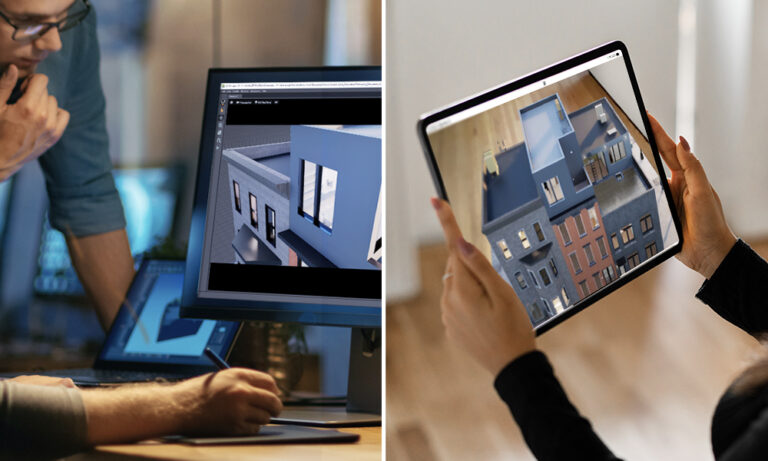
Creators and developers can now view their 3D content as it was meant to be experienced, in full immersive detail with NVIDIA Omniverse XR Remote for iPad.
Content creators and developers can now view their 3D content in full-immersive detail with NVIDIA Omniverse XR Remote for iPad. The app is available now from the Apple Store for iPad iOS 14.5 and higher.
Visualizing complex 3D models is critical to industries, such as architecture and manufacturing, where context is everything. Minor design decisions can trigger changes that lead to higher costs and time-consuming adjustments.
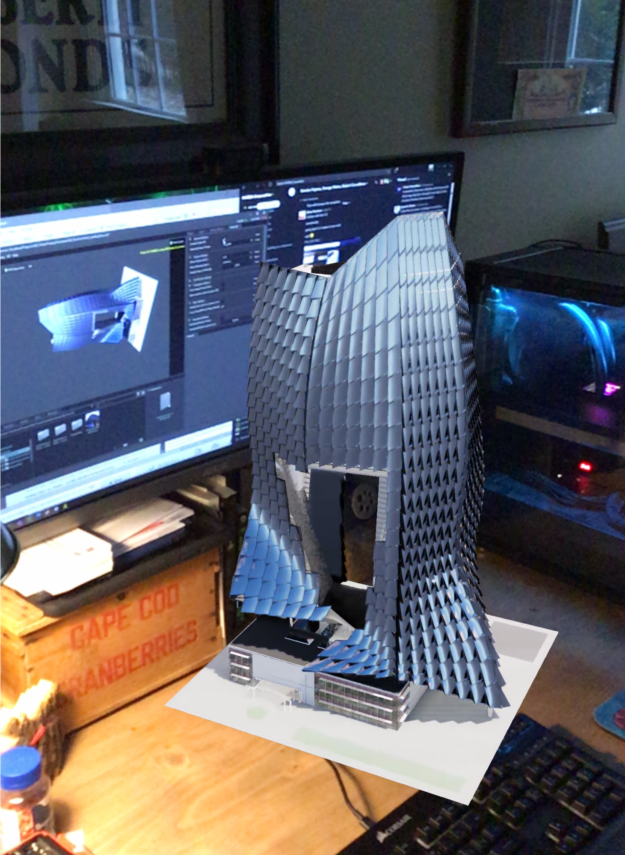
Figure 1. View full-fidelity 3D models using AR mode in XR Remote.
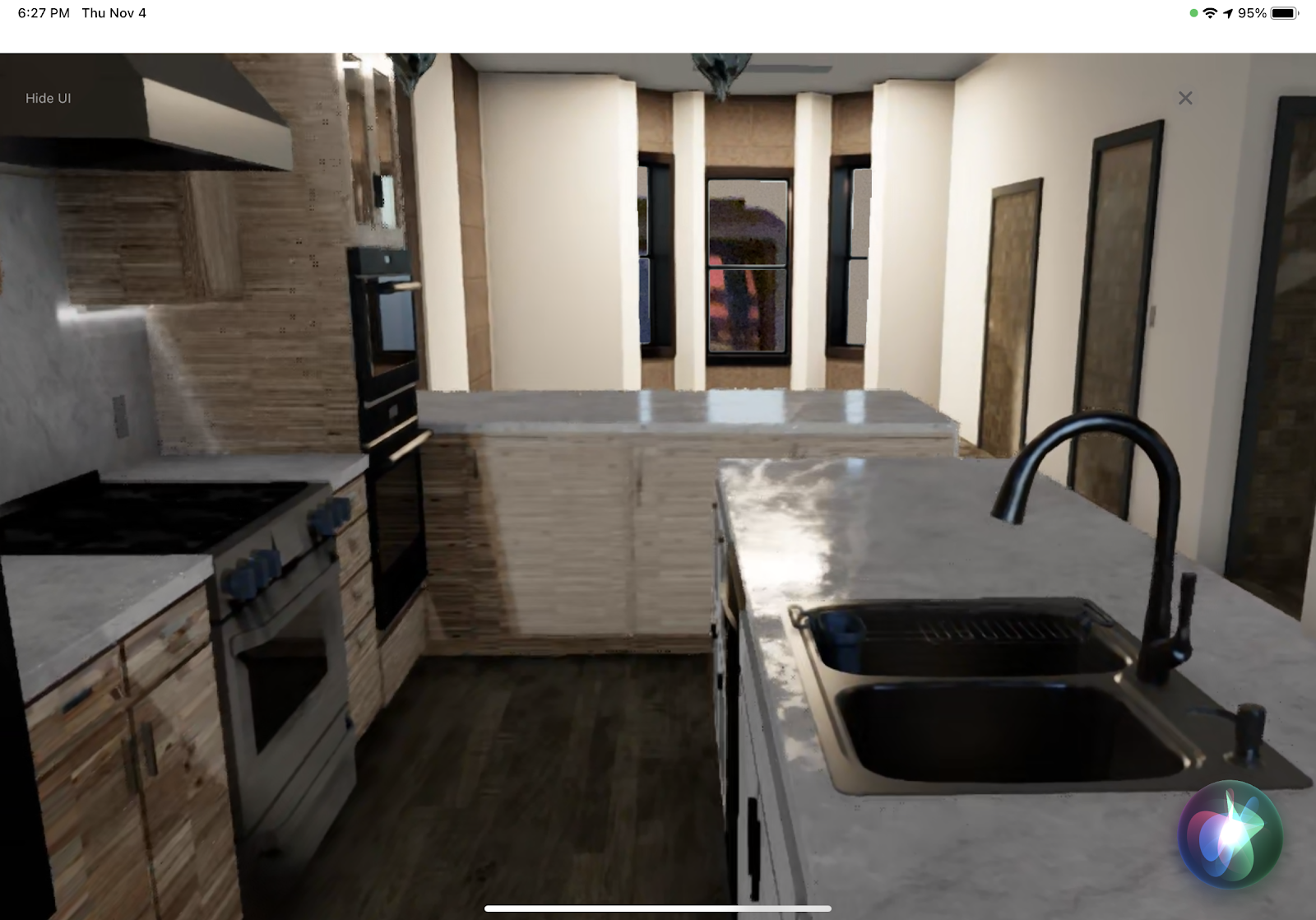
Omniverse XR Remote addresses this challenge by enabling users to interact with full-fidelity, real-time NVIDIA RTX ray-traced content in Omniverse. This can be streamed directly from a desktop to an iPad using NVIDIA CloudXR. Content is viewed in AR, where users bring virtual assets into their world, or as a VR virtual camera that gives users a “window” to navigate a 3D scene or experience.
For developers, this provides a new means to distribute content built in Omniverse, without compromising on quality or mobility.
Figure 2. Explore model details including full-fidelity textures and real-time NVIDIA RTX ray-traced lighting using VR Virtual Camera mode in XR Remote.
Streaming immersive design
Kohn Pedersen Fox Associates (KPF), one of the world’s preeminent architecture firms, is leveraging NVIDIA technologies to make the design process more intuitive for designers, engineers, and clients.
“We see a future where we can bring our design to the table and the computer helps us make it real,” said Applied Research Director at KPF, Cobus Bothma.
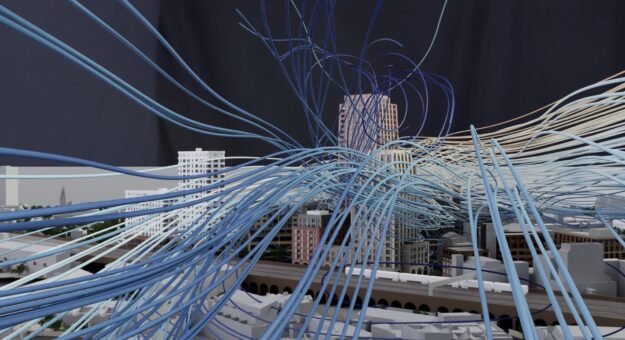
Bothma is using XR Remote to visualize at-scale architectural models overlaid with complex data sets—like diagrammatic flow lines of wind around a building, creating a virtual wind tunnel. Currently, KPF is working to simulate multiple buildings in the same scene, viewed on a tablet device.
Figure 3. Diagrammatic flow lines of windflow overlaid on a 3D building model using Omniverse and viewed in XR Remote. Image provided by Kohn Pedersen Fox Associates.
“With XR Remote, we can reduce review cycles from days to hours,” said Bothma.
Historically, it would have taken the KPF design team 4 to 6 weeks to develop a custom app for every design change. “Now we can simply stream it to them and they will immediately have the latest view,” Bothma said.
The application delivers an immersive view of Universal Scene Description content from Omniverse to any supported iOS or Android device through the use of the NVIDIA CloudXR streaming solution. XR Remote is one of the first instances where users can leverage CloudXR streaming to reach back through a remote agent and harness extra compute power. This helps users run a simulation in Omniverse and stream full-fidelity graphics to an iPad in real time.
The result is a fully immersive interaction with 3D content, which enables easier collaboration to speed up design processes. “This is a much more intuitive way to interact with 3D content than a mouse and keyboard,” said Greg Jones, Director of Global Business Development and Product Management for XR at NVIDIA.
“With XR Remote, users can grab the iPad and literally walk through their data. This changes the game for industries like AEC, manufacturing, and M&E, where flat digital tools have required designers to translate 2D renderings into 3D results,” Jones said.
Getting started with Omniverse XR Remote
The Omniverse XR Remote application is available now through the Apple Store and Android devices.
Requirements for using XR Remote on an iPad:
An iPad with iOS 14.5 or higher.
Omniverse XR Remote application, installed on an iPad.
The latest version of Omniverse Create, installed on an NVIDIA RTX-enabled PC (Windows and Linux compliant) or VM.
Both PC and iPad must be connected to the network.
Load a 3D model and enable AR settings in Omniverse Create on a PC to get started. Then input the corresponding IP address into the Omniverse XR Remote on their iPad. Check out the XR Remote documentation for detailed instructions.
Android tablet users can follow these steps and connect a device using NVIDIA Omniverse XR Remote.
Expand the design process and view 3D content as it was meant to be experienced, in full immersive detail. Download NVIDIA Omniverse XR Remote for iPad today from the Apple Store.
In an evaluation of enterprise AI infrastructure providers, Forrester Research Monday recognized NVIDIA as a leader in AI infrastructure. The “Forrester Wave™: AI Infrastructure, Q4 2021” report states that “NVIDIA’s DNA is in every other AI infrastructure solution we evaluated. It’s an understatement to say that NVIDIA GPUs are synonymous with AI infrastructure.” “Reference customers Read article >
‘Tis the season for all content creators, especially 3D artists, this month on NVIDIA Studio. Blender, the world’s most popular open-source 3D creative application, launched a highly anticipated 3.0 release, delivering extraordinary performance gains powered by NVIDIA RTX GPUs, with added Universal Scene Description (USD) support for NVIDIA Omniverse. Faster 3D creative workflows are made Read article >
I am doing image classification with TensorFlow for learning purposes. I am splitting the data into 5 folds. I would like to get useful summary statistics on these validation sets. What could be useful other than the shape of the validation sets?
I understand that Tensorflow is geared towards proprietary NVIDIA Cuda, but is there a workaround for AMD Radeon GPU? I’m on a Macbook Pro with an AMD Radeon 580 external GPU card.
I am trying to go through the DCGAN example on the tensorflow website https://www.tensorflow.org/tutorials/generative/dcgan. it seems to run fine up until the step where it uses the generator generated_image = generator(noise, training=False). At that point it exits with error code Process finished with exit code -1073740791 (0xC0000409).
I am running on Windows 10 using pycharm. I have tried messing with the batch size in case this is a memory issue, but even setting it to 1 gives the same results. I have also tried running pycharm as administrator.

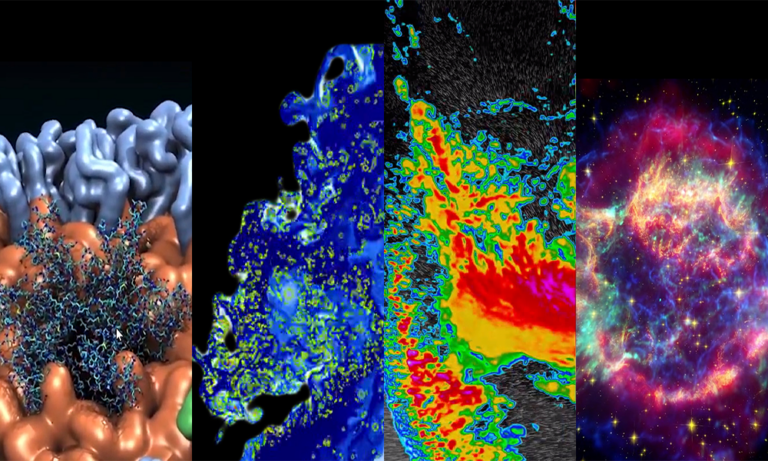 The latest NVIDIA HPC SDK includes a variety of tools to maximize developer productivity, as well as the performance, and portability of HPC applications.
 Creators and developers can now view their 3D content as it was meant to be experienced, in full immersive detail with NVIDIA Omniverse XR Remote for iPad.