Unreal Engine developers receive access to several NVIDIA updates. Our custom branch of Unreal Engine 4.27 (NvRTX) improves Deep Learning Super Sampling (DLSS), RTX Global Illumination (RTXGI), RTX Direct Illumination (RTXDI), and NVIDIA Real-Time Denoisers (NRD).
Custom RTX Branch of UE4.27 Drops, Global Illumination and Low Latency Solutions Level Up
Today, Unreal Engine developers receive access to several NVIDIA updates. Our custom branch of Unreal Engine 4.27 (NvRTX) improves Deep Learning Super Sampling (DLSS), RTX Global Illumination (RTXGI), RTX Direct Illumination (RTXDI), and NVIDIA Real-Time Denoisers (NRD). The Unreal Engine RTXGI plugin has been updated, making it easy to add the latest version of this global illumination SDK (1.1.40) to your game. And NVIDIA Reflex is now a standard feature in Unreal Engine 4.27. Details for each product are below.
NVIDIA has made it easy for game developers to add leading-edge technologies to their Unreal Engine (UE4) games by providing custom UE4 branches for NVIDIA technologies on GitHub. NvRTX 4.27 will shorten your development cycles and help make your games look even more stunning.
In NvRTX 4.27, RTX Direct Illumination (RTXDI) and NVIDIA Real-Time Denoisers (NRD) improved support for Metahuman hair. Deep Learning Super Sampling (DLSS) added softening capability to the sharpness slider, and provided a workaround for packaged builds not initializing DLSS on d3d11 devices. RTXGI increased the number of volumes supported in the indirect lighting pass from 6 to 12, made screen-space indirect lighting resolution adjustable through cvars, and supported blending of more than 2 volumes.
Leveraging the power of ray tracing, RTXGI provides scalable solutions to compute multi-bounce indirect lighting without bake times, light leaks, or expensive per-frame costs. RTXGI is supported on any DXR-enabled GPU, and is an ideal starting point to bring the benefits of ray tracing to your existing tools, knowledge, and capabilities.
As in the NvRTX update, this plugin update doubles the number of volumes supported in the indirect lighting pass, enables developers to adjust screen-space indirect lighting resolution, and supports the blending of more than 2 volumes.
Reflex (now available in Unreal Engine 4.27)
The NVIDIA Reflex SDK allows game developers to implement a low latency mode that aligns game engine work to complete just-in-time for rendering, eliminating the GPU render queue and reducing CPU back pressure in GPU-bound scenarios. As a developer, System Latency (click-to-display) can be one of the hardest metrics to optimize for. In addition to latency reduction functions, the SDK also features measurement markers to calculate both Game and Render Latency – great for debugging and in-game performance counters.
NVIDIA Reflex is now mainlined within UE4.27 and natively supported. To get started adding NVIDIA Reflex to your game, check out our easy step by step integration guide.
When using RAPIDS, practitioners can quickly accelerate data science workloads on NVIDIA GPUs, and with Saturn Cloud allows practitioners and enterprises to focus on solving their business challenges.
GPU-accelerated computing is a game-changer for data practitioners and enterprises, but leveraging GPUs can be challenging for data professionals. RAPIDS remediates these challenges by abstracting the complexities of accelerated data science through familiar interfaces. When using RAPIDS, practitioners can quickly accelerate data science workloads on NVIDIA GPUs, reducing operations like data loading, processing, and training from hours to seconds.
Managing large-scale data science infrastructure presents significant challenges. With Saturn Cloud, managing GPU-based infrastructure is made easier, allowing practitioners and enterprises to focus on solving their business challenges.
What is Saturn Cloud?
Saturn Cloud is an end-to-end platform that makes Python-based data science accessible with scalable computing resources in the cloud. Saturn Cloud offers an easy path to moving to the cloud with no cost, setup, or infrastructure work. This includes access to GPU-equipped computing resources with pre-built environments that include tools like RAPIDS, PyTorch, and TensorFlow.
Users are able to write their code in a hosted JupyterLab environment or connect their own IDE (integrated development environment) using SSH. As their data sizes increase, users can scale up to a GPU-enabled Dask cluster to execute code across a distributed network of machines. After a data pipeline, model, or dashboard is developed, users can deploy it to a persistent location or create a job to run it on a schedule.
Figure 1: Saturn Cloud provides a Python-based platform for large-scale data science.
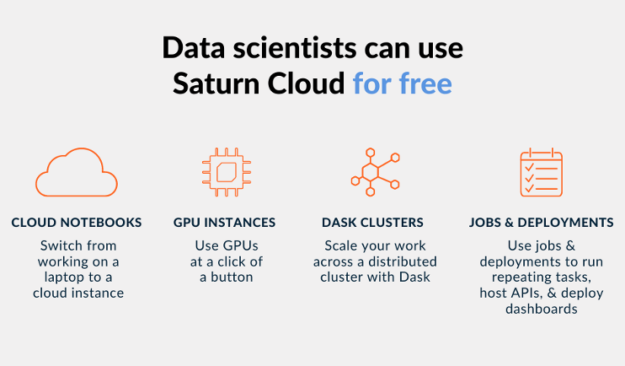
In addition to Saturn Cloud’s enterprise offering, Saturn Cloud also provides hosted offerings where anyone can get started with GPU-accelerated data science for free. The Hosted Free plan includes 10 hours of a Jupyter workspace and 3 hours of a Dask cluster per month. If you want more resources, you can upgrade to the Hosted Pro plan and pay as you go.
Figure 2: Users have access to notebooks, GPUs, clusters, and scheduling tools on Saturn Cloud Hosted.
Saturn Cloud provides an easy-to-use platform for GPU-accelerated data science applications. With this platform, GPUs become a core component of the everyday data science stack.
Get started with RAPIDS on Saturn Cloud
You can quickly get going with RAPIDS after creating a free account on Saturn Cloud Hosted. In this section, we show how Saturn Cloud can be used to train a machine learning model on New York taxi data using RAPIDS. We then go further and run RAPIDS on a Dask cluster. By combining RAPIDS and Dask, you can use a network of multi-node GPU systems to train a model far faster than with a single GPU.
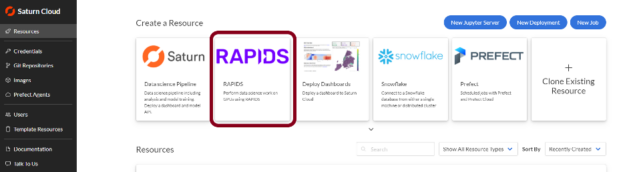
After creating your free account on Saturn Cloud Hosted, open the service and go to the “Resources” page. From there, look at the premade resource templates and click the one labeled RAPIDS.
Figure 3: Saturn Cloud has pre-configured RAPIDS images to ease getting started with GPUs.
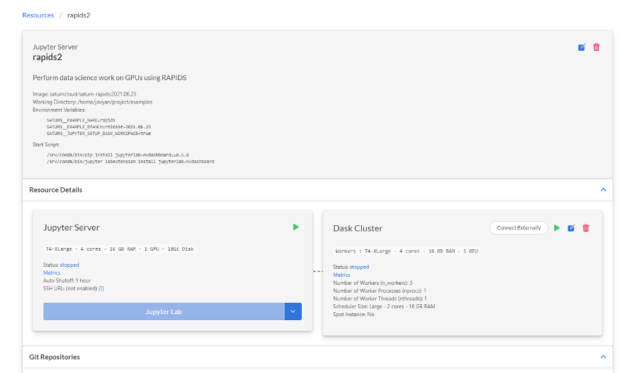
You will be taken to the newly created resource. Everything is already set up for you here to run your code on GPU hardware, with a Docker image that has all the necessary Python and RAPIDS packages installed.
Figure 4: Saturn Cloud sets up a RAPIDS-equipped Jupyter server and Dask cluster.
Common PyData packages such as NumPy, SciPy, pandas, and scikit-learn
Click the play button on the “Jupyter Server” and “Dask Cluster” cards to start your resources. Now your cluster is ready to go; follow along to see how a GPU can significantly speed up model training time.
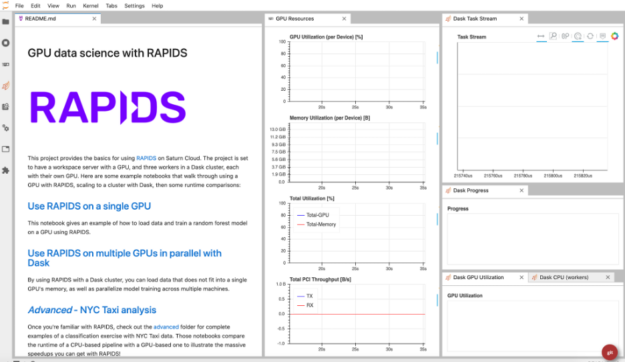
Figure 5: Pre-built RAPIDS environment with single and multi-GPU backends.
Train a random forest model with RAPIDS
For this exercise, we will use the NYC Taxi dataset. We will load a CSV file, select our features, then train a random forest model. To illustrate the runtime speedups we can achieve using RAPIDS on a GPU, we’ll first use traditional CPU-based PyData packages like pandas and scikit-learn.
Our machine learning model answers the question:
> Based on characteristics that can be known at the beginning of a trip, will this trip result in a high tip?
The dependent variable here is the “tip percentage”, or the dollar amount of the tip divided by the dollar amount of the ride cost. We’ll use pickup destination, drop-off destination, and the number of passengers as independent variables.
To follow along, you can copy the code chunks below into a new notebook in the Saturn Cloud JupyterLab interface. Alternatively, you can download the entire notebook here. First, we’ll set up a context manager to time different portions of the code:
 from time import time
 from contextlib import contextmanager

 times = {}

 @contextmanager
 def timing(description: str) -> None:
        start = time()
        yield
        elapsed = time() - start
        times[description] = elapsed
        print(f"{description}: {round(elapsed)} seconds")
Then we will pull a CSV file down from the NYC Taxi S3 bucket. Note that we could read the file directly from S3 into a dataframe. However, we want to separate network IO time from processing time on the CPU or GPU, and in case we want to run this step with modifications dozens of times, we won’t have to incur the network cost multiple times.
Before we get to the GPU part, let’s see how this would look with traditional PyData packages such as pandas and scikit-learn that use the CPU for computations.
 import pandas as pd
 from sklearn.ensemble import RandomForestClassifier as RFCPU

 with timing("CPU: CSV Load"):
        taxi_cpu = pd.read_csv(
        "data.csv",
        parse_dates=["tpep_pickup_datetime", "tpep_dropoff_datetime"],
        )

 X_cpu = (
        taxi_cpu[["PULocationID", "DOLocationID", "passenger_count"]]
        .fillna(-1)
 )
 y_cpu = (taxi_cpu["tip_amount"] > 1)

 rf_cpu = RFCPU(n_estimators=100, n_jobs=-1)

 with timing("CPU: Random Forest"):
        _ = rf_cpu.fit(X_cpu, y_cpu)
The CPU code will take a few minutes, so go ahead and open a new notebook for the GPU code. You’ll notice that the GPU code looks almost identical to the CPU code, except we’re swapping out `pandas` for `cudf` and `scikit-learn` for `cuml`. The RAPIDS packages resemble typical PyData packages on purpose, making it as easy as possible to enable your code to run on GPUs!
 import cudf
 from cuml.ensemble import RandomForestClassifier as RFGPU

 with timing("GPU: CSV Load"):
        taxi_gpu = cudf.read_csv(
        "data.csv",
        parse_dates=["tpep_pickup_datetime", "tpep_dropoff_datetime"],
        )

 X_gpu = (
        taxi_gpu[["PULocationID", "DOLocationID", "passenger_count"]]
        .astype("float32")
        .fillna(-1)
 )
 y_gpu = (taxi_gpu["tip_amount"] > 1).astype("int32")

 rf_gpu = RFGPU(n_estimators=100)

 with timing("GPU: Random Forest"):
        _ = rf_gpu.fit(X_gpu, y_gpu)
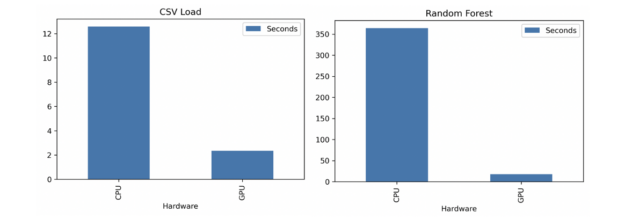
You should have been able to copy this into a new notebook and execute the whole thing before the CPU version finished. Once that’s done, check out the difference in the runtimes of each.
With the CPU, CSV loading took 13 seconds while random forest training took 364 seconds (6 minutes). With the GPU, CSV loading took 2 seconds while random forest training took 18 seconds. That’s 7x faster CSV loading and 20x faster random forest training.
Figure 6: RAPIDS + Saturn Cloud help users solve their challenges instead of waiting on processes.
Using RAPIDS + Dask for your big data problems
While a single GPU is powerful enough for many use cases, modern data science use cases often benefit from increasingly large datasets to generate more accurate and profound insights. Many use cases require scale-out infrastructure consisting of multiple GPUs or nodes to churn through workloads. RAPIDS pairs well with Dask to support scaling out to large GPU clusters.
With Saturn Cloud, you can connect to a GPU-powered Dask cluster from the same project we were using earlier. Then, to utilize Dask on GPUs, you would swap out the cudf package for dask_cudf for loading data, and use the cuml.dask submodule for machine learning. Notice now that we’re using glob syntax with dask_cudf.read_csv to load in data for all of 2019, rather than a single month as we did previously. This processes approximately 12x the amount of data as our previous example but only takes 90 seconds with the GPU cluster.
Make Accelerated Data Science Easy with RAPIDS and Saturn Cloud
This example showed how easy it is to accelerate your data science workloads with RAPIDS on a GPU or a GPU Dask cluster. Using RAPIDS can increase training times by an order of magnitude, which can help you iterate your models more quickly. With Saturn Cloud, you can spin up Jupyter Notebooks, Dask clusters, and other cloud resources right when you want them.
To get started with GPUs on Saturn Cloud, create a free account here and see what the power of accelerated compute can bring to your data science workloads.
AI has transformed synthesized speech from the monotone of robocalls and decades-old GPS navigation systems to the polished tone of virtual assistants in smartphones and smart speakers. But there’s still a gap between AI-synthesized speech and the human speech we hear in daily conversation and in the media. That’s because people speak with complex rhythm, Read article >
Promising more accurate predictions in an era of rapid climate change, a new tool is harnessing deep learning to help better forecast Arctic sea ice conditions months into the future. As described in a paper published in the science journal Nature Communications Thursday, the new AI tool, dubbed IceNet, could lead to improved early-warning systems Read article >
I have implemented a simple helper module to code layers easier. It has embedding layers, layer normalization, multi-head attention and an Adam optimizer implemented from ground up. I may have made mistakes and not followed JAX best practices since I’m new to JAX. Let me know if you see any opportunities for improvement.
Hello, I’m training a segmentation model and it ends up freezing in the middle of training with no error. Running on a google cloud dedicated notebook with 2 GPUs (not COLAB), about 900 training images and it freezes in the middle of the ~30th epoch. For context it’s taking ~1.5 min per epoch with a batch size of 1 until it slows down and freezes. Wondering if this is a problem with google cloud cutting out or if I’m running out of room on my GPUs? I also included the resizing of the images and normalization of from 0-255 to 0-1 in the sequential model, can remove that if it is causing an issue but I doubt that’s the problem. Any advice very welcome, not finding much on SO or here. Cheers!
In order to better understand the human body for videos and images, pose detection is a critical step. Currently, many of us have tried 2D pose estimation with support from existing models.
Tensorflow just launched their first 3D model in TF.js pose-detection API. An increasing interest from the TensorFlow.js community in 3D pose estimation has been seen, which opens up new design opportunities for applications such as fitness, medical and motion capture among many others. A great example of this is using 3D motion to drive a character animation on your browser.
The community demo uses multiple models powered by MediaPipe and TensorFlow.js (namely FaceMesh, BlazePose, Hand Pose). It even works without app installation since a webpage is all you need to enjoy the experience.
In March, a 28-car freight train derailment in Gibbons, Neb., forced Union Pacific to shut down three rail lines, delaying shipments nationwide for up to 48 hours and costing it millions as its rail network slowed down substantially. Fortunately, no one was injured. Duos Technologies, based in Jacksonville, Fla., says its NVIDIA GPU-accelerated AI railcar Read article >
This NVIDIA Inception Spotlight features Resemble AI, a new generative voice technology startup able to create high-quality synthetic AI voices.
Deep learning is proving to be a powerful tool when it comes to high-quality synthetic speech development and customization. A Toronto-based startup, and NVIDIA Inception member, Resemble AI is upping the stakes with a new generative voice tool able to create high-quality synthetic AI Voices.
The technology can generate cross-lingual and naturally speaking voices in over 50 of the most popular languages, and with Resemble Fill, users can create programmatic audio and edit and replace words for audio clips.
The ability to build, deploy, and scale realistic AI voices stands to help a multitude of industries. The wide-ranging applications span from creating AI-generated text for advertisements, to interactive voice response systems, to video game development.
Since July 2020, the Resemble AI team has worked closely with the conversational AI team at NVIDIA to integrate the NVIDIA Riva multimodal conversational AI SDK into their speech pipeline. According to Resemble AI Founder and CEO, Zohaib Ahmed, the experience gave them unique insights into the entire conversational AI pipeline.
“The NVIDIA Inception Program has been helpful with providing key insights into the conversational AI space, as well as technical support on recommending GPU compute for every workload that we have as a product,” Ahmed said.
For training their speech models and inference, the team is using Amazon Elastic Kubernetes service (Amazon EKS) with clusters of NVIDIA T4 GPUs. They then use the NVIDIA Triton Inference Server to deploy their trained AI models at scale in production.
A recent demo of Resemble AI synthetic speech integrated with NVIDIA Omniverse Audio2Face showcases how the combined technology can create expressive facial animations and voices from a single audio source.
“Audio2Face is a good example of a powerful tool that can be combined easily with generative AI speech to produce results in seconds, which otherwise would take days,” Ahmed said.
The companyhas grown to host over 150,000 users, building over 60,000 voices. To date,Resemble AI has over 240 paying customers in various industries including telecommunication, finance, contact centers, education, gaming, and media and entertainment.
Do you have a startup? Join NVIDIA Inception’s global network of over 8,500 startups.

 Unreal Engine developers receive access to several NVIDIA updates. Our custom branch of Unreal Engine 4.27 (NvRTX) improves Deep Learning Super Sampling (DLSS), RTX Global Illumination (RTXGI), RTX Direct Illumination (RTXDI), and NVIDIA Real-Time Denoisers (NRD).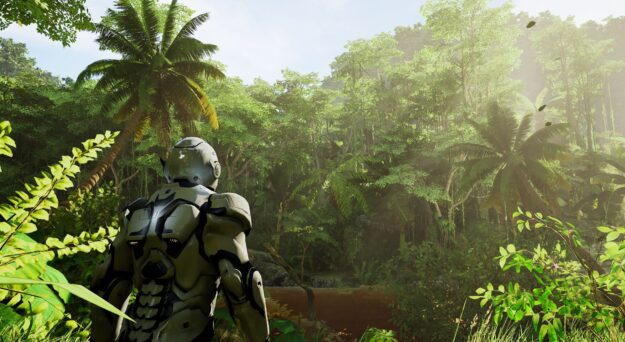
 When using RAPIDS, practitioners can quickly accelerate data science workloads on NVIDIA GPUs, and with Saturn Cloud allows practitioners and enterprises to focus on solving their business challenges.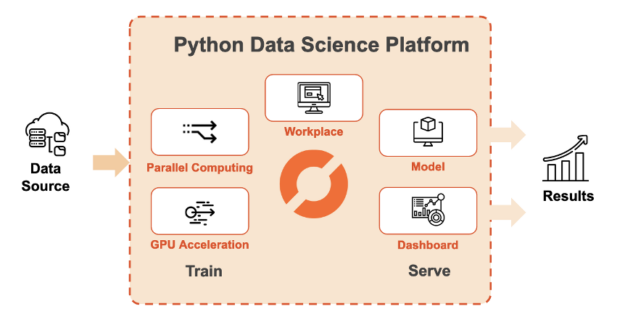


 This NVIDIA Inception Spotlight features Resemble AI, a new generative voice technology startup able to create high-quality synthetic AI voices.