Categories
Misc

“ValueError: cannot reshape array of size 278540 into shape (256,128,3,3)” Conversion YOLOv3 .weights to .pb

I have trained a YOLO v3 Object Detection Model. To incorporate into my flutter application I am trying to convert it to .tflite, with .pb needed as intermediate. I am getting this error with every github repo I have tried. (A few linked below)

Error: ValueError: cannot reshape array of size 278540 into shape (256,128,3,3)

Following is what my classes.names file looks like:

upstairs

downstairs

I have just 2 classes. I am unable to convert. Can someone please help?

Link to my weights and config file:

A few repos that I have tried:

submitted by /u/mishaalnaeem
[visit reddit] [comments]

Categories
Misc

Adding value rules to a tf model(noob)

Hello all

TLDR: 4 columns in df, sequential model, LSTM, how to add rule column a > column b for all a,b, and get a return for all 4 columns

Thanks for your help in advance.

I’m working on a sequential model. In python. Pretty much teaching myself as I go so I apologize for any incorrect jargon or naïveté.

Assume we have a list of families histories with family members weights x each in column, heaviest to lightest.

Ie Generation. Heaviest. Med heavy. Med light. Lightest

  1. 275. 225. 180. 145
  2. 300. 250. 225. 165

I have tried two approaches to guess the weights of the next generation. I have 100 generations to iterate over.

The first approach is to just feed the whole df into tf sequential model with lstm. Now maybe I don’t understand exactly what’s happening when I do that, which I don’t, but it returns a single value, not 4. (And I’m not sure it knows that column ‘heaviest’ >’lightest’ for all generations.) So as a work around I thought oh, just split it up and pass each column through its own model and then look at the values. I’m obviously loosing way to many connections because I’m only using 25% of the data at a time and the results are well, not ordered really.

So my long short question is……. if I pass the entire 4 column df, and I want tf to guess each value of the next generation, what do I need to add to force it to guess all 4? And is there a way to simply pass a rule I already know about the data?

submitted by /u/obibongcannobi
[visit reddit] [comments]

Categories
Misc

The Roaring 20+: GFN Thursday Game Releases Include Biomutant, Maneater, Warhammer Age of Sigmar: Storm Ground and More

GFN Thursday comes roaring in with 22 games and support for three DLCs joining the GeForce NOW library this week. Among the 22 new releases are five day-and-date game launches: Biomutant, Maneater, King of Seas, Imagine Earth and Warhammer Age of Sigmar: Storm Ground. DLC, Without the Download GeForce NOW ensures your favorite games are Read article >

The post The Roaring 20+: GFN Thursday Game Releases Include Biomutant, Maneater, Warhammer Age of Sigmar: Storm Ground and More appeared first on The Official NVIDIA Blog.

Categories
Misc

NVIDIA Announces Financial Results for First Quarter Fiscal 2022

NVIDIA today reported record revenue for the first quarter ended May 2, 2021, of $5.66 billion, up 84 percent from a year earlier and up 13 percent from the previous quarter, with record revenue from the company’s Gaming, Data Center and Professional Visualization platforms.

Categories
Misc

Most computational efficient way for list of random numbers in Tensroflow given a list of maxiumum values like in `np.random.randint`

For np.random.randint, you can input a list of maximum values, and get a list of random ints from 0 to those maximum values.

np.random.randint([1, 10, 100, 1000] ) >array([ 0, 7, 31, 348]) 

Tensorflow tf.random.uniform doesn’t allow lists for maxval, so you need to either create a statement for each, or run a loop. I was wondering if there was more elegant way to get these random numbers.

submitted by /u/PrudentAlternative10
[visit reddit] [comments]

Categories
Misc

Error Converting Image to Luma channel

I’m trying to convert an RGB image into the luma channel, similar to how it is done in PIL, but I cannot find a good way to do this.

I have tried with tensorflow_io and the values are incorrect.

with tensorflow_io

img_file = tf.io.read_file(“./img/img.jpg”) img = tf.image.decode_jpeg(img_file, channels=3) luma = tfio.experimental.color.rgb_to_ycbcr(img)[:,:,0] luma.numpy() “”” Value: array([[ 22, 22, 22, …, 21, 21, 21], [ 22, 22, 22, …, 21, 21, 21], [ 22, 22, 22, …, 21, 21, 21], …, [159, 159, 156, …, 51, 48, 48], [158, 158, 158, …, 50, 46, 46], [226, 226, 227, …, 230, 231, 231]], dtype=uint8) “””

with PIL

im = Image.open(“./img/img.jpg”) im = im.convert(“L”) np.asarray(im) “”” Value: array([[ 8, 8, 8, …, 6, 6, 6], [ 8, 8, 8, …, 6, 6, 6], [ 8, 8, 8, …, 6, 6, 6], …, [168, 167, 165, …, 41, 38, 38], [167, 167, 167, …, 42, 37, 37], [246, 246, 247, …, 251, 253, 253]], dtype=uint8) “””

Am I doing something wrong here?

submitted by /u/potato-sword
[visit reddit] [comments]

Categories
Misc

Make a Digital Twin of your Data Center with SONiC running on NVIDIA Air

We have made it incredibly easy to try-out a full multi-switch network fabric using the Microsoft SONiC operating system – in a virtual data center that is available to anyone free of charge.

Testing out new network gear and running proof of concept (POC) tests for new technology can be difficult at the best of times, but in today’s environment, it’s even harder. We have made it incredibly easy to try-out a full multi-switch network fabric using the Microsoft SONiC operating system – in a virtual data center that is available to anyone free of charge.

Data centers serve a crucial role in business growth and organizations aim to adopt the emerging open networking mindset to enable flexibility to suit their unique business needs and operations.

For an open networking data center to occur, IT departments need to train their staff to plan their networking core replacement and predict future challenges in a relatively short time.

NVIDIA supports “Pure SONiC”, a fully open-source version of SONiC. The Pure SONiC NOS would be ideal for IT departments who don’t want to have another proprietary NOS and want to have full control and flexibility in their data center. Being one of the most significant contributors to “SONiC”, NVIDIA has launched the “SONiC Air” platform to support organizations before a transition using a digital twin and provide an entire network experience. 

What’s Supported?

  • Full CLI and API functionality
  • Control plane software including BGP, VLANs and containers
  • Automation and Zero Touch Provisioning (ZTP)
  • Network monitoring with streaming telemetry
  • Interop testing between NVIDIA Cumulus Linux and SONiC
  • Custom topologies and network designs

Using “SONiC Air” enables flexibility in the evaluation process, eliminating the limitations of having a small POC that is not representative of the production environment. Staff can use the platform for free, build an exact network digital twin, validate configurations, confirm security policies or test CI/CD pipelines. In addition to CLI access, the platform provides full software functionality and access to the system core components such as docker containers and APIs. On the other hand, since the platform is software-based it doesn’t support hardware features like “What Just Happened”, to let the end-user know why the ASIC has dropped a packet and assist in troubleshooting.

Beyond POCs, with NVIDIA Air, customers can build a tailor-made network topology, define any connectivity, and create configurations and automation for the initial deployment and ongoing operations, before any hardware even ships. Today’s customers are building their entire network with a digital twin and enabling services the same day equipment is installed.

Planning

Organizations who choose to define their workflow pipelines in advance can dramatically reduce the transition time to an open networking product deployed and fully operational in their production environment and save on both CapEx and OpEx in the long term.

Organizations can use NVIDIA Air for end-to-end evaluation and testing, combining the network,servers and applications. NVIDIA Air not only supports SONiC and Cumulus Linux on the network but also Ubuntu and Red Hat servers. Leveraging Infrastructure As Code, the platform supports integration with production’s CI/CD pipeline and version control repository to test the integrations and build the code for their future production environment. 

Staff training 

Training resources are always a challenge for IT departments. With the use of NVIDIA Air, IT teams can now give every team member their own private replica of the production environment to learn on. No more waiting for hardware resources to be racked and stacked or balancing limited lab time across multiple users

Get started

Customers who want to try SONiC in NVIDIA Air can watch the “SONiC experience” on-demand, hands-on workshop to help them get started. The workshop covers the basics of SONiC architecture, configuration and troubleshooting. We demystify the SONiC microservices architecture and highlight the different configuration approaches available in SONiC. The hands-on lab provides a step-by-step guide to build and configure a leaf-spine SONiC network from the ground up.

Links

Categories
Misc

NVIDIA Announces Financial Results for First Quarter Fiscal 2022

NVIDIA today reported record revenue for the first quarter ended May 2, 2021, of $5.66 billion, up 84 percent from a year earlier and up 13 percent from the previous quarter, with record revenue from the company’s Gaming, Data Center and Professional Visualization platforms.

Categories
Misc

Cyber Security Analysis – Beginner’s Guide to Processing Security Logs in Python

This is the last installment of the series of articles on the RAPIDS ecosystem with this being the ninth installment. The series explores and discusses various aspects of RAPIDS that allow its users solve ETL (Extract, Transform, Load) problems, build ML (Machine Learning) and DL (Deep Learning) models, explore expansive graphs, process signal and system … Continued

This is the last installment of the series of articles on the RAPIDS ecosystem with this being the ninth installment. The series explores and discusses various aspects of RAPIDS that allow its users solve ETL (Extract, Transform, Load) problems, build ML (Machine Learning) and DL (Deep Learning) models, explore expansive graphs, process signal and system log, or use SQL language via BlazingSQL to process data.

Today’s interconnected world makes us more vulnerable to cyber attacks: ever-present IoT devices record and listen to what we do, spam and phishing emails threaten us every day, and attacks on networks that steal data can lead to serious consequences. These systems produce terabytes of logs full of information that can help detect and protect vulnerable systems. Estimating on the conservative side, a medium-sized company with hundreds to thousands of interconnected devices can produce upwards of 100GB of log files per day. Also, the rate of events that get logged can reach levels counted in tens of thousands per second.

CLX (pronounced clicks) is part of the RAPIDS ecosystem that accelerates the processing and analysis of cyber logs. As part of RAPIDS, it builds on top of RAPIDS DataFrames cuDF, and further extends the capabilities of the RAPIDS ML library cuML by tapping into the latest advances in natural language processing field to organize unstructured data and build classification models.

 The previous posts in the series showcased other areas:

In this post, we introduce CLX. To help with getting familiar with CLX, we also published a cheat sheet that can be downloaded here CLX-cheatsheet, and an interactive notebook with all the current functionality of CLX showcased here.

Cybersecurity

With the advent of personalized computers, the adversarial games shifted from pure reconnaissance missions and traditional warfare to interrupting the computer systems of one’s enemy. The organizations like the National Security Agency (NSA) are full of scientists of various backgrounds that daily try to keep our national networks safe so an adversary cannot access the power grid or our banking system. At this level stakes are exceedingly high as are the defense mechanisms to prevent such attacks.

Personal computers or business networks are a different measure: while an attack on a single computer or a network might not cripple or otherwise threaten the well-being of citizens, it can have profound effects on one person’s or a business’s finances and/or future opportunities.

Many of these attacks leave a trace, a breadcrumbs trail of information that can help a business detect an attack so it can defend itself against it. After all, any attack that compromises the ability of a company to conduct a business as usual leads to lost productivity. Worse yet, if an attacker gains access to and steals intellectual property, it may cripple or completely ruin such a business.

However, how can a business that generates upwards of 100GB per day of logs keep up with all this data flood?

cyBERT

Historically, the approach was to parse the logs using Regex. And while we’re big fans of Regex per se, such an approach becomes impractical if a business needs to maintain thousands of different patterns for every single type of a log such a business collects. And that’s where it all begins: in order to detect attacks on our network we need data, and in order to get data we need to parse logs. Without data we cannot train any machine learning model. No other way around it.

BERT (or Bi-directional Encoder Representations from Transformers) model is a deep neural network introduced by Google to build a better understanding of natural language. Unlike previous approaches for solving problems in the NLP field that relied on recurrent network architectures (like LSTM – Long Short-Term Memory), the BERT model is a feed-forward network that learns the context of a word by scanning a sentence in both directions. Thus, BERT would produce a different embedding (or numerical representation) for similarly sounding sentences, like ‘She is watching TV’ and ‘She is watching her kids grow’.

In the context of cybersecurity logs, such embedding can be helpful to distinguish between IP addresses, network endpoints, ports, or free flow comments or messages. In fact, by using BERT embeddings one can train a model to detect such entities. Enter cyBERT!

cyBERT is an automatic tool to parse logs and extract relevant information. To get started, we just need to load the model we intend to use:

cybert = Cybert()
cybert.load_model(
      'pytorch_model.bin'
    , 'config.json'
)

The pytorch_model.bin is a PyTorch model that was trained to recognize entities from Apache WebServer logs; it can be downloaded from the models.huggingface.co/bert/raykallen/cybert_apache_parser S3 bucket. In the same bucket we can find the config.json file.

Once we have the model loaded, CyBERT will utilize the power of NVIDIA GPUs to parse the logs at rapid speed to extract the useful information and produce a structured representation of the log information. The API makes it really simple.

logs_df = cudf.read_csv(‘apache_log.csv')
parsed_df, confidence_df = cybert.inference(logs_df["raw"])

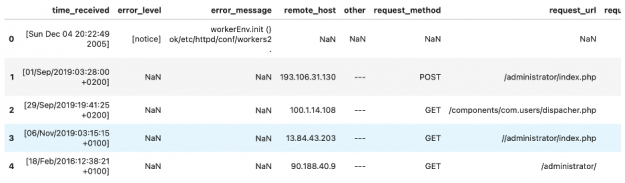
The first dataframe returned contains all the parsed fields from the logs.

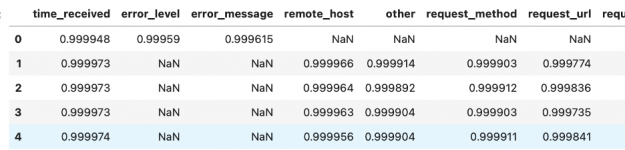
while the confidence_df DataFrame outlines how confident the CyBERT model is about each extracted piece of information.

As you can see the model is pretty confident and a glimpse at the data confirms that the extracted information matches the column name.

Want to try other functionality of CLX or simply run through the above examples? Go to the CLX cheatsheet here!

Categories
Misc

NVIDIA Deep Learning Institute Announces Public Workshop Summer Schedule

NVIDIA DLI Summer WorkshopsWorkshops are conducted live in a virtual classroom environment with expert guidance from NVIDIA-certified instructors.NVIDIA DLI Summer Workshops

Training for Success

Continuing its popular public workshop series, the NVIDIA Deep Learning Institute (DLI) released the schedule for June, July, and August of 2021. These workshops are conducted live in a virtual classroom environment with expert guidance from NVIDIA-certified instructors. Participants have access to fully configured GPU-accelerated servers in the cloud to perform hands-on exercises. 

Learning new and advanced software development skills is vital to staying ahead in a competitive job market. DLI offers a comprehensive learning experience on a wide range of important topics in AI, data science, and accelerated computing. Gain hands-on experience with the most widely used, industry-standard software, tools, and frameworks. Successful completion of the course and assessment earns an NVIDIA certificate of competency.

Among the workshops scheduled are two new courses: Accelerating Data Engineering Pipelines and Building Conversational AI Applications

To register, visit our website. Space is limited so we encourage you to sign up early.

Here is our current public workshop schedule:

June

Fundamentals of Accelerated Data Science
Tue, June 22, 9:00 a.m. to 5:00 p.m. CEST (EMEA)
Wed, June 23, 9:00 a.m. to 5:00 p.m. PDT (NALA)

Building Intelligent Recommender Systems
Wed, June 23, 9:00 a.m. to 5:00 p.m. CEST (EMEA)
Thu, June 24, 9:00 a.m. to 5:00 p.m. PDT (NALA)

July

Accelerating Data Engineering Pipelines
Tue, July 6, 9:00 a.m. to 5:00 p.m. CEST (EMEA)
Tue, July 13 9:00 a.m. to 5:00 p.m. PDT (NALA)

Building Transformer-Based Natural Language Processing Applications 
Wed, July 7, 9:00 a.m. to 5:00 p.m. CEST (EMEA)

Fundamentals of Accelerated Computing with CUDA Python
Wed, July 14, 9:00 a.m. to 5:00 p.m. PDT (NALA)

August

Building Conversational AI Applications
Tue, August 24, 9:00 a.m. to 5:00 p.m. PDT (NALA)
Tue, August 31, 9:00 a.m. to 5:00 p.m. CEST (EMEA)

Fundamentals of Deep Learning
Wed, August 25, 9:00 a.m. to 5:00 p.m. PDT (NALA)

Fundamentals of Accelerated Computing with CUDA Python
Thu, August 26, 9:00 a.m. to 5:00 p.m. CEST (EMEA)

Visit the DLI website for details on each course and the full schedule of upcoming instructor-led workshops, which is regularly updated with new training opportunities.

For more information, email nvdli@nvidia.com.