Categories
Misc

Edge Computing is Essential to Building Smarter and Safer Spaces

A new generation of AI applications at the edge is driving incredible operational efficiency and safety gains across a broad range of spaces. Read how the power of AI and edge computing is critical to building smarter and safer spaces.

In an increasingly complex world, the need to automate and improve operational efficiency and safety in our physical spaces has never been greater. Whether it is streamlining the retail experience, tackling traffic congestion in our growing cities, or improving productivity in our factories—the power of AI and edge computing is critical. 

Video cameras are one of the most important IoT sensors. With approximately 1 billion cameras deployed worldwide, they generate a wealth of data that, when combined with AI-enabled perception and reasoning, is key to transforming ordinary areas into smart spaces. 

As the number of IoT sensors grows, more data is getting generated in remote edge locations. Sending data from sensors at the edge to data centers is extremely costly. However, data movement is critical for the successful operation of AI applications, which means that these applications are susceptible to high costs and latency when processing through the cloud. Sending the data to data centers is not ideal in contexts where every second counts, such as managing real-time traffic or addressing medical emergencies.

This leads us to edge computing, a distributed computing model that allows computing to take place near the sensor where data is being collected and analyzed.

Edge computing is the technology that powers edge AI, an architecture that processes the sensor data with deep learning algorithms close to the sensors generating the data. Edge AI enables any device or computer to process data and make decisions in real-time with minimal latency. Hence, edge computing is essential for real-time applications that require low latency to enable quick responses. Examples include spotting obstacles on rail lines, inspecting defects on fast moving assembly lines, or detecting patient falls in hospitals.

By bringing AI processing tasks closer to the source, edge computing overcomes issues that can occur with cloud computing, like high latency and compromised security. Some advantages of edge computing are:

  • Reduced latency: Bringing AI and computing power to where data is generated, rather than collecting and uploading data to a data center, minimizing latency. This responsiveness is critical for the successful execution of real-time applications.
  • Improved security: Allowing data to be processed locally reduces the need to send sensitive data over networks. With edge computing, data doesn’t need to leave the sensor, making it possible for the data to remain private. 
  • Minimized expenses: Moving AI processing to the edge is cost efficient. Entities only need to send highly valuable data to the data center and process everything else locally—saving on costs associated with bandwidth and data storage. 
  • Enhanced range: Processing data without needing internet access enables applications to run in previously inaccessible, remote locations.

Use Cases of Edge Computing for Smart Cities

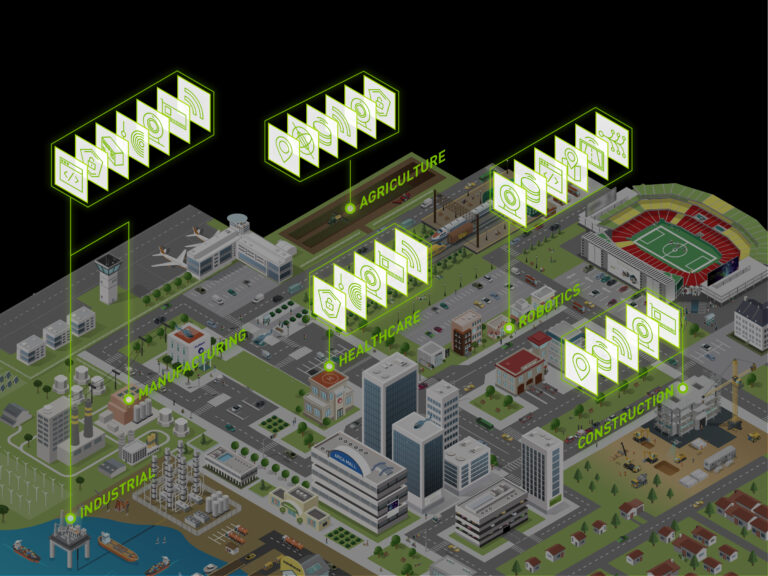
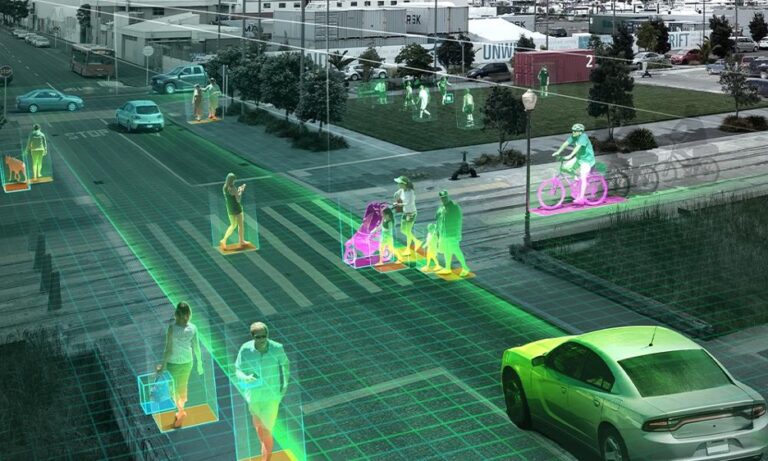
Cities, school campuses, and shopping malls are several of many places that have started to use AI at the edge to transform themselves into smart spaces. From traffic management to city planning, these entities are using AI to make their spaces more efficient, accessible, and safe. 

The following examples illustrate how edge computing has been used to transform operations and improve safety around the world. 

To reduce traffic congestion
Nota developed a real-time traffic control solution that uses edge computing and computer vision to identify traffic volume, analyze congestion, and optimize traffic signal controls at intersections. Nota’s solutions are used by cities to improve traffic flow, saving them traffic congestion-related costs and minimizing the amount of time drivers spend in traffic. [Read more]

To assess and avoid operational hazards in cities
Viisights helps manage operations within Israel’s cities. Viisights’ edge computing application assists city officials in identifying and managing events in densely populated areas. Its real-time detection of behavior helps officials predict how quickly an event is growing and determine if there is reason for alarm or a need to take action. [Read more]

To revolutionize the retail industry
Many retail stores and distribution centers use edge computing and computer vision to bring real-time insights to retailers, enabling them to protect their assets and streamline distribution system processes. The technology can help retailers grow their top line with efficiencies that can improve retailers’ net profit margins. [Read more]

To save lives at beaches
Sightbit developed an image detection application that helps spot dangers at beaches. Speed is very critical in these life or death situations which is why processing is done at the edge. The system detects potential dangers such as rip currents, or hazardous ocean conditions allowing authorities to enact life-saving procedures. [Read more]

To improve airline and airport operation efficiency
Airports around the world are partnering with ASSAIA to use edge computing to improve turnaround times and reduce delays. ASSAIA’s AI-enabled video analytics application produces insights that help airlines and airports make better and quicker decisions around capacity, sustainability, and safety. [Read more]

A new generation of AI applications at the edge is driving incredible operational efficiency and safety gains across a broad range of spaces. Download this free e-book to learn how edge computing is helping build smarter and safer spaces around the world.

Categories
Misc

Soar into the Hybrid-Cloud: Project Monterey Early Access Program Now Available to Enterprises

Modern workloads such as AI and machine learning are putting tremendous pressure on traditional IT infrastructure. Enterprises that want to stay ahead of these changes can now register to participate in an early access of Project Monterey, an initiative to dramatically improve the performance, manageability and security of their environments. VMware, Dell Technologies and NVIDIA Read article >

The post Soar into the Hybrid-Cloud: Project Monterey Early Access Program Now Available to Enterprises appeared first on The Official NVIDIA Blog.

Categories
Misc

Building NVIDIA GPU-Accelerated Pipelines on Azure Synapse Analytics with RAPIDS

Azure recently announced support for NVIDIA’s T4 Tensor Core Graphics Processing Units (GPUs) which are optimized for deploying machine learning inferencing or analytical workloads in a cost-effective manner. With Apache Spark™ deployments tuned for NVIDIA GPUs, plus pre-installed libraries, Azure Synapse Analytics offers a simple way to leverage GPUs to power a variety of data … Continued

Azure recently announced support for NVIDIA’s T4 Tensor Core Graphics Processing Units (GPUs) which are optimized for deploying machine learning inferencing or analytical workloads in a cost-effective manner. With Apache Spark™ deployments tuned for NVIDIA GPUs, plus pre-installed libraries, Azure Synapse Analytics offers a simple way to leverage GPUs to power a variety of data processing and machine learning tasks. With built-in support for RAPIDS acceleration, the Azure Synapse version of GPU-accelerated Spark offers at least 2x performance gain on standard analytical benchmarks compared to running on CPUs, all without any code changes.
Currently, this GPU acceleration feature in Azure Synapse is available for private preview by request.

Benefits of NVIDIA GPU acceleration

NVIDIA GPUs offer extraordinarily high compute performance, bringing parallel processing to multi-core servers to accelerate demanding workloads. A CPU consists of a few cores optimized for sequential serial processing, whereas. On the other hand, a GPU has a massively parallel architecture consisting of thousands of smaller and more efficient cores designed to handle multiple tasks simultaneously. Considering that data scientists spend up to 80% of their time on data pre-processing, GPUs are a critical tool to accelerate data processing pipelines compared to relying on pipelines containing CPUs alone.

One of the most efficient and familiar ways to build these pipelines is using Apache Spark™. The benefits of NVIDIA GPU acceleration in Apache Spark™ include:

  • Faster to complete data processing, queries, and model training, which grants accelerated iteration and time to insight.
  • The same GPU-accelerated infrastructure is helpful to eliminate the need for complex decision-making and tuning for both Spark and ML/DL frameworks.
  • Fewer compute nodes are required; reducing infrastructure cost and potentially helping avoid scale-related problems.

NVIDIA and Azure synapse collaboration

NVIDIA and Azure Synapse have teamed up to bring GPU acceleration to data scientists and data engineers. This integration will give customers the freedom to use NVIDIA GPUs for Apache Spark™ applications with no-code changes and with an experience identical to a CPU cluster. In addition, this collaboration will continue to add support for the latest NVIDIA GPUs and networking products and provide continuous enhancements for big data customers who are looking to improve productivity and save costs with a single pipeline for data engineering, data preparation, and machine learning.

To learn more about this project, check out our presentation at NVIDIA’s GTC 2021 Conference.

Apache Spark™ 3.0 GPU Acceleration in Azure Synapse

While Apache Spark™ provides GPU support out-of-box, configuring and managing all the required hardware and installing all the low-level libraries can take significant effort. When you try GPU-enabled Apache Spark™ pools in Azure Synapse, you will immediately notice a surprisingly simple user experience:

Behind the scenes heavy lifting: To efficiently use GPUs, libraries are used to perform communication with the graphics card on the host machine. Installing and configuring these libraries takes time and effort. Azure Synapse takes care of pre-installing these libraries and setting up all the complex networking between compute nodes through integration with GPU Apache Spark™ pools. Within just a few minutes, you can stop worrying about setup and focus on solving business problems.

Optimized Spark configuration: By collaborating between NVIDIA and Azure Synapse, we have come up with optimal configurations for your GPU-enabled Apache Spark™ pools. Thus, your workloads run most optimally saving you both time and operational costs.

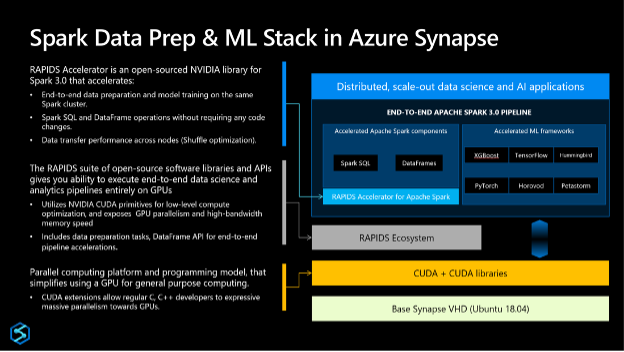
Packed with Data Prep and ML Libraries: The GPU-enabled Apache Spark™ pools in Azure Synapse come built-in with two popular libraries with support for more on the way:

  • RAPIDS for Data Prep: RAPIDS is a suite of open-source software libraries and APIs for executing end-to-end data science and analytics pipelines entirely on GPUs for a substantial speed-up, particularly on large data sets. Built on top of NVIDIA CUDA and UCX, the RAPIDS Accelerator for Apache Spark™ enables GPU-accelerated SQL, DataFrame operations, and Spark shuffles. Since there are no code changes required to leverage these accelerations, you can also accelerate your data pipelines that rely on Linux Foundation’s Delta Lake or Microsoft’s Hyperspace indexing (both of which are available on Synapse out-of-box).
  • Hummingbird for accelerating scoring and inference over your traditional ML models. Hummingbird is a library for converting traditional ML operators to tensors, with the goal of accelerating inference (scoring/prediction) for traditional machine learning models.
Figure 1: Spark Data Prep and ML in Azure Synapse.

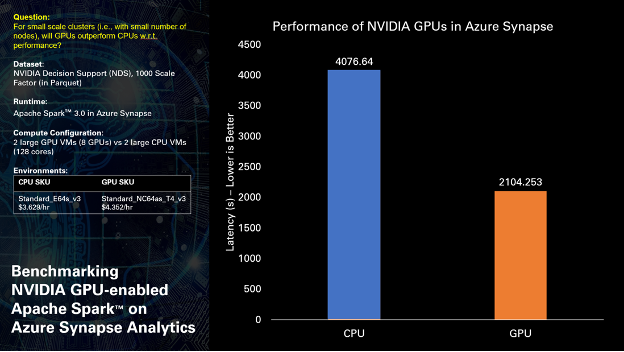
When running NVIDIA Decision Support (NDS) test queries, derived from industry-known benchmarks, over 1 TB of Parquet data our early results indicate that GPUs can deliver nearly 2x acceleration in overall query performance, without any code changes.

 Figure 2: Overall performance results.
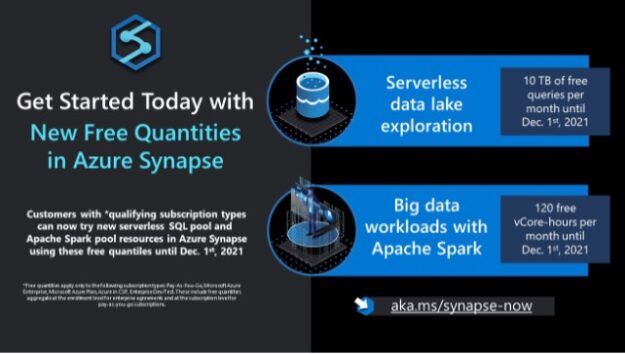
Figure 3: Current Azure Synapse offerings.
Categories
Misc

Classification model outputs floats

Hi

I’m not sure what’s going on with my classification model, as it predicts objects as floats instead of classes. Is it something to do with the loss function or activation functions at the end of the network?

The barebones code can be found here:

https://pastebin.com/wd8i6P7R

submitted by /u/dahkneela
[visit reddit] [comments]

Categories
Misc

Does label_map.pbtx have to be contiguous?

Say I would like to quickly remove an object from my dataset. Can I drop all samples with the specific id (say id=7), and then remove the definition of the label with id=7 from the label_map file (making it skip from 6 straight to 8)?

Or is it expected that the ids are contiguous, so that I have to shift all labels (8 and up) down by one after removing 7?

submitted by /u/Meriipu
[visit reddit] [comments]

Categories
Misc

Find Your Groove: Add NVIDIA AI Essentials Series to Your Summer Playlist

If AI, data science, graphics or robotics is your jam, stream the NVIDIA AI Essentials Learning Series this summer. These intro-level courses provide foundational knowledge to students and early-career developers looking to broaden their areas of expertise. The free series includes over a dozen sessions — each less than an hour long — on topics Read article >

The post Find Your Groove: Add NVIDIA AI Essentials Series to Your Summer Playlist appeared first on The Official NVIDIA Blog.

Categories
Misc

Batches in TF-Slim

Hi all, I’m trying to use TF-Slim (yes it has to be tf-slim) and I’m having some trouble figuring out how to break my data up into batches. I want to avoid loading my dataset into RAM (although I could), but the documentation doesn’t specify how to handle batches. If anyone that has used tf-slim before could shed some light, it would be much appreciated.

submitted by /u/prinse4515
[visit reddit] [comments]

Categories
Misc

Unsupervised learning technique

I want to create a model that is made up by a bunch of objects. Each one has a name and 6 attributes associated with it. I want to make an unsupervised model that groups objects with similar attributes together. When a piece of data is added, I would like to have the group it best fits into outputted and be able to get the names of other objects in this group. Is this possible with tensorflow?

submitted by /u/UnreadyDog
[visit reddit] [comments]

Categories
Misc

Learn How to Build Applications of AI for Anomaly Detection

The NVIDIA Deep Learning Institute (DLI) is offering instructor-led, hands-on training on how to implement multiple AI-based approaches to solve a specific use case of identifying network intrusions for telecommunications.
Whether you need to monitor cybersecurity threats, fraudulent financial transactions, product defects, or equipment health, artificial intelligence can help you catch data abnormalities before they impact your business. AI models can be trained and deployed to automatically analyze datasets, define “normal behavior,” and identify breaches in patterns quickly and effectively. These models can then be used to predict future anomalies. With massive amounts of data available across industries and subtle distinctions between normal and abnormal patterns, it’s critical that organizations use AI to quickly detect anomalies that pose a threat.

The NVIDIA Deep Learning Institute (DLI) is offering instructor-led, hands-on training on how to implement multiple AI-based approaches to solve a specific use case of identifying network intrusions for telecommunications. You’ll learn three different anomaly detection techniques using GPU-accelerated XGBoost, deep learning-based autoencoders, and generative adversarial networks (GANs) and then implement and compare supervised and unsupervised learning techniques. At the end of the workshop, you’ll be able to use AI to detect anomalies in your work across telecommunications, cybersecurity, finance, manufacturing, and other key industries.

By participating in this workshop, you’ll:

  • Prepare data and build, train, and evaluate models using XGBoost, autoencoders, and GANs
  • Detect anomalies in datasets with both labeled and unlabeled data
  • Classify anomalies into multiple categories regardless of whether the original data was labeled

This training will be offered:

Tue, Sep 21, 2021, 9:00 a.m. – 5:00 p.m. CEST/EMEA, UTC+2

Tue, Sep 21, 2021, 9:00 a.m. – 5:00 p.m. PDT, UTC-7

Space is limited, register now.

Categories
Misc

Upcoming Webinar: Building a Computer Vision Service Using NVIDIA NGC and Google Cloud

Join the NGC team for a webinar and live Q&A on Aug. 25, at 10 a.m. PT

The NGC team is hosting a webinar and live Q&A. Topics include how to use containers from the NGC catalog deployed from Google Cloud Marketplace to GKE, a managed Kubernetes service on Google Cloud, that easily builds, deploys, and runs AI solutions.

Building a Computer Vision Service Using NVIDIA NGC and Google Cloud
August 25 at 10 a.m. PT

Organizations are using computer vision to improve the product experience, increase production, and drive operational efficiencies. But, building a solution requires large amounts of labeled data, the software and hardware infrastructure to train AI models, and the tools to run real-time inference that will scale with demand.

With one click, NGC containers for AI can be deployed from Google Cloud Marketplace to GKE. This managed Kubernetes service on Google Cloud, makes it easy for enterprises to build, deploy, and run their AI solutions.

By joining this webinar, you will learn:

  • How the NGC catalog can work with GCP Marketplace to accelerate your AI workflows.
  • About ways the Transfer Learning Toolkit can be used as a template and a custom training data set.
  • How to easily deploy an NVIDIA Triton inferencing container from the GCP Marketplace that will scale inference using GKE.

Register now >>>