|
submitted by /u/nbortolotti [visit reddit] [comments] |
 DataBloom
|
|
submitted by /u/nbortolotti [visit reddit] [comments] |
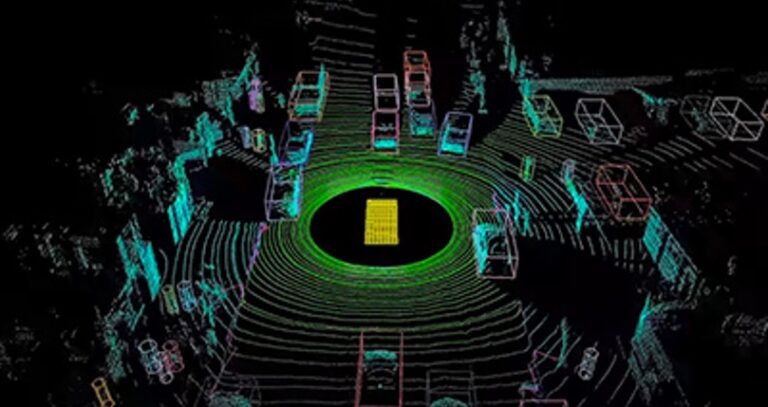 With NVIDIA DriveWorks SDK, autonomous vehicles can bring their understanding of the world to a new dimension. The SDK enables autonomous vehicle developers to easily process three-dimensional lidar data and apply it to specific tasks, such as perception or localization. You can learn how to implement this critical toolkit in our expert-led webinar, Point Cloud … Continued
With NVIDIA DriveWorks SDK, autonomous vehicles can bring their understanding of the world to a new dimension.
The SDK enables autonomous vehicle developers to easily process three-dimensional lidar data and apply it to specific tasks, such as perception or localization. You can learn how to implement this critical toolkit in our expert-led webinar, Point Cloud Processing on DriveWorks, Aug. 25.
Lidar sensors enhance an autonomous vehicle’s sensing capabilities, detecting the depth of surrounding objects that may not be picked up by camera or radar.
It does so by bouncing invisible lasers off the vehicle’s surrounding environment, building a 3D image based on the time it takes for those lasers to return. However, processing and extracting contextual meaning from lidar data efficiently and quickly is not as straightforward.
Lidar point cloud processing must be performed in real-time and in tight coordination with other sensing modalities to deliver the full benefits of enhanced perception — a difficult feat to accomplish when working with third-party open source modules.
With DriveWorks, efficient and accelerated lidar point cloud processing can be performed right out of the gate.
The SDK provides middleware functions that are fundamental to autonomous vehicle development. These consist of the sensor abstraction layer (SAL) and sensor plugins, data recorder, vehicle I/O support and a deep neural network framework. It’s modular, open, and designed to be compliant with automotive industry software standards.
These development tools include a point cloud processing module, which works with the SAL and sensor plugin framework to provide a solid basis for developers to implement a lidar-based perception pipeline with little effort and quick results.
The module is CUDA-accelerated and straightforward to implement. It’s the same toolkit the NVIDIA autonomous driving team uses to develop our own self-driving systems, making it purpose-built for production solutions rather than purely research and development.
Register now to learn more from NVIDIA experts about the DriveWorks point cloud processing module and how to use it in your autonomous vehicle development process.
|
submitted by /u/lindaarden [visit reddit] [comments] |
Hey all, I’m trying to take a train model and move it to a local deployment software (OpenFrameworks with ofxTensorFlow2 library) but the lib only takes .pb format models. Is there a way to convert the model from .pkl to .pb? It is a TF model, so I feel like maybe it isn’t so hard, but I have no idea how.
This is the colab I’m working from: https://colab.research.google.com/github/dvschultz/ml-art-colabs/blob/master/Stylegan2_ada_Custom_Training.ipynb
submitted by /u/diditforthevideocard
[visit reddit] [comments]
 Cumulus Linux 4.4 introduces a new CLI, NVUE, that is more than just a CLI. NVUE provides a complete object model for Linux, unlocking incredible operational potential.
Cumulus Linux 4.4 is the first release with the NVIDIA User Experience (NVUE), a brand new CLI for Cumulus Linux. Being excited about a new networking CLI sounds a bit like being excited about your new 56k modem. What makes NVUE special isn’t just that it’s a new CLI but it’s the principles it was built on that make it unique. At its core, NVUE has created a full object model of Cumulus Linux enabling advanced programmability, extensibility, and usability.
Object models aren’t exactly the kind of thing network engineers think about daily. I didn’t know what an object model was before I got involved in helping the team design NVUE.
An object model defines the components of a system and their relationships to each other. For example, an interface is an object. It has components like an IP address or MTU setting. It’s not just the fact that an object model exists that is important, but the thought that is put into how those relationships between objects and components fit together.
An interface and IP address are an easy example, but what about something more complicated? Think about a “bond” interface, also called a port-channel. Is the bond a top-level interface like an Ethernet port with the components of other Ethernet interfaces as children or is being a member in a bond an element of the interface?
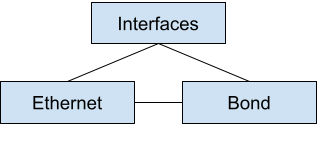
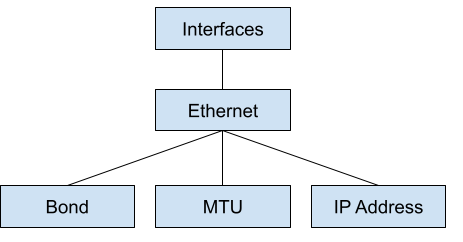
These relationships get complicated fast. Failing to think through them creates a poor user experience where you may have to define the same setting multiple times to achieve an end goal or an inconsistent configuration. An imaginary network CLI could have you define any route inside a VRF under a VRF object but any route in the global routing table at the top level, like the following example:
ip vrf red
   ip route 10.1.1.0/24 via 169.254.1.1
 !
 ip route 192.168.1.0/24 via 172.16.1.1
This is a trivial example, but now the way that a route is defined is not uniform, depending on where you are in the system.
With an understanding of what an object model is, the next question is, “Why should you care?” By having an object model, it makes building ways to interact with the system extremely easy. Systems talk to an API that represents the object model. The first interface is, of course, the CLI, but anything can now be an interface to the system: REST, gRPC, or even RFC1149 Avian Carriers.

By having all the interfaces use the same object model, it guarantees consistent results regardless of how you interface with the system. The CLI and REST API use the same methods to configure a BGP peer. There is never a chance of seeing different behaviors based on which interface you use. Because the object model is the same no matter how you interact with it, this means that going from playing with the CLI to building full automation is an evolution, not a completely new process.
REST and CLI are expected for any network device today. Where can we think beyond this? An object model can be directly imported into a programming language like Python or Java. This enables you to use true programming concepts to build configurations for one device or an entire fabric of devices. You can enforce inputs, values, and relationships like never before. The following code example shows what an NVUE Python interface might look like:
from nvue import Switch spine01 = Switch() x = 1 while xIn this example, I load the
nvuelibrary and create a newSwitchobject called spine01. I have the object tell me how many interfaces exist on the system withlen(spine01.interfaces). For each interface, I put it in the up state and assign an IP address with the subnet value matching the interface number. For example, port 3 would have an IP address of 10.1.3.1/24.This doesn’t exist yet, but it is absolutely in the realm of possibility because an object model exists. Unlike all other networking vendor systems, where the model is determined by the CLI, this CLI is based on the model. The object model is a standalone element that can be imported into programming languages, APIs, or any other system.
Try it out
One of the most valuable pieces of Cumulus Linux is the ability to try all our features and functions virtually. You can use NVIDIA Air to start using NVUE today and see what you think of the future of network CLIs and programmability.
 NVIDIA Omniverse Create 2021.3 is now available in open beta, delivering a new set of features for Omniverse artists, designers, developers, and engineers to enhance graphics and content creation workflows. We sat down with Frank DeLise, Senior Director of Product Management for Omniverse, to get a tour of some of the exciting new features. Get … Continued
NVIDIA Omniverse Create 2021.3 is now available in open beta, delivering a new set of features for Omniverse artists, designers, developers, and engineers to enhance graphics and content creation workflows.
We sat down with Frank DeLise, Senior Director of Product Management for Omniverse, to get a tour of some of the exciting new features. Get an overview through the clips or view the entirety of the livestream here.
A Beginner’s Look at Omniverse
Let’s start with a quick overview of the Omniverse Platform.
Introduction to Omniverse Create
NVIDIA Omniverse Create is an app that allows users to assemble, light, simulate, and render large-scale scenes. It is built using NVIDIA Omniverse Kit, and the scene description and in-memory model is based on Pixar’s USD.
Omniverse Create can be used on its own or as a companion application alongside popular content creation tools in a connected, collaborative workflow. Omniverse Connectors, or plug-ins to applications, can provide real-time, synchronized feedback. Being an extra viewport with physically accurate path tracing and physics simulation, greatly increases any creative and design workflow.
Zero Gravity Mode, powered by PhysX 5
Frank shows us Zero Gravity, a physics-based manipulation tool built to make scene composition intuitive for creators. With physics interactions based on NVIDIA PhysX 5, users can now nudge, slide, bump, and push objects into position with no interpenetration. Zero Gravity easily makes objects solid, making precise positioning, scattering and grouping of objects a breeze.
Features to Simplify Workflows
Next on our tour is a trio of features:
Sun Study Simulations
Omniverse users can further explore lighting options with the Sun Study extension, which offers a quick way to review a model with accurate sunlight. When the Sun Study Timeline is invoked, it will appear on the bottom of the viewport and allow the user to “scrub” or “play” through a given day/night cycle. It even includes dynamic skies with animated clouds for added realism.
Animation and Sequencer
Animation gets a massive push forward with the addition of a sequencer and key framer.
The new sequencer enables users to assemble animations through clips, easily cut from one camera to another, apply motion data to characters, and add a soundtrack or sound effects.
The key framer extension provides a user-friendly way of adding keyframes and animations to prims in your scenes.
UsdShade Graphic Editor for Material Definition Language (MDL)
New with Create 2021.3 is the UsdShade graph editor for Material Definition Language (MDL) materials. Provided with the Material Graph is a comprehensive list of MDL BSDFs and functions. Materials and functions are represented as drag and droppable nodes in the Material Graph Node List. Now, you can easily create custom materials by connecting shading nodes together and storing them in USD.
OpenVDB Support, Accelerated by NanoVDB
Support for OpenVDB volumes has also been added, making use of NanoVDB for acceleration. This feature helps artists visualize volumetric data created with applications like SideFX Houdini or Autodesk Bifrost.
What is Omniverse Create versus Omniverse View?
Lastly, Frank finishes our tour with an explanation of Omniverse View compared to Omniverse Create.
To learn more, look at the new features in Omniverse View 2021.3.
More Resources
Calling all warriors. It’s a glorious week full of new games. This GFN Thursday comes with the exciting release of the new battle royale NARAKA: BLADEPOINT, as well as the Hello Neighbor franchise as part of the 11 great games joining the GeForce NOW library this week. Plus, the newest Assassin’s Creed Valhalla DLC has Read article >
The post Hooked on a Feeling: GFN Thursday Brings ‘NARAKA: BLADEPOINT’ to GeForce NOW appeared first on The Official NVIDIA Blog.
During the configuration before compilation it asks for what cuda capability your graphics card has if you enable cuda so wouldn’t that mean that if I compile it myself and select the correct capability then it will be a better fit for my graphics card than the generic tensorflow-gpu package?
submitted by /u/NotSamar
[visit reddit] [comments]
Hey guys, I have just getting started with tensorflow regression, now I want to do some practice. Can you guys suggest any simple dataset for me to practice on? Are there ‘beginner’ dataset on kaggle?
submitted by /u/nyyirs
[visit reddit] [comments]
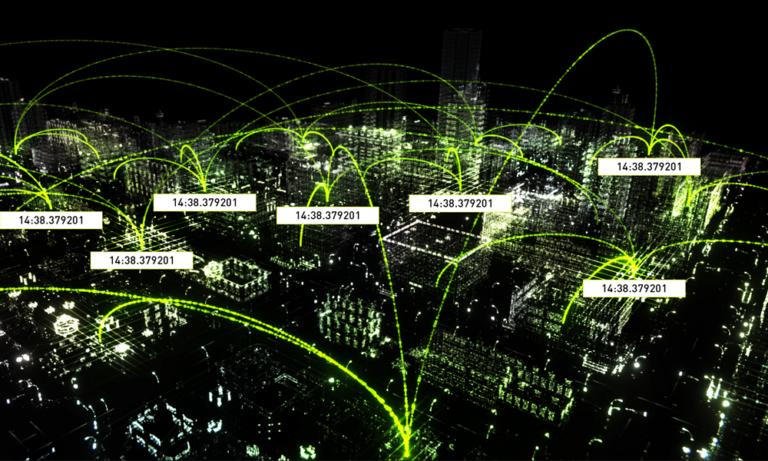 Facebook is open-sourcing the Open Compute Project Time Appliance Project (OCP TAP), which provides very precise time keeping and time synchronization across data centers in a cost-effective manner.
NVIDIA ConnectX NIC enables precise timekeeping for social network’s mission-critical distributed applications
Facebook is open-sourcing the Open Compute Project Time Appliance Project (OCP TAP), which provides very precise time keeping and time synchronization across data centers in a cost-effective manner. The solution includes a Time Card that can turn almost any commercial off-the-shelf (COTS) server into an accurate time appliance, enabled by the NVIDIA ConnectX-6 Dx network card (NICs), with precision timing protocol, to share the precise time keeping with other servers across the data center.
The combination of Facebook’s Time Card and NVIDIA’s NIC gives data center operators a modern, affordable, time synchronization solution that is open-sourced, secure, reliable, and scalable.
Why Accurate Time Matters in the Data Center
As applications scale-out and IT operations span the globe, keeping data synchronized across different servers within a data center, or different data centers across continents, it becomes more important and more difficult. If a database is distributed, it must track the exact order of events to maintain consistency and show causality. If two people try to buy the same stock, fairness (and compliance) requires knowing with certainty which order arrived first. Likewise when thousands of people post content and millions of users like/laugh/love those posts every hour, Facebook needs to know the actual order in which each post, thumbs up, reply or emoji happened.
One way to keep data synchronized is to have each data center send its updates to the others after each transaction, but this rapidly becomes untenable because the latency between data centers is too high to support millions of events per hour.
A better way is to have each server and data center synchronized to the exact time, within less than a microsecond of each other. This enables each site to keep track of time, and when they share events with other data centers, the ordering of each event is already correct.
The more accurate the time sync, the faster the performance of the applications. A recent test showed that making the timekeeping 80x more precise (making any time discrepancies 80x smaller) made a distributed database run 3x faster — an incredible performance boost on the same server hardware, just from keeping more accurate and more reliable time.
The Role of the NIC and Network in Time Synchronization
The OCP TAP project (and Facebook’s blog post on Open Sourcing the Time Appliance) defines exactly how the Time Card receives and processes time signals from a GPS satellite network, keeps accurate time even when the satellite signal is temporarily unavailable, and shares this accurate time with the time server. But the networking — and the network card used — is also of critical importance.
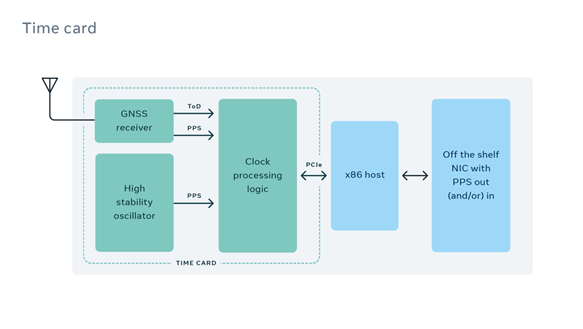
The NIC in the time appliance must have a time pulse per second (PPS) port to connect to the Time Card. This ensures exact time synchronization between the Time Card and NIC in each Time Server, accurate to within a few nanoseconds. ConnectX-6 Dx is one of the first modern 25/50/100/200 Gb/s NICs to support this. It also filters and checks the incoming PPS signal and maintains time internally using hardware in its ASIC to ensure accuracy and consistency.
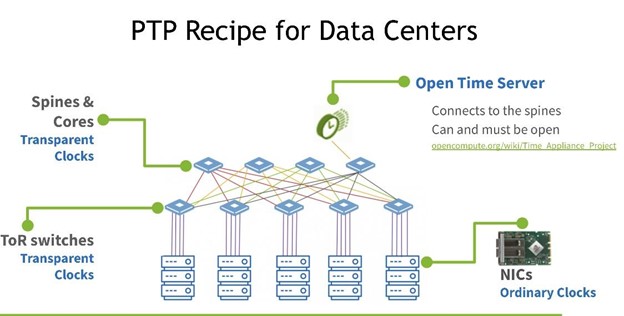
Time Appliances with sub-microsecond accurate timing can share that timing with hundreds of regular servers using the network time protocol (NTP) or tens of thousands of servers using the precision time protocol (PTP). Since the network adds latency to the time signal, NTP and PTP timestamp packets to measure the travel time in both directions, factor in jitter and latency, and calculate the correct time on each server (PTP is far more accurate so it is starting to displace NTP).
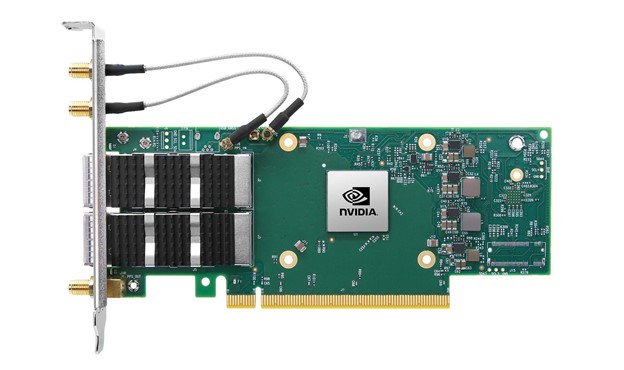
An alternative is to timestamp with software solutions, but timestamping with software at today’s speed is too unpredictable and inaccurate or even impossible, varying by up to milliseconds due to congestion or CPU distractions. Instead, the ConnectX-6 Dx NIC and BlueField-2 DPU apply hardware timestamps to inbound packets as soon as they arrive and outbound packets right before they hit the network, at speeds up to 100Gb/s. ConnectX-6 Dx can timestamp every packet with less than 4 nanoseconds (4ns) of variance in time stamping precision, even under heavy network loads. Most other time-capable NICs stamp only some packets and show a much greater variance in precision, becoming less precise with their timestamps when network traffic is heavy.
NVIDIA networking delivers the most precise latency measurements available from a commercial NIC, leading to the most accurate time across all the servers, with application time variance typically lower than one microsecond (
Accurate Time Synchronization, for Everyone
The OCP Time Appliance Project makes time keeping precise, accurate, and accessible to any organization. The Open Time Servers and open management tools from Facebook, NVIDIA, and OCP provide an easy to adopt recipe everyone can use just like a hyperscaler.
NVIDIA provides precision time-capable NICs and data processing units (DPUs) that deliver ultra-precise timestamping and network synchronization features needed for precision timing appliances. If the BlueField DPU is used, it can run the PTP stack on its Arm cores, isolating the time stack from other server software and continuously verifying the accuracy of time within that server and continuously calculating the maximum time error bound across the data center.
Cloud services and databases are already adding new time-based commands and APIs to take advantage of better time servers and time synchronization. Together, this solution enables a new era of more accurate time keeping that can improve the performance of distributed applications and enable new types of solutions in both cloud and enterprise.
Specifics about OCP TAP, including specifications, schematics, mechanics, bill of materials, and source code can be found at www.ocptap.com.