Categories
Misc

Removing Aliasing Artifacts in Ultrasound Color Doppler Imaging with NVIDIA Clara Holoscan and the NVIDIA Clara Developer Kit

The NVIDIA Clara developer kit, NVIDIA Clara Holoscan, and us4us front end help build AI models on streaming data for ultrasounds, to remove artifacts like aliasing.

At RSNA 2021, there are dedicated tracks on ultrasound imaging, which is a cost-effective way to see what is going on inside a patient’s body without exposure to radiation or the need for injections and surgeries. 

Ultrasound imaging is typically done by trained sonographers and needs special expertise to interpret. The probe is a small transducer to both transmit sound waves into the body and record the waves that echo back. It is placed on the skin and as it moves, waves bounce off your blood cells, organs, and other body parts, and then back to the device. A computer then takes all the sound waves and turns them into moving images that you visualize on a screen.

The LITMUS group (Laboratory on Innovative Technology in Medical Ultrasound) at the University of Waterloo, Canada is working on making ultrasound color doppler imaging (CDI) easier to visualize. They used the NVIDIA Clara Holoscan platform, including the NVIDIA Clara AGX Developer Kit and the NVIDIA Clara Holoscan SDK, along with frontend us4us, to remove aliasing artifacts and increase the frame rate 12-fold- from 2 fps to 30 fps. 

  • Clara Holoscan is an AI platform that includes strong deep learning compute ability that can run a model at high frame rates. The Clara Holoscan SDK is designed to facilitate the creation of AI pipelines for the processing of real-time streaming medical data for ultrasound, video, and other imaging applications.
  • The Clara AGX Developer Kit combines the power of an NVIDIA RTX 6000 GPU controlled by an NVIDIA AGX Xavier SoC, with external connectivity provided by two PCIe Gen4 x 8 slots, and a NVIDIA ConnectX-6 SmartNIC with a 100 GbE port.  
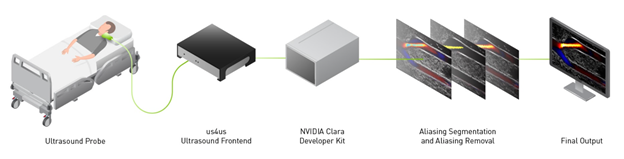
Raw sensor data is copied to the GPU where a CUDA and TensorRT based framework is applied for AI based aliasing removal, which results in improved flow visualization in CDI.
Figure 1. Overview of the aliasing-resistant CDI pipeline on the Clara AGX Developer Kit and us4us frontend.

Color Doppler imaging

Color Doppler imaging (CDI) is a non-invasive way to see blood flow in arteries and veins. It is used to identify a blockage, blood clot, or narrowing of the arteries that can lead to deadly clinical outcomes such as a stroke or heart attack. These blockages can occur in a variety of arteries in the body and significantly alter the properties of blood flow. The flow alterations can be captured by CDI and used in the identification and monitoring of diseased conditions. CDI can also be used for detecting aneurysms, where swollen artery walls can also impact blood flow.

Figure 2 shows a typical CDI sequence obtained from a carotid artery model where flow comes in from the left side of the image, then branches out into the upper and lower branches. Flow speed in the artery is shown in shades of blue or red, depending on its direction relative to the probe. The surrounding grayscale image shows the tissue structure.  The CDI sequence also shows how blood flow dynamics can change throughout the cardiac cycle, which is typically less than a second long.
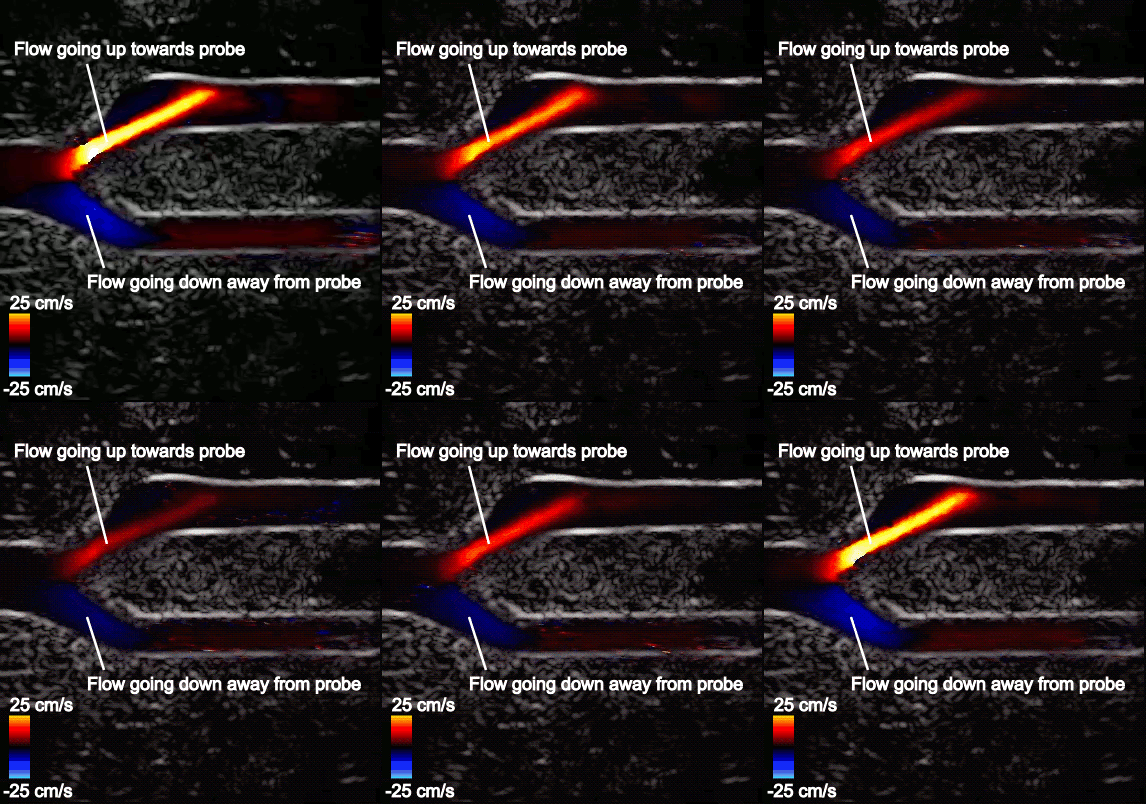
Blood flow speed in the artery is shown using shades of blue and red, with red depicting flow going up towards the probe, and blue depicting flow going down, away from the probe. The brighter colors indicate faster flow according to the color scale on the bottom left. Tissue structures can be visualized using the surrounding gray-scale image, with bright regions indicating strong reflectors such as vessel walls.
Figure 2. Typical CDI sequence on an artery bifurcation model. 

Aliasing problems in CDI 

One recurring issue in CDI is the presence of so-called aliasing artifacts that hinder the visualization of blood flow. Aliasing artifacts occur when blood flow exceeds the maximum flow speed measurable by the CDI system. 

For example, Figure 3 shows that flow in the upper branch is fast and exceeds the maximum measurable flow speed on the color scale (25 cm/s). The color chosen for this region is therefore picked from the opposite end of the color scale and incorrectly indicates that flow is going in the opposite direction. The maximum measurable speed stems from underlying system limitations and imaging considerations. 

Aliasing is most problematic in tortuous vasculature such as bifurcations and in conditions where a wide range of multidirectional velocities are encountered. CDI in such conditions can become difficult to interpret.
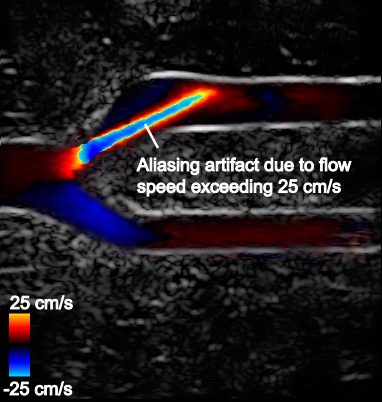
Blood flow speed in the upper branch exceeds the maximum measurable speed (25 cm/s) and wraps around from red to blue, incorrectly indicating that flow is going in the opposite direction.
Figure 3. CDI sequence on an artery bifurcation model with aliasing artifacts

Novel deep learning–based solution

The LITMUS group devised a new deep learning–based solution to address these aliasing artifacts in CDI for the femoral artery bifurcation.  The femoral artery bifurcation in the thigh was chosen due to its diverse flow properties, including a wide range of flow speeds and multidirectional flow. The artery can be a site of blockage in conditions of peripheral artery disease and would be susceptible to aliasing in the bifurcation, even in healthy conditions.
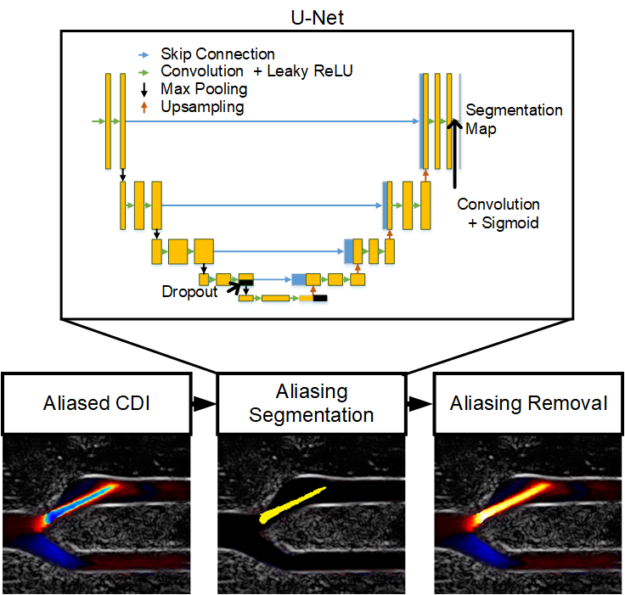
A pretrained U-Net convolutional neural network segments aliasing artifacts in Color Doppler images. The segmented artifacts are then removed by an adaptive phase unwrapping algorithm.
Figure 4. Overview of the CDI aliasing removal pipeline

To address aliasing artifacts in CDI, the LITMUS group devised a two-step process: 

  • Aliasing artifacts in CDI are segmented using a convolutional neural network (CNN) model. 
  • The segmented aliasing artifacts are subsequently removed by an adaptive technique. 

For the aliasing segmentation, a U-Net CNN was trained to detect aliasing artifacts using several relevant ultrasound features that are often computed in typical CDI pipelines and can contain features that are relevant for aliasing detection. The network was trained on 1,136 frames obtained from three real femoral artery bifurcation acquisitions using a us4us ultrasound frontend. The aliasing artifacts in CDI were manually labelled for training and validation. The model definition and training were done in TensorFlow. 

The segmentation maps were then leveraged by an adaptive phase unwrapping algorithm that reverses the aliasing artifact according to flow continuity criteria so that a smooth aliasing-free flow profile is achieved. The framework was then evaluated on a new acquisition from an unseen femoral artery bifurcation acquisition, where it was shown to deal with multidirectional and excessive aliasing. 

The framework was computationally demanding, requiring more than 500 ms per frame for simple de-aliasing, and even slower for excessive aliasing cases.

Clara Holoscan for real-time de-aliasing in bedside applications

CDI is widely expected to be a point-of-care modality that can be used to gain quick and immediate insights into blood flow conditions in patients. Offline processing would disrupt this utility of CDI, so it is important that the aliasing removal framework be run in real time. 

NVIDIA and the LITMUS group collaborated to accelerate the de-aliasing framework to achieve real-time performance that would be suitable in a bedside application, using the NVIDIA Clara Holoscan SDK and the NVIDIA Clara AGX Developer kit. 

A GPU-accelerated CDI platform was implemented on the NVIDIA Clara AGX Developer Kit using a CUDA-based framework previously reported by LITMUS. For more information, see Live Ultrasound Color-Encoded Speckle Imaging Platform for Real-Time Complex Flow Visualization In Vivo. 

Raw sensor data is continuously copied to the NVIDIA RTX 6000 GPU in the Clara AGX developer kit where custom CUDA-built kernels perform the necessary processing for image formation. The pretrained U-Net TensorFlow model was implemented using the Tensor RT API and the adaptive phase unwrapping algorithm was accelerated using the CUDA-NPP library. Further CUDA and OpenGL functions were used for display. The result was a complete raw-sensor-data-to-de-aliased-CDI package that was run on the Clara AGX Developer Kit with demonstrated real-time performance. 

Figure 5 shows the aliasing resistant CDI framework in action on the Clara AGX developer kit, processing raw sensor data from a femoral bifurcation model to aliasing resistant CDI in live mode. The raw data was acquired using the us4us frontend, which gives researchers access to all the fundamental signals as they arrive from the probe: 
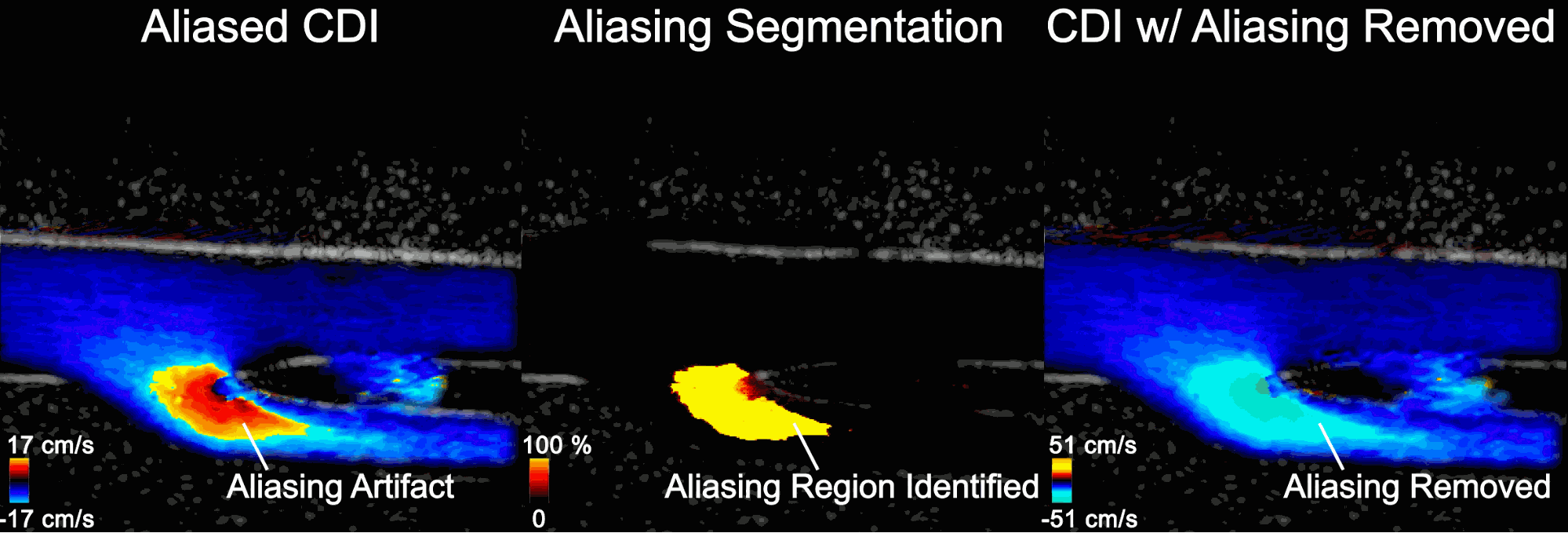
 (Left) screen recording of a conventional CDI processing pipeline showing aliasing in the bottom branch at systole. (Middle) The pre-trained U-Net can correctly segment the aliasing artifacts in a live pipeline. (Right) CDI with aliasing removed on the Clara AGX Developer kit using the deep-learning powered framework.
Figure 5. Screen capture of the aliasing-resistant CDI platform on the Clara AGX Developer kit
  • Left: The aliased CDI sequence is obtained using a conventional processing pipeline. At systole (peak of the cardiac cycle, frozen frame), flow is moving away from the probe and should all be blue. In the bottom branch, however, the flow speed in the direction of the probe exceeds the maximum measurable and therefore appears as a red/orange shaded region that incorrectly suggests flow is going up. 
  • Middle: Aliasing segmentation is obtained by the integrated U-Net model during the live imaging session. You can see how the aliasing artifact in the systolic frame is correctly captured on-site. 
  • Right: The CDI sequence has the aliasing removed. The maximum measurable speed is increased and the visualization of blood flow is made more intuitive. 

The processing time of the de-aliasing module was improved to 30 fps, a 12x improvement from the previous 2-2.5 fps. In building up to this, CuPy was used to prototype and get quick GPU acceleration, giving an intermediate ~15 fps.

Conclusion

The LITMUS group’s workflow showed how the NVIDIA Clara AGX Developer Kit and the NVIDIA Clara Holoscan SDK can resolve aliasing artifacts in CDI, in real time. Removing aliasing makes image visualization and interpretation easier by removing the ambiguity about the blood flow direction. This makes the most impact in tortuous vasculature where flow direction can be difficult to guess by the sonographer. 

For more information, see the following resources:
Categories
Misc

The Force is Strong with NVIDIA Jetson

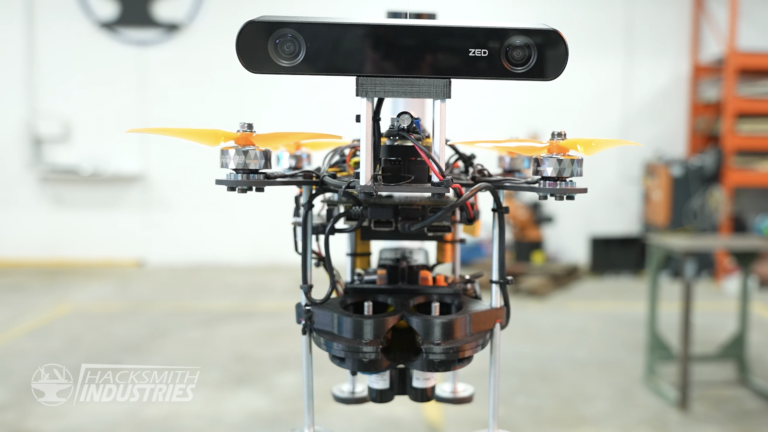
NVIDIA Jetson Nano-powered training drone. Courtesy of Hacksmith IndustriesThis post features winners from the NVIDIA sponsored contest with Make: where makers submit their best robotics projects with a galactic theme.NVIDIA Jetson Nano-powered training drone. Courtesy of Hacksmith Industries
Earlier this year, NVIDIA sponsored a contest with Make: Magazine, asking makers to submit their best AI-enabled droid projects with a galactic theme. Below are the two droid contest winners. 

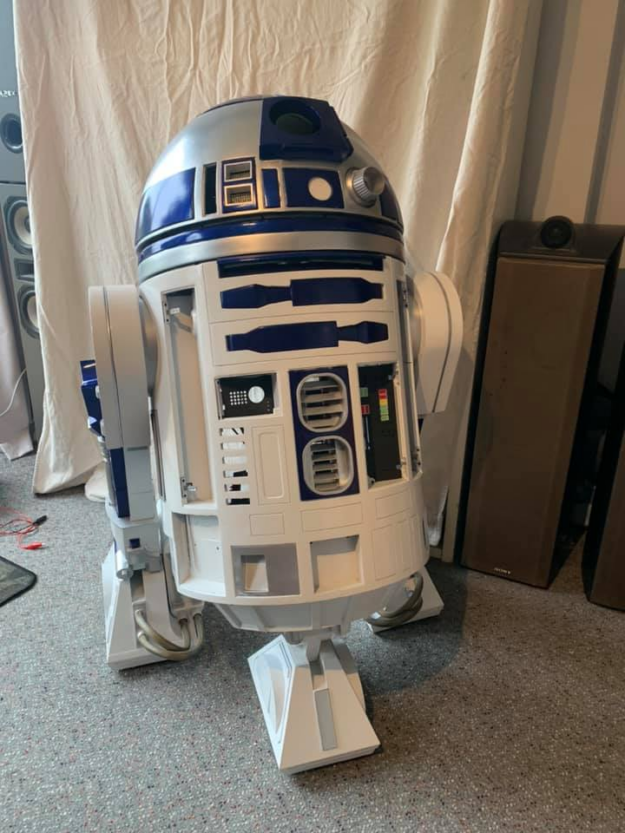
A life-sized 3D printed replica of Star Wars’ R2-D2, a service robot, stands tall and fully assembled with a white body, a silver domed head, and dark blue accents.
Figure 1. R2D2 robot. Courtesy of John Ferguson.

 Autonomous 3D Printed R2-D2

During the Covid lockdown, John Ferguson looked for a fun project to build with his 11-year-old son. Using a 3D printer, John took on the massive task of creating every inch of his robot. About 40 kg of filament and 10 months of printing later, he had himself the body of an R2 unit. This hands-on project required sanding, prepping each piece, filling, painting, and tuning for a truly movie-grade finish.

A few components of the R2-D2 robot include Sabertooth Motor controllers, Sony cameras, two scooter motors, Arduino, NVIDIA Jetson Nano, a Muse EEG brainwave reader for an active periscope mechanism, and it is controlled with an Xbox 360 wireless controller. This project is a way for the Ferguson family to learn about AI, integrating NVIDIA Jetson Nano to activate R2’s vision-enabled object recognition capabilities and speech recognition. 

“This is the first time we’ve done a project using object recognition and it’s a thrill. It really feels like the future is here! To teach children this capability and show them the interactivity—you really get stunned silence as a reaction,” said Ferguson.

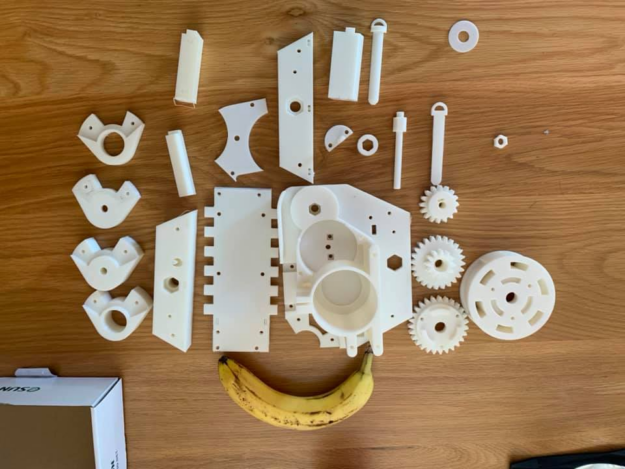
Plain, uncolored 3D printed components are laid out on a wooden table, including gears and joints. The components are under a banana for size comparison. Most of the parts are equal or smaller than the banana.
Figure 2. 3D printed droid parts, banana for scale. Courtesy of John Ferguson.

When asked why John decided to implement the NVIDIA Jetson Nano into his project, he said that the plastic body of the R2 is heavy, so having a lightweight component is preferable. It’s also a premium option for object recognition using AI, easily integrated with Python apps, and a good system for a young person to learn with.

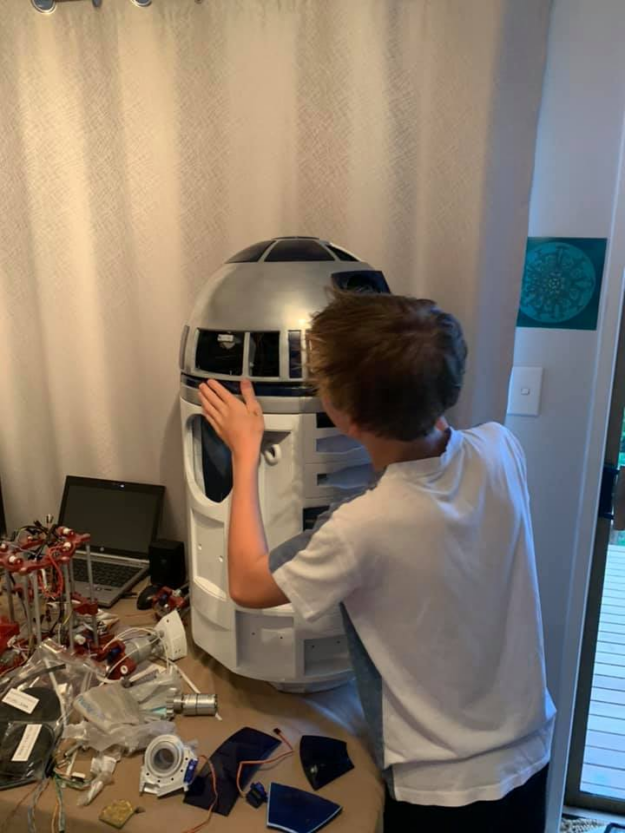
In the image, John’s son is working on inserting components onto the R2D2 incomplete frame to finalize the build of its head.
Figure 3. John’s son constructing droid. Courtesy of John Ferguson.

Their goal is to attend in-person events and have R2 autonomously strolling at their side using ROS2, identify other Star Wars characters accurately, and vocally respond just like the real thing. John and his son are building the body from scratch, training the recognition model using their own annotated image library, and optimizing the models. 

“I’m not a developer. We’ve learned everything from videos and tutorials. We had the time and the passion, and that’s got us to where we are through experimenting and persistence,” Ferguson said.

At the heart of the R2-D2 project, John hopes to showcase the robot to local schools, outline his journey so that it’s replicable, and talk about the personal growth that comes with building something from scratch and having fun with robotics.

“I want to encourage young people to enjoy developing technology,” said Ferguson.

Follow along with “build log” updates on their Facebook page. >>

AI Made Accessible with RoboJango

Figure 4. RoboJango holding an NVIDIA Jetson Nano Developer Kit. Courtesy of Jim Nason.

Next up, we have Jim Nason’s impressive Mandalorian-inspired droid named RoboJango.

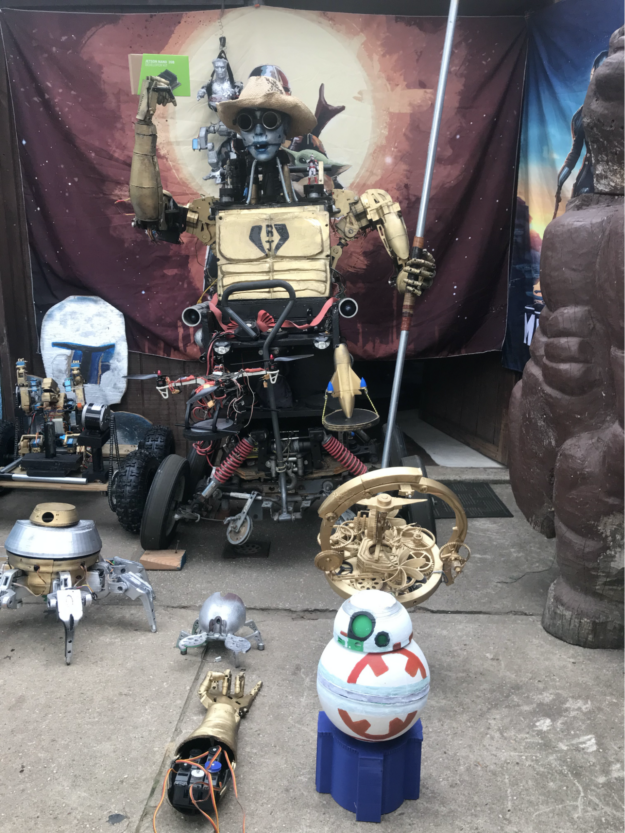
This droid is packed with features that any Star Wars fanatic would be psyched to see. To name a few, this droid has HD vision for eyes, acoustic sensors, dual lidar to promote autonomy, heat sensors, off-roading ATV capabilities, and a powerful winch for getting out of sticky situations. Similar to the R2-D2 robot, the RoboJango incorporates 3D printed parts mounted onto a wood frame and steel core. 

RoboJango is surprisingly personable. It uses human-like movements and conversational AI skills, giving people in the room casual greetings, flexing its “muscles”, and spitting jokes. The RoboJango recognizes Jim’s family members, their pets, and harnesses object recognition capabilities by self-organizing to a DNN. This is done with several Arduinos, a battery matrix, customized software framework, and NVIDIA Jetson Nano as its brain.

The coolest thing about RoboJango is the maker, Jim Nason. With a 30-year professional history in programming, he started building this robot because his son asked for a 3D printer and wanted to build an android with the materials. 

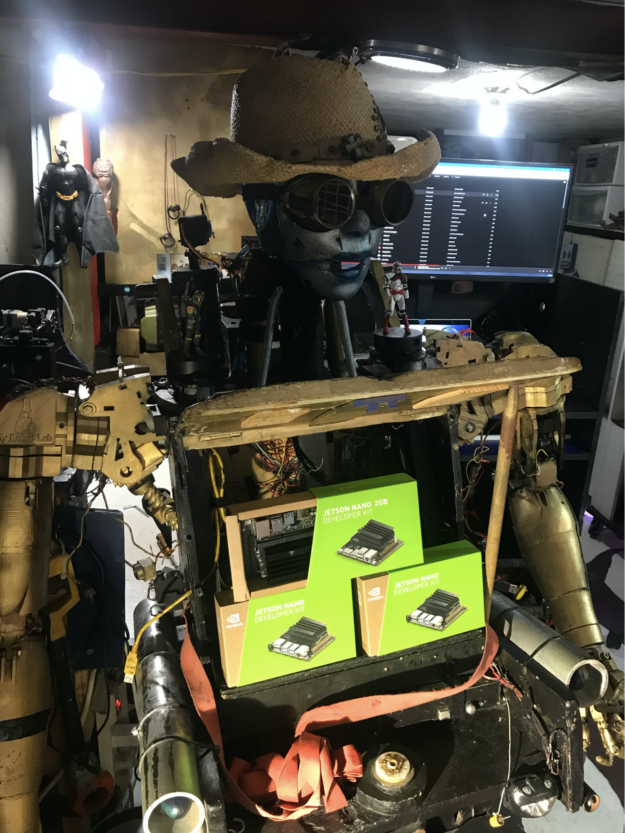
RoboJango’s chest plate has been removed. In playful fashion, the inventor, Jim Nason, has placed three Jetson Nano Developer kit packages into the cavity of the human-like robot.
Figure 5. Space cowboy, RoboJango posing with its NVIDIA Jetsons. Courtesy of Jim Nason.

Three years ago, Jim started by just building a finger, then an arm, eventually leading to an AI-enabled robot. RoboJango also has functional anthropomorphic eyes, with a wire-based circulatory system based on a virtual representation of a human. 

Talking with Jim, you get the sense that he really understands the mantra of being a maker, which is to dream, learn, and innovate: 

“I’m teaching him how to play the ukulele and drums. Just need to work on the movements,” Nason said. 

Nason standing on a platform outside.
Figure 6. Jim Nason, winner of Make: contest.

He also built a best friend for RoboJango, its very own robot dog. 

Now, Jim wants to give back to the community and teach kids all about STEAM with his wacky and whimsical robotics projects. Since March of this year, Jim has taught over 1,500 virtual students across the United States and was awarded a 2021 Impact Award for his outstanding contributions to the classroom. On summer weekends, Jim hosted community builds in Long Beach where anyone could walk in and learn about robotics. 

“RoboJango was created to drive funding for Long Island robotics apprentices. We want to teach to all communities and allow kids to have a ball,” said Nason

Learn more about Jim’s robotics course here, and follow his adventures on Instagram. 


Thank you to our friends at Make: for hosting this contest. 

To see more NVIDIA Jetson Nano projects, visit our Jetson community project page for inspiration. 

Categories
Misc

If I Had a Hammer: Purdue’s Anvil Supercomputer Will See Use All Over the Land

Carol Song is opening a door for researchers to advance science on Anvil, Purdue University’s new AI-ready supercomputer, an opportunity she couldn’t have imagined as a teenager in China. “I grew up in a tumultuous time when, unless you had unusual circumstances, the only option for high school grads was to work alongside farmers or Read article >

The post If I Had a Hammer: Purdue’s Anvil Supercomputer Will See Use All Over the Land appeared first on The Official NVIDIA Blog.

Categories
Misc

Federated Learning With FLARE: NVIDIA Brings Collaborative AI to Healthcare and Beyond

NVIDIA is making it easier than ever for researchers to harness federated learning by open-sourcing NVIDIA FLARE, a software development kit that helps distributed parties collaborate to develop more generalizable AI models. Federated learning is a privacy-preserving technique that’s particularly beneficial in cases where data is sparse, confidential or lacks diversity. But it’s also useful Read article >

The post Federated Learning With FLARE: NVIDIA Brings Collaborative AI to Healthcare and Beyond appeared first on The Official NVIDIA Blog.

Categories
Misc

NVIDIA AI Enterprise Helps Researchers, Hospitals Targeting Cancer Hit the Mark

Whether facilitating cancer screenings, cutting down on false positives, or improving tumor identification and treatment planning, AI is a powerful agent for healthcare innovation and acceleration. Yet, despite its promise, integrating AI into actual solutions can challenge many IT organizations. The Netherlands Cancer Institute (NKI), one of the world’s top-rated cancer research and treatment centers, Read article >

The post NVIDIA AI Enterprise Helps Researchers, Hospitals Targeting Cancer Hit the Mark appeared first on The Official NVIDIA Blog.

Categories
Misc

MONAI Leaps Forward with AutoML-Powered Model Development and Cloud-Native Deployments

Graphic showing logos of MONAI Application Packages + HELMProject MONAI continues to expand its end-to-end workflow with new releases and a new component called MONAI Deploy Inference Service.
Graphic showing logos of MONAI Application Packages + HELM

Project MONAI continues to expand its end-to-end workflow with new releases and a new subproject called MONAI Deploy Inference Service.

Project MONAI is releasing three new updates to existing frameworks, MONAI v0.8, MONAI Label v0.3, and MONAI Deploy App SDK v0.2. It’s also expanding its MONAI Deploy subsystem with the MONAI Deploy Inference Service (MIS), a server that runs MONAI Application Packages (MAPs) in a Kubernetes Cluster as cloud-native microservices.

MIS helps expand the end-to-end capabilities of MONAI by integrating with a container orchestration system like Kubernetes. By using the Kubernetes framework, developers can quickly start testing their models. This allows moving the execution from local development to staging environments.

More information:

MONAI Core v0.8

MONAI Core v0.8 focuses on expanding its learning capabilities by both adding Self-Supervised and Multi-Instance learning support.  

Also included is a new state-of-the-art differential search framework called DiNTS that helps accelerate Neural Architecture Search (NAS) for large-scale 3D image sets like those found in medical imaging.

Highlights include:

  • Multi-instance learning with examples for the MSD dataset.
  • Visualization of transforms and notebook with approaches for 3D image transform augmentation.
  • Self-supervised learning with pretraining pipeline-leveraging vision transformer  tutorials, highlighting training with unlabeled data and adaptation for downstream tasks. 
  • DiNTS AutoML with examples using MSD tasks.

Get started with the new features using the included Jupyter Notebooks:

MONAI Label v0.3

MONAI Label v0.3 focuses on including multilabel segmentation support with DynUNet and UNETR networks as the base architecture options. It also focuses on enhanced performance with multi-GPU training support to improve scalability and usability improvements that make active learning easier to use.

Highlights include:

  • Multi-Label Segmentation Support
  • Multi-GPU Training
  • Active Learning UX Changes

MONAI Deploy 

MONAI Deploy App SDK v0.2

MONAI Deploy App SDK v0.2 continues to expand its base operators, including support for additional DICOM operations.

Highlights include:

  • Operator for DICOM Series Selection.
  • Operator for exporting DICOM Structured Reports SOP for classification results.

MONAI Deploy Inference Service v0.1

MONAI Deploy Inference Service v0.1 is the first component of the MONAI Deploy Application Server that continues to expand on the end-to-end workflow of MONAI.  It includes the ability to deploy MONAI Application Packages (MAPs) created by MONAI Deploy App SDK into a Kubernetes cluster.

Highlights include:

  • Register a MAP in the Helm Charts of MIS.
  • Upload inputs through a REST API request and make them available to the MAP container.
  • Provision resources for the MAP container.
  • Provide outputs of the MAP container to the client who made the request.

Check out the new MONAI Deploy tutorials that walk you through creating a MAP using App SDK, deploying the MIS Service, and pushing your MAP to MIS to be run as a cloud-native microservice.

You can find more in-depth information about each release under their respective projects in the Project MONAI GitHub.

Categories
Misc

Programming Distributed Multi-GPU Tensor Operations with cuTENSOR v1.4

NVIDIA cuTENSOR, version 1.4, library supports 64-dimensional tensors, distributed multi-GPU tensor operations, and improves tensor contraction performance models.

Today, NVIDIA is announcing the availability of cuTENSOR, version 1.4, which supports up to 64-dimensional tensors, distributed multi-GPU tensor operations, and helps improve tensor contraction performance models. This software can be downloaded now free of charge.

Download the cuTENSOR software.

What’s New?

  • Supports up to 64-dimensional tensors.
  • Supports distributed, multi-GPU tensor operations.
  • Improved tensor contraction performance model (i.e., algo CUTENSOR_ALGO_DEFAULT).
  • Improved performance for tensor contraction that have an overall large contracted dimension (i.e., a parallel reduction was added).
  • Improved performance for tensor contraction that have a tiny contracted dimension (
  • Improved performance for outer-product-like tensor contractions (e.g., C[a,b,c,d] = A[b,d] * B[a,c]).
  • Additional bug fixes.

For more information, see the cuTENSOR Release Notes.

About cuTENSOR

cuTENSOR is a high-performance CUDA library for tensor primitives; its key features include:

  • Extensive mixed-precision support:
    • FP64 inputs with FP32 compute.
    • FP32 inputs with FP16, BF16, or TF32 compute.
    • Complex-times-real operations.
    • Conjugate (without transpose) support.

Learn more

Recent Developer posts

Categories
Misc

Has anyone used the Tensorflow Lite Model Maker to make an object detection model for a Raspberry Pi? I am trying to make a model and in DESPERATE need of some help.

submitted by /u/Matthewdlr4
[visit reddit] [comments]

Categories
Misc

Tensorflow – Help Protect the Great Barrier Reef

Hi, everyone, hope you are doing well. I am new to Machine Learning and Tensorflow. I was wondering if anyone wants to team up or include me in your team. I would be very grateful. I want to work on a real-life project and this seems to be the best. Thank You.

submitted by /u/boringly_boring
[visit reddit] [comments]

Categories
Misc

Help with Tensorflow Lite

Is anyone here able to help me out make a tensorflow lite object detection model I can run on my pi? I have all of the training data collected and labeled just need help making the model.

I have tried a few things including the Tensorflow Lite Model Maker as well as doing it from scratch locally. Just need help making my model.

submitted by /u/Matthewdlr4
[visit reddit] [comments]