NVIDIA Omniverse is an open platform built for virtual collaboration and real-time physically accurate simulation. Explore the latest resources to learn and get started with Omniverse today.
At GTC 2021 we shared a glimpse of the immense power the NVIDIA Omniverse platform can bring to the world of architecture, manufacturing, product design, robotics, gaming development, and media and entertainment. This new open, cloud-native platform makes virtual collaboration easy for creators, researchers, and engineers on photorealistic rendering projects. For a deeper understanding of the platform and its capabilities, we curated a collection of the latest resources to help you get started on Omniverse.
The developer resources listed below are exclusively available to NVIDIA Developer Program members. Join today for free in order to get access to the tools and training necessary to build on NVIDIA’s technology platform here.
We introduce NVIDIA RTX technology at a very high level (Shaders, RT Cores and Tensor Cores), then introduce the Omniverse platform. We focus on the Omniverse technology stack and give a high-level overview of its components and how developers can leverage them. Our target audience is technical artists or developers who have little-to-no exposure to the platform or creatives, who are currently trying the open beta and looking for a deeper overview of the platform and components.
Panel: Plumbing the Metaverse with USD Speakers: Dean Takahashi, VentureBeat; F. Sebastian Grassia, Pixar; Guido Quaroni, Adobe; Ivar Dahlberg, Embark Studios; Lori Hufford, Bentley Systems; Martha Tsigkari, Foster+Partners; Mattias Wikenmalm, Volvo; Perry Nightingale, WPP; Susanna Holt, Autodesk Forge
Learn more about the Pixar USD file format and discover its benefits to digital creators in all verticals. The session will provide a brief overview of USD, followed by a panel of distinguished industry luminaries to discuss their experience and adoption of the format and its benefits.
This session introduces Universal Scene Description (USD), open-source software from Pixar Animation Studios that’s used as the core representation of the 3D world within NVIDIA’s Omniverse platform. We’ll show what USD is and how assets are constructed with it. We’ll show why this standard and open representation enables interchange with 3D applications to more easily construct virtual worlds. We’ll include hands-on demo examples that illustrate USD scene construction in Python that you can try with a web browser at home, and show how to interact with USD files within Omniverse.
Learn how to connect with the Omniverse platform and be able to send data to it, establish a live sync session, as well as a USD 101 overview to get you started. This is primarily targeted at developers who want to learn how to create a plugin for an application and push data to Omniverse. However, the topic also applies to those seeking to write command line or scripted converters, as well as connecting Omniverse and a data management system. We’ll start with an overview of USD structuring and some of the basics in geometry and materials. A tour of the Sample SDK, which is available on the Omniverse Launcher, will be discussed in detail. From there, we’ll look at how we implemented a Connector for an application, like SketchUp, to discuss design considerations and material mapping and handling.
For more on-demand content, check out the collection of developer sessions from GTC 2021 to learn how industry experts and our very own Omniverse engineers use and build on top of the platform.
NVIDIA RTX enables developers to create breathtaking, interactive worlds with performance that exceeds gamers expectations. Integrating RTX has never been easier – gain access through popular game engines such as Unreal Engine or through standalone SDKs made available at GTC.
Developers, engineers, artists and leaders from game studios across the world gathered virtually at this year’s virtual GTC to learn how the latest NVIDIA technologies are revolutionizing game development.
NVIDIA RTX enables developers to create breathtaking, interactive worlds with performance that exceeds gamers expectations. Integrating RTX has never been easier – gain access through popular game engines such as Unreal Engine or through standalone SDKs.
The developer resources listed below are exclusively available to NVIDIA Developer Program members. Join today for free in order to get access to the tools and training necessary to build on NVIDIA’s technology platform here.
In this session, NVIDIA’s Richard Cowgill goes over where RTX is today in Unreal Engine 4, all the advancements in the past year, and a quick look at what’s coming up.
This session is a deep dive on how to leverage Omniverse, using new asset collaboration tools USD and MDL for game development. You’ll learn how to leverage Nucleus for collaboration, AI for asset tagging, and USD and MDL for ground truth content creation and lighting using ray tracing.
Experience the latest NVIDIA RTX technologies available in Unreal Engine 4. Toggle ray tracing on and off between reflections, shadows and translucency to see the impact these features have on NVIDIA’s Attic demo and what they could bring to your project. You’ll also learn how RTX Global Illumination adds dynamic range to the scene with multi-bounce indirect lighting. Maximize these ray-tracing settings with DLSS, which will boost the frame-rate of the Attic scene while maintaining a high resolution. With an RTX GPU, you can try this demo as a standalone build here.
RTXDI offers realistic lighting of dynamic scenes that require computing shadows from millions of area lights. Until now, this hasn’t been possible in video games in real-time. Traditionally, game developers have baked most lighting and supported a small number of “hero” lights that are computed at runtime. With RTXDI, lighting artists can render scenes with millions of dynamic area lights in real-time without complex computational overheads or disruptive changes to the artist’s workflow. In this scene, you can see neon billboards, brake lights, apartment windows, store displays, and wet roads—all acting as independent light sources. All this can now be captured in real-time with RTXDI. Learn more here.
System Latency is the measure of PC responsiveness – a critical metric for gamers that is difficult to optimize for. In this demo, we will show you how NVIDIA Reflex optimizes system latency and helps developers give players a response experience.
In this talk available on NVIDIA On-Demand, Seth Schneider (NVIDIA) and Ryan Greene (Blizzard) will provide a crash course on system latency covering: the basics of system latency, NVIDIA Reflex, and the Overwatch team’s approach to system latency optimization. If you are interested in a deep dive into system level performance, you’ve come to the right place.
Get the latest resources and news about the NVIDIA technologies that are accelerating the latest innovations in HPC from industry leaders and developers.
Get the latest resources and news about the NVIDIA technologies that are accelerating the latest innovations in HPC from industry leaders and developers. Explore sessions and demos across a variety of HPC topics, ranging from weather forecasting and energy exploration to computational chemistry and molecular dynamics.
The developer resources listed below are exclusively available to NVIDIA Developer Program members. Join today for free in order to get access to the tools and training necessary to build on NVIDIA’s technology platform here.
Get an introduction to GPU computing by the lead architect of CUDA. We’ll walk through the internals of how the GPU works and why CUDA is the way that it is, and connect the dots between physical hardware and parallel computing.
Take a deep dive into the latest developments in NVIDIA software for HPC applications, including a comprehensive look at what’s new in programming models, compilers, libraries, and tools. We’ll cover topics of interest to HPC developers, targeting traditional HPC modeling and simulation, HPC+AI, scientific visualization, and high-performance data analytics.
Explore the role of key tools and toolchains on Arm servers, from Arm, NVIDIA, and elsewhere — and show how each tool fits in the end-to-end journey to production science and simulation.
SDK
Accelerate Quantum Information Science with NVIDIA cuQuantum SDK NVIDIA cuQuantum is an SDK of optimized libraries and tools for accelerating quantum computing workflows. Learn more about how NVIDIA cuQuantum speeds up quantum circuit simulations by orders of magnitude.
Today, NVIDIA released world class speech recognition capability for enterprises to generate highly accurate transcriptions and NeMo 1.0 which includes new state-of-the-art speech and language models for democratizing and accelerating conversational AI research.
Today, NVIDIA released world class speech recognition capability for enterprises to generate highly accurate transcriptions and NeMo 1.0 which includes new state-of-the-art speech and language models for democratizing and accelerating conversational AI research.
World Class Speech Recognition
Jarvis world class speech recognition is an out-of-the-box speech service that can be easily deployed in any cloud or datacenter. Enterprises can use Transfer Learning Toolkit (TLT) to customize speech service across a variety of industries and use cases. With TLT, developers can accelerate development of custom speech and language models by 10x.
The speech recognition model is highly accurate and trained on domain-agnostic vocabulary from telecommunications, finance, healthcare, education, and also various proprietary and open-source datasets. Additionally, it was trained on noisy data, multiple sampling rates including 8khz for call centers, variety of accents, and dialogue all of which contribute to the model’s accuracy.
With Jarvis speech service, you can generate a transcription in under 10 milliseconds. It is evaluated on multiple proprietary datasets with over ninety percent accuracy and can be adapted to a wide variety of use cases and domains. It can be used in several apps such as transcribing audio in call centers, video conferencing and in virtual assistants.
T-Mobile, one of the largest telecommunication operators in the United States, used Jarvis to offer exceptional customer service.
“With NVIDIA Jarvis services, fine-tuned using T-Mobile data, we’re building products to help us resolve customer issues in real time,” said Matthew Davis, vice president of product and technology at T-Mobile.
“After evaluating several automatic speech recognition solutions, T-Mobile has found Jarvis to deliver a quality model at extremely low latency, enabling experiences our customers love.”
You can download Jarvis speech service from the NGC Catalog to start building your own transcription application today.
NeMo 1.0
NVIDIA NeMo is an open-source toolkit for researchers developing state-of-the-art (SOTA) conversational AI models. It includes collections for Automatic Speech Recognition (ASR), Natural Language Processing (NLP) and Text-to-Speech (TTS) which enables researchers to quickly experiment with new SOTA neural networks in order to create new models or build on top of existing ones.
NeMo is tightly coupled with PyTorch, PyTorch Lightning and Hydra frameworks. These integrations enable researchers to develop and use NeMo models and modules in conjunction with PyTorch and PyTorch Lightning modules. Also, with the Hydra framework and NeMo, researchers can easily customize complex conversational AI models.
Highlights of this version include:
Added speech recognition support for multiple languages and also new CitriNet and Conformer-CTC ASR models
Bidirectional Neural Machine Translation models support in five languages from English to Spanish, Russian, Mandarin, German and French
New speech synthesis models such as Fastpitch, Talknet, Fastspeech2, and also end-to-end models like Fastpitch + HiFiGAN and Fastspeech2 + HiFiGAN
Also, most NeMo models can be exported to NVIDIA Jarvis for production deployment and high-performance inference.
Learn more about what is included in NeMo 1.0 from the NVIDIA Developer Blog. NeMo is open-sourced and is available for download and use from the NGC Catalog and GitHub.
The 15 accepted papers and posters from NVIDIA range from simulating dynamic driving environments, to powering neural architecture search for medical imaging.
Researchers, developers, and engineers worldwide are gathering virtually this year for the annual Conference on Computer Vision and Pattern Recognition (CVPR) from June 19th to June 25th. Throughout the week, NVIDIA Research will present their recent computer vision-related projects via presentations and interactive Q&As.
The nearly 30 accepted papers from NVIDIA range from simulating dynamic driving environments, to powering neural architecture search for medical imaging.
DriveGAN is a fully differentiable simulator, it further allows for re-simulation of a given video sequence, offering an agent to drive through a recorded scene again, possibly taking different actions.
The talk will be live on Tuesday, June 22, 2021 at 10:00pm EST
From the abstract: In this work, we focus on three important aspects of NAS in 3D medical image segmentation: flexible multi-path network topology, high search efficiency, and budgeted GPU memory usage. Our method achieves the state-of-the-art performance and the top ranking on the MSD challenge leaderboard.
The talk will be live on Tuesday, June 22, 2021 at 10:00 pm EST
To view the complete list of NVIDIA Research accepted papers, workshop and tutorials, demos, and to explore job opportunities at NVIDIA, visit the NVIDIA at CVPR 2021 website.
Hear directly from the engineers, designers, and creators that are at the edge of developing NVIDIA Omniverse, the virtual collaboration and physically accurate simulation platform, now live on Twitch.
Hear directly from the engineers, designers, and creators that are at the edge of developing NVIDIA Omniverse, the virtual collaboration and physically accurate simulation platform, now live on Twitch.
NVIDIA Omniverse is an open platform built for creators, designers, and engineers like you to enhance collaborative visual workflows and create real-time physically accurate simulation. This means you and your team will be able to connect major design tools, assets and projects for collaborative iteration in a shared virtual space.
All the Sneak Peaks – Exclusively on Twitch
Whether it’s our latest app releases or just a behind the scenes look at our engineer’s work-from-home set-up, our Twitch streams will provide you special access to learn what Omniverse, and the people behind the platform, are all about.
Become a True Omnivore
With Twitch’s live-chat feature, you’ll be able to interact with our team in real-time. All information in our streams will be coming from Omniverse-insiders.Your input matters to us, and during our streams you can play a key role in helping us build the metaverse.
Take 3D Game Storytelling to the Next Level with Omniverse Machinima.
Omniverse Machinima enables creators to animate characters using just an audio source, render high-fidelity, realistic scenes with physically accurate materials, and simulate human motion through a video feed powered by AI-based pose estimation technology, all in real-time.
Omniverse enables universal interoperability across different applications and 3D ecosystem vendors, and provides efficient real-time scene updates, based on open-standards and protocols. The Omniverse platform is designed to act as a hub, enabling new capabilities to be exposed as microservices to any connected clients and applications.
Whether you’re looking for ways to integrate Omniverse apps into your workflow or just want to get a high-level overview of what the platform is, make sure to follow our Twitch for direct access to Omniverse-insiders.
Follow us on social: Instagram, Twitter, LinkedIn and Discord for the latest announcements and next events. See you in the Omniverse!
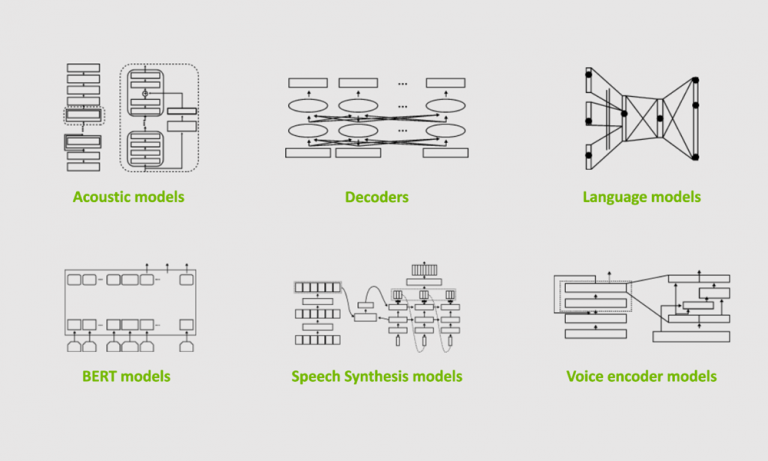
NVIDIA NeMo is a conversational AI toolkit built for researchers working on automatic speech recognition (ASR), natural language processing (NLP), and text-to-speech synthesis (TTS). The primary objective of NeMo is to help researchers from industry and academia to reuse prior work (code and pretrained models and make it easier to create new conversational AI models. … Continued
NVIDIA NeMo is a conversational AI toolkit built for researchers working on automatic speech recognition (ASR), natural language processing (NLP), and text-to-speech synthesis (TTS). The primary objective of NeMo is to help researchers from industry and academia to reuse prior work (code and pretrained models and make it easier to create new conversational AI models. NeMo is an open-source project, and we welcome contributions from the research community.
The 1.0 update brings significant architectural, code quality, and documentation improvements as well as a plethora of new state-of-the-art neural networks and pretrained checkpoints in several languages. The best way to start with NeMo is by installing it in your regular PyTorch environment:
pip install nemo_toolkit[all]
NeMo collections
NeMo is a PyTorch ecosystem project that relies heavily on two other projects from the ecosystem: PyTorch Lightning for training and Hydra for configuration management. You can also use NeMo models and modules within any PyTorch code.
NeMo comes with three main collections: ASR, NLP, and TTS. They are collections of models and modules that are ready to be reused in your conversational AI experiments. Most importantly, for most of the models, we provide weights pretrained on various datasets using tens of thousands of GPU hours.
Speech recognition
The NeMo ASR collection is the most extensive collection with a lot to offer for researchers of all levels, from beginners to advanced. If you are new to deep learning for speech recognition, we recommend that you get started with an interactive notebook for both ASR and NeMo overview. If you are an experienced researcher looking to create your own model, you’ll find various ready-to-use building blocks:
Data layers
Encoders
Augmentation modules
Text normalization and denormalization
More advanced decoders, such as RNN-T
The NeMo ASR collection provides you with various types of ASR networks: Jasper, QuartzNet, CitriNet, and Conformer. With the NeMo 1.0 update, the CitriNet and Conformer models are the next flagship ASR models providing better accuracy on word-error-rate (WER) than Jasper and QuartzNet while maintaining similar or better efficiency.
CitriNet
CitriNet is an improvement upon QuartzNet that uses several ideas originally introduced in ContextNet. It uses subword encoding through word piece tokenization and Squeeze-and-Excitation mechanism to obtain highly accurate audio transcripts while using a nonautoregressive, CTC-based decoding scheme for efficient inference.
Figure 1. CitriNet architecture.
Conformer-CTC
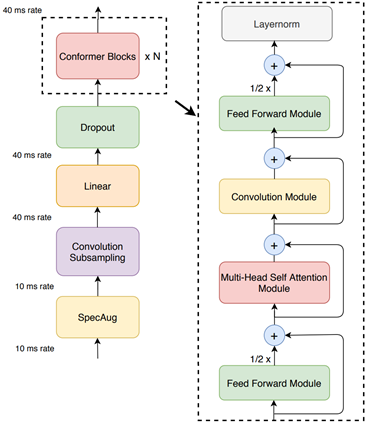
Conformer-CTC is a CTC-based variant of the Conformer model that uses CTC loss and decoding instead of RNN-T loss, making it a nonautoregressive model. This model combines self-attention and convolution modules to achieve the best of both worlds. The self-attention modules can learn the global interaction while the convolutions efficiently capture the local correlations.
This model gives you an option to experiment with attention-based models. Due to the global context obtained by self-attention and squeeze-and-excitation mechanism, Conformer and CitriNet models have superior WER in offline scenarios.
Figure 2. Conformer-CTC architecture.
You can use Citrinet and Conformer models with CTC as well as RNN-T decoders.
We spent tens of thousands of GPU hours training ASR models in various languages. In NeMo, we offer these checkpoints back to the community for free. As of this release, NeMo has ASR models in English, Spanish, Chinese, Catalonian, Italian, Russian, French, and Polish. Moreover, we partner with Mozilla to make more pretrained models available with the help of Mozilla Common Voice project.
Hugging Face transformers have fueled many recent advances in NLP by providing a huge set of pretrained models and an easy-to-use experience for developers and researchers. NeMo is compatible with transformers in that most of the pretrained Hugging Face NLP models can be imported into NeMo. You may provide pretrained BERT-like checkpoints from transformers for the encoders of common tasks. The language models of the common tasks are initialized in default with the pretrained model from Hugging Face transformers.
NeMo is also integrated with models trained by NVIDIA Megatron, allowing you to incorporate Megatron-based encoders into your question answering and neural machine translation models. NeMo can be used to fine-tune model-parallel models based on Megatron.
Neural machine translation
In today’s globalized world, it has become important to communicate with people speaking different languages. A conversational AI system capable of converting source text from one language to another will be a powerful communication tool. NeMo 1.0 now supports neural machine translation (NMT) tasks with transformer-based models allowing you to quickly build an end-to-end language translation pipelines. This release includes pretrained NMT models for the following language pairs in both directions:
English Spanish
English Russian
English Mandarin
English German
English French
Because tokenization is an extremely important part of NLP and NeMo supports most widely used tokenizers, such as HF tokenizers, SentencePiece, and YouTokenToMe.
Speech synthesis
If humans can talk to computers, the computers should be able to talk back as well. Speech synthesis takes text as an input and generates humanized audio output. This is typically accomplished with two models: a spectrogram generator that generates spectrograms from text and a vocoder that generates audio from spectrogram. The NeMo TTS collection provides you with the following models:
Pretrained spectrogram generator models: Tacotron2, GlowTTS, Fastspeech, Fastpitch, and Talknet
Pretrained vocoder models: HiFiGan, MelGan, SqueezeWave, Uniglow, and WaveGlow
End-to-end models: FastPitchHiFiGAN and Fastspeech2 Hifigan
End-to-end conversational AI example
Here’s a simple example demonstrating how to use NeMo for prototyping a universal translator app. This app takes a Russian audio file and generates an English translation audio. You can play with it using the AudioTranslationSample.ipynb notebook.
# Start by importing NeMo and all three collections
 import nemo
 import nemo.collections.asr as nemo_asr
 import nemo.collections.nlp as nemo_nlp
 import nemo.collections.tts as nemo_tts
 # Next, automatically download pretrained models from the NGC cloud
 quartznet = nemo_asr.models.EncDecCTCModel.from_pretrained(model_name="stt_ru_quartznet15x5")
 # Neural Machine Translation model
 nmt_model = nemo_nlp.models.MTEncDecModel.from_pretrained(model_name='nmt_ru_en_transformer6x6')
 # Spectrogram generator that takes text as an input and produces spectrogram
 spectrogram_generator = nemo_tts.models.Tacotron2Model.from_pretrained(model_name="tts_en_tacotron2")
 # Vocoder model that takes spectrogram and produces actual audio
 vocoder = nemo_tts.models.WaveGlowModel.from_pretrained(model_name="tts_waveglow_88m")
 # First step is to transcribe, or recognize, what was said in the audio
 russian_text = quartznet.transcribe([Audio_sample])
 # Then, translate it to English text
 english_text = nmt_model.translate(russian_text)
 # Finally, convert it into English audio
 # A helper function that combines Tacotron2 and WaveGlow to go directly from
 # text to audio
 def text_to_audio(text):
   parsed = spectrogram_generator.parse(text)
   spectrogram = spectrogram_generator.generate_spectrogram(tokens=parsed)
   audio = vocoder.convert_spectrogram_to_audio(spec=spectrogram)
   return audio.to('cpu').numpy()
 audio = text_to_audio(english_text[0])
The best part of this example is that you can fine-tune all the models used here on your datasets. In-domain fine-tuning is a great way to improve the performance of your models on specific applications. The NeMo GitHub repo provides plenty of fine-tuning examples.
NeMo models have a common look and feel, regardless of domain. They are configured, trained, and used in a similar fashion.
Scaling with NeMo
An ability to run experiments and quickly test new ideas is key to successful research. With NeMo, you can speed up training by using the latest NVIDIA Tensor Cores and model parallel training features across many nodes and hundreds of GPUs. Much of this functionality is provided with the help of the PyTorch Lightning trainer, which has an intuitive and easy-to-use API.
For speech recognition, language modeling, and machine translation, we provide high-performance web dataset-based data loaders. These data loaders can handle scaling to tens of thousands of hours of speech data to deliver high performance in massively distributed settings with thousands of GPUs.
Text processing and dataset creation with NeMo
Proper preparation of training data and pre and post-processing are hugely important and often overlooked steps in all machine learning pipelines. NeMo 1.0 includes new features for dataset creation and speech data explorer.
NeMo 1.0 includes important text processing features such as text normalization and inverse text normalization. Text normalization converts text from written form into its verbalized form. It is used as a preprocessing step before training TTS models. It could also be used for preprocessing ASR training transcripts. Inverse text normalization (ITN) is a reverse operation and is often a part of the ASR post-processing pipeline. It is the task of converting the raw spoken output of the ASR model into its written form to improve text readability.
For example, the normalized version of “It weighs 10 kg.” would be “It weighs 10 kilograms”.
Conclusion
NeMo 1.0 release substantially improves overall quality and documentation. It adds support for new tasks such as neural machine translation and many new models pretrained in different languages. As a mature tool for ASR and TTS, it also adds new features for text normalization and denormalization, dataset creation based on CTC-segmentation and speech data explorer. These updates benefit researchers in academia and industry by making it easier for you to develop and train new conversational AI models.
Many NeMo models can be exported to NVIDIA Jarvis for production deployment and high-performance inference. NVIDIA Jarvis is an application framework for building multimodal conversational AI services that delivers real-time performance on GPUs.
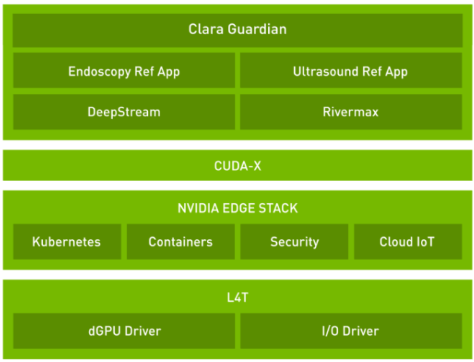
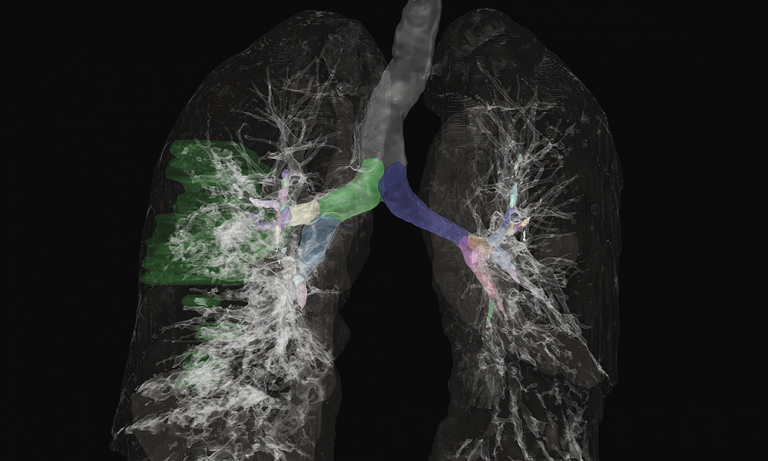
The Clara AGX SDK runs on the NVIDIA Jetson and Clara AGX platform and provides developers with capabilities to build end-to-end streaming workflows for medical imaging.
NVIDIA Clara AGX SDK 3.0 is available today! The Clara AGX SDK runs on the NVIDIA Jetson and Clara AGX platform and provides developers with capabilities to build end-to-end streaming workflows for medical imaging. The focus of this release is to provide added support for NGC containers, including TensorFlow and PyTorch frameworks, a new ultrasound application, and updated Transfer Learning Toolkit scripts.
NVIDIA Clara AGX SDK
There is now support for the leading deep learning framework containers, including TensorFlow 1, TensorFlow 2, and PyTorch, as well as the Triton Inference Server. These containers can help you quickly get started using the Clara AGX Development Kit, NVIDIA’s GPU super-charged development platform for AI medical devices and edge-based inferencing. We’ve also released three new application containers along with the SDK, available on NGC. These application containers include:
Metagenomics application
US4US Ultrasound application and sample code
Dermatology Melanoma detection
Clara AGX SDK has also been updated to the latest Transfer Learning Toolkit (TLT) 3.0 release. Developers can now use TLT 3.0 out-of-the-box and includes compatibility with DeepStream SDK for real-time, low latency, high-resolution image AI deployments.
Download Clara AGX SDK 3.0 through the Clara AGX Developer Site. An NVIDIA Developer Program account is needed to access the SDK. You can also find all of our containers through NGC.
Hi guys, I’m trying to reproduce this mlp in tf (constraining it to have only one hidden layer with 2 units). However, like in playground tf, many times do not converge to global maxima. I think is due to weight initialization, tried xavier and he initializations but no success. The following piece of code is the model in tf keras.
model = tf.keras.models.Sequential([ Dense(units=2, activation='sigmoid', input_shape=(2,)), Dense(units=1, activation='sigmoid')
All the threads I’ve read online regarding utilizing multiple cores in python requires multiprocessing. By default python can only bye running on one core (and one on thread, because of the GIL).
On the other hand, I often read that tensorflow by default uses multiple cores. How can this work if python itself is limited to one core?

 NVIDIA Omniverse is an open platform built for virtual collaboration and real-time physically accurate simulation. Explore the latest resources to learn and get started with Omniverse today.
 NVIDIA RTX enables developers to create breathtaking, interactive worlds with performance that exceeds gamers expectations. Integrating RTX has never been easier – gain access through popular game engines such as Unreal Engine or through standalone SDKs made available at GTC.
 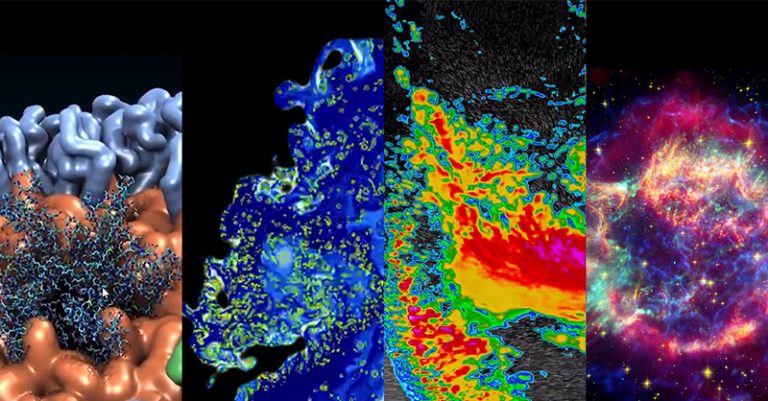 Get the latest resources and news about the NVIDIA technologies that are accelerating the latest innovations in HPC from industry leaders and developers.
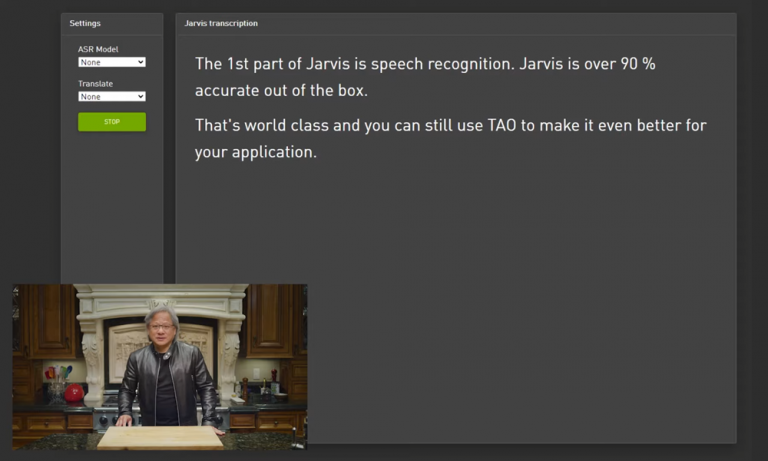 Today, NVIDIA released world class speech recognition capability for enterprises to generate highly accurate transcriptions and NeMo 1.0 which includes new state-of-the-art speech and language models for democratizing and accelerating conversational AI research.
 The 15 accepted papers and posters from NVIDIA range from simulating dynamic driving environments, to powering neural architecture search for medical imaging.
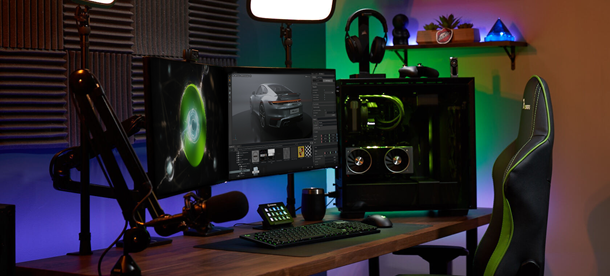 Hear directly from the engineers, designers, and creators that are at the edge of developing NVIDIA Omniverse, the virtual collaboration and physically accurate simulation platform, now live on Twitch.
 NVIDIA NeMo is a conversational AI toolkit built for researchers working on automatic speech recognition (ASR), natural language processing (NLP), and text-to-speech synthesis (TTS). The primary objective of NeMo is to help researchers from industry and academia to reuse prior work (code and pretrained models and make it easier to create new conversational AI models. …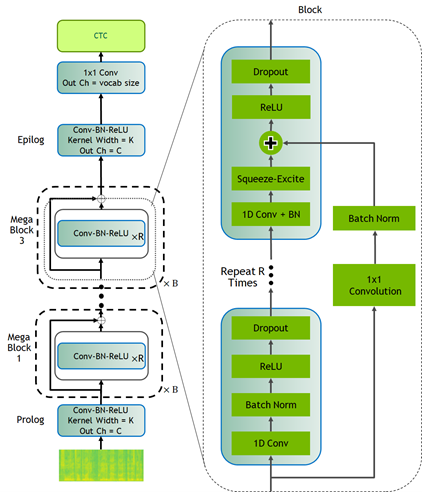
 The Clara AGX SDK runs on the NVIDIA Jetson and Clara AGX platform and provides developers with capabilities to build end-to-end streaming workflows for medical imaging.